
Disc Workshop
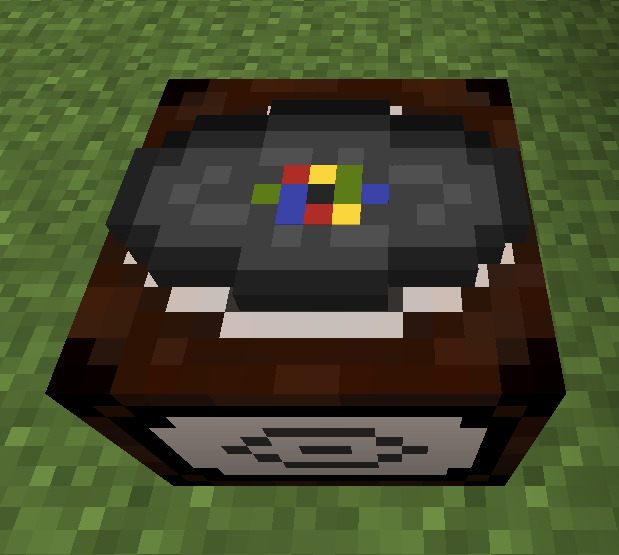
You can craft music discs using a disc workshop, these discs can be played in the jukebox to listen to any hosted audio via URL.
Screenshots
About this Mod
About
Disc workshop is a 1.21.1 fabric mod by fozimus.
You can craft music discs using a disc workshop, these discs can be played in the jukebox to listen to any hosted audio via URL.
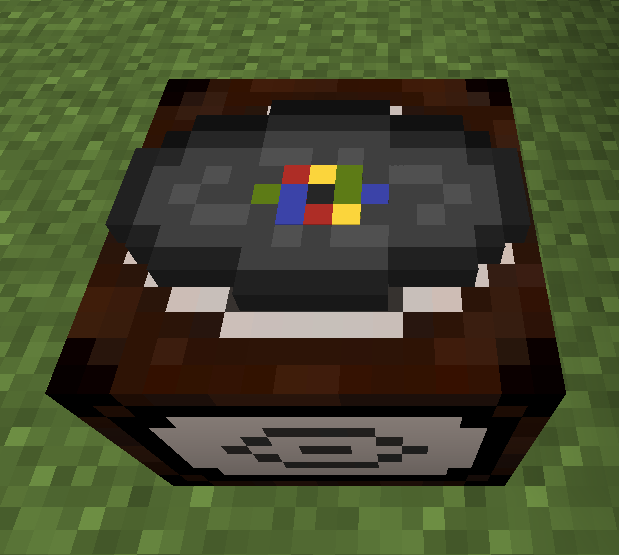
This mod was inspired by VinURL by Plompi.
Recipes
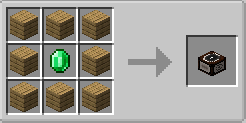
Disc workshop
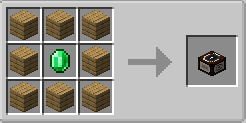
You can use any type of wood.
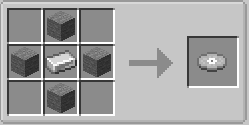
Blank disc
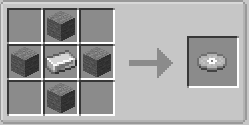
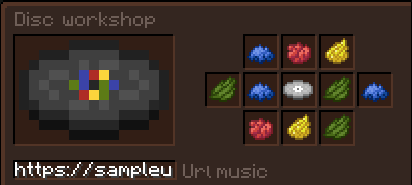
Music disc
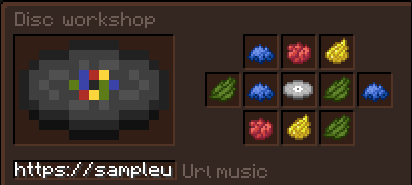
You can use any dye to change the pattern color and insert any url to select the audio.
Commands
Audiocache
Use /audiocache followed by
sizeto get the total size of the cachelistto list the cached filesclearto clear the cachereloadto reload the cache descriptions
Disclaimer
This mod automatically downloads FFmpeg and yt-dlp.
This mod was created for educational and personal use only. It is provided "as is" without warranty of any kind, express or implied. The creator of this mod does not host, distribute, or provide access to any copyrighted content. This mod may allow users to download or interact with media from external sources. It is the sole responsibility of the user to ensure they have the legal right to download or use any content accessed through this mod.
By using this mod, you agree that the creator holds no liability for any misuse, copyright infringement, or legal consequences resulting from its use. Users are expected to comply with all applicable laws and terms of service of any third-party services they choose to access.
If you do not agree with these terms, do not use this mod.
Available Versions
How to Install Disc Workshop on Your Server
Order Server
Order a Minecraft Java server with at least 3 GB RAM (4 GB recommended).
Set fabric Loader
In the panel under "Egg", select the fabric loader and matching Minecraft version (1.21.8).
Install Mod
Open the mod browser in the dashboard and search for "Disc Workshop". Click "Install" – done! Alternatively, upload the .jar via SFTP to the /mods folder.
Compatibility
Mod Loaders
Minecraft Versions
1.21.8, 1.21.1
Server-side
✓ RequiredRecommended RAM
4 GB(min. 3 GB)Frequently Asked Questions
Disc Workshop server crashes on startup – what to do?
Most common cause: wrong fabric version or insufficient RAM. Check the server log (latest.log) for "OutOfMemoryError" or "Mixin" errors. With Mado Hosting: ensure at least 3 GB RAM is allocated and the loader matches the mod version (1.21.8). You can switch loaders with one click in the panel.
Is Disc Workshop compatible with fabric?
Disc Workshop officially supports fabric for Minecraft 1.21.8, 1.21.1. The Mado dashboard automatically detects incompatible loader combinations.
Server lagging with Disc Workshop – how to optimize performance?
Recommended RAM: 4 GB (per 8 players). Use /spark profiler to check if Disc Workshop consumes the most tick time. Common fixes: reduce server view-distance to 8-10, install "performant" or "starlight" as supplementary mods on Forge. With Mado Hosting, your server runs on NVMe SSDs with dedicated CPU cores for minimal latency.
Similar Mods

![[ETF] Entity Texture Features](https://cdn.modrinth.com/data/BVzZfTc1/af683d206d50b05258d865b0d6e4aa2f2cee12f2_96.webp)
![[EMF] Entity Model Features](https://cdn.modrinth.com/data/4I1XuqiY/6e5bbd0d06b1741bfdab6c0cfab6de8fdaf0064c_96.webp)



Rent Modded Server
Install Disc Workshop with just one click on your server.
Details
- License
- Creative Commons Attribution Non Commercial 4.0 International
- Server-side
- Required