Display Delight Fabric
Allows to place every food item in Farmer's Delight and friends in 3D
About this Mod
Display Delight Fabric
A port of the NeoForge mod https://modrinth.com/mod/display-delight.
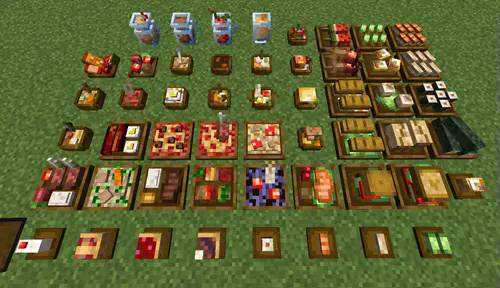
Allows you to place many different foods from farmers delight and their add ons as 3D models, including stackable plates that allow you to store multiple foods in one spot aesthetically. Wandering trader support is also added for blocks that come from mods that are not present.
Currently, the mod only supports Minecraft version 26.1.2, 1.21.1, 1.21.11, and 1.20.1.
Mechanics
- Wandering traders are able to sell food blocks
- Right click with empty hand to take one food if mod is loaded
- Sneak right click to take everything
- Right click with food on plate to place one food
- Sneak right click to place everything
- Swap food on small plates with your held food
- Pick block to pick the food if mod is loaded, otherwise picks the block
- Sneak pick block to always pick the block
- Some food can be placed on top of each other and on other blocks which may require support
- You can use silk touch to get the block itself, but only if the block has the max stack of food
- You can use an axe to hide the plates of certain food blocks
- Insert the right food plate to show the plate again
- If the mod isn't loaded, the axe won't take durability nor take the plate
Compatibility
The mod adds in multiple blocks from different mods, but some mods are not available on certain Minecraft versions or on Fabric. In these cases, the placeable foods will drop their model and not the item. Wandering traders also allow you to get blocks from other mods not present.
- The following mods have blocks added:
- Farmer's Delight
- Ocean Delight
- Pineapple Delight
- Corn Delight
- Delightful
- Expanded Delight
- Cultural Delights
- Festive Delights
- Alex Delight
- Large Meals
- Brewin n Chewin
- Aquacultural Delight
- End's Delight
- Ender Delight
- Crabber's Delight
- My Nether's Delight
- Nether Delight
Credits
Credits go to the original mod, linked above, for the assets and parts of the code (modified).
Available Versions
How to Install Display Delight Fabric on Your Server
Order Server
Order a Minecraft Java server with at least 3 GB RAM (4 GB recommended).
Set fabric Loader
In the panel under "Egg", select the fabric loader and matching Minecraft version (26.1.2).
Install Mod
Open the mod browser in the dashboard and search for "Display Delight Fabric". Click "Install" – done! Alternatively, upload the .jar via SFTP to the /mods folder.
Compatibility
Mod Loaders
Minecraft Versions
26.1.2, 1.21.11, 1.21.1 (+1 more)
Server-side
✓ RequiredRecommended RAM
4 GB(min. 3 GB)Frequently Asked Questions
Display Delight Fabric server crashes on startup – what to do?
Most common cause: wrong fabric version or insufficient RAM. Check the server log (latest.log) for "OutOfMemoryError" or "Mixin" errors. With Mado Hosting: ensure at least 3 GB RAM is allocated and the loader matches the mod version (26.1.2). You can switch loaders with one click in the panel.
Is Display Delight Fabric compatible with fabric?
Display Delight Fabric officially supports fabric for Minecraft 26.1.2, 1.21.11, 1.21.1. The Mado dashboard automatically detects incompatible loader combinations.
Server lagging with Display Delight Fabric – how to optimize performance?
Recommended RAM: 4 GB (per 8 players). Use /spark profiler to check if Display Delight Fabric consumes the most tick time. Common fixes: reduce server view-distance to 8-10, install "performant" or "starlight" as supplementary mods on Forge. With Mado Hosting, your server runs on NVMe SSDs with dedicated CPU cores for minimal latency.
Similar Mods

![[ETF] Entity Texture Features](https://cdn.modrinth.com/data/BVzZfTc1/af683d206d50b05258d865b0d6e4aa2f2cee12f2_96.webp)
![[EMF] Entity Model Features](https://cdn.modrinth.com/data/4I1XuqiY/6e5bbd0d06b1741bfdab6c0cfab6de8fdaf0064c_96.webp)



Rent Modded Server
Install Display Delight Fabric with just one click on your server.