DisplayFPS
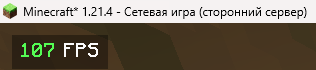
DisplayFPS shows your in-game FPS with customizable colors, positions, and background options. Perfect for monitoring performance in style!
Screenshots
About this Mod
[EN]
DisplayFPS is a lightweight and highly customizable mod that displays your in-game FPS (frames per second) directly on your screen. Whether you're optimizing your game or just want to keep an eye on performance, DisplayFPS has you covered with a variety of features:
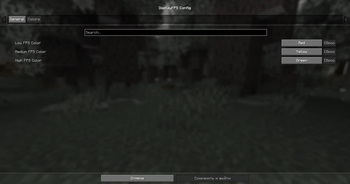
- Customizable Colors: Set different colors for low, medium, and high FPS values to quickly see your performance at a glance.
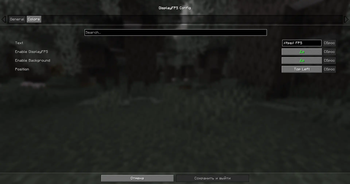
- Flexible Positioning: Choose from four predefined positions (top-left, top-right, bottom-left, bottom-right) to place the FPS counter wherever you like.
- Background Options: Enable or disable a background for better readability, with adjustable padding.
- Custom Text: Personalize the display text using placeholders like
$fps$to show the FPS value in your preferred format (e.g., "FPS: $fps$"). - Cloth Config Integration: Easily tweak all settings through an intuitive in-game configuration menu (requires Cloth Config).
- ModMenu Support: Access the config screen directly from ModMenu for a seamless experience.
Compatibility:
- Supports Minecraft 1.20.x, and 1.21.x.
- Requires Fabric API and Fabric Language Kotlin.
- Optional: Cloth Config for in-game settings, ModMenu for easy config access.
Note: Java 21 or higher is required!
Enhance your Minecraft experience with DisplayFPS and keep track of your performance in style!
================================================================================
[RU]
DisplayFPS — это лёгкий и гибкий мод, который отображает ваш FPS (кадры в секунду) прямо на экране в Minecraft. Хотите оптимизировать игру или просто следить за производительностью? DisplayFPS предлагает множество функций для удобного мониторинга:
- Настраиваемые цвета: Установите разные цвета для низкого, среднего и высокого FPS, чтобы сразу видеть, как работает игра.
- Гибкое расположение: Выберите одну из четырёх позиций (верхний левый, верхний правый, нижний левый, нижний правый угол) для отображения счётчика FPS.
- Настройка фона: Включите или отключите фон для лучшей читаемости, с регулируемыми отступами.
- Персонализированный текст: Настройте отображаемый текст с помощью плейсхолдеров, таких как
$fps$, чтобы показывать FPS в нужном формате (например, "FPS: $fps$"). - Интеграция с Cloth Config: Удобно изменяйте все настройки через интуитивное меню в игре (требуется Cloth Config).
- Поддержка ModMenu: Открывайте экран настроек прямо из ModMenu для простоты использования.
Совместимость:
- Поддерживает Minecraft 1.20.x и 1.21.x.
- Требует Fabric API и Fabric Language Kotlin.
- Опционально: Cloth Config для настроек в игре, ModMenu для удобного доступа к настройкам.
Примечание: Для мода требуется Java 21 или выше!
Улучшайте свой игровой опыт в Minecraft с DisplayFPS и следите за производительностью стильно!
Available Versions
How to Install DisplayFPS on Your Server
Order Server
Order a Minecraft Java server with at least 3 GB RAM (4 GB recommended).
Set fabric Loader
In the panel under "Egg", select the fabric loader and matching Minecraft version (1.21.5).
Install Mod
Open the mod browser in the dashboard and search for "DisplayFPS". Click "Install" – done! Alternatively, upload the .jar via SFTP to the /mods folder.
Compatibility
Mod Loaders
Minecraft Versions
1.21.5, 1.21.4, 1.21.3 (+10 more)
Server-side
✗ UnsupportedRecommended RAM
4 GB(min. 3 GB)Frequently Asked Questions
DisplayFPS server crashes on startup – what to do?
Most common cause: wrong fabric version or insufficient RAM. Check the server log (latest.log) for "OutOfMemoryError" or "Mixin" errors. With Mado Hosting: ensure at least 3 GB RAM is allocated and the loader matches the mod version (1.21.5). You can switch loaders with one click in the panel.
Is DisplayFPS compatible with fabric?
DisplayFPS officially supports fabric for Minecraft 1.21.5, 1.21.4, 1.21.3. The Mado dashboard automatically detects incompatible loader combinations.
Server lagging with DisplayFPS – how to optimize performance?
Recommended RAM: 4 GB (per 8 players). Use /spark profiler to check if DisplayFPS consumes the most tick time. Common fixes: reduce server view-distance to 8-10, install "performant" or "starlight" as supplementary mods on Forge. With Mado Hosting, your server runs on NVMe SSDs with dedicated CPU cores for minimal latency.
Similar Mods




Rent Modded Server
Install DisplayFPS with just one click on your server.