
Distance Travel
Simple commands to calculate distance traveled over a period of time!
Screenshots
About this Mod
Distance Travel
Simple commands to calculate distance traveled over a period of time! I made this mod because I have a giant railway network and would love to figure out how long it actually is without having to do complicated math.
Thankfully, this mod does exactly that, and in a very simple way!
Requirements
Minecraft >=1.20.1
Fabric Loader >=0.16.10
Fabric API >=0.102.0
How to use
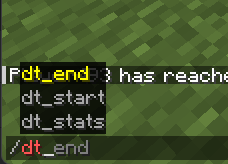
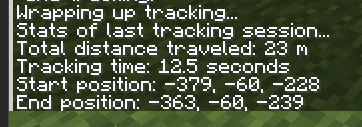
To start, simply type /dt_start to begin your tracking session! To end your tracking session, type /dt_end! To view the stats from the last tracking session, type /dt_stats!
A tracking session tracks how far you're going from your start position (which is set by using the /dt_start command) and how long your session has lasted for!
Config
The config is short and simple, containing two options related to tracking messages and opening stats after finishing tracking without having to use an extra command. There's also an option to change tracking intervals!
The config is done using MidnightLib. If you have ModMenu, you should be able to access the config without doing anything!
Contributing
Feel free to contribute to this project as it's available under the MIT license. Find any issues or have a suggestion, report it on https://github.com/ThePhaseCat/Distance-Travel!
Thanks to MidnightLib for the GUI Library!
Available Versions
How to Install Distance Travel on Your Server
Order Server
Order a Minecraft Java server with at least 3 GB RAM (4 GB recommended).
Set fabric Loader
In the panel under "Egg", select the fabric loader and matching Minecraft version (26.2).
Install Mod
Open the mod browser in the dashboard and search for "Distance Travel". Click "Install" – done! Alternatively, upload the .jar via SFTP to the /mods folder.
Compatibility
Mod Loaders
Minecraft Versions
26.2, 26.1.2, 26.1.1 (+19 more)
Server-side
✗ UnsupportedRecommended RAM
4 GB(min. 3 GB)Frequently Asked Questions
Distance Travel server crashes on startup – what to do?
Most common cause: wrong fabric version or insufficient RAM. Check the server log (latest.log) for "OutOfMemoryError" or "Mixin" errors. With Mado Hosting: ensure at least 3 GB RAM is allocated and the loader matches the mod version (26.2). You can switch loaders with one click in the panel.
Is Distance Travel compatible with fabric?
Distance Travel officially supports fabric for Minecraft 26.2, 26.1.2, 26.1.1. The Mado dashboard automatically detects incompatible loader combinations.
Server lagging with Distance Travel – how to optimize performance?
Recommended RAM: 4 GB (per 8 players). Use /spark profiler to check if Distance Travel consumes the most tick time. Common fixes: reduce server view-distance to 8-10, install "performant" or "starlight" as supplementary mods on Forge. With Mado Hosting, your server runs on NVMe SSDs with dedicated CPU cores for minimal latency.
Similar Mods




![[ETF] Entity Texture Features](https://cdn.modrinth.com/data/BVzZfTc1/af683d206d50b05258d865b0d6e4aa2f2cee12f2_96.webp)
![[EMF] Entity Model Features](https://cdn.modrinth.com/data/4I1XuqiY/6e5bbd0d06b1741bfdab6c0cfab6de8fdaf0064c_96.webp)
Rent Modded Server
Install Distance Travel with just one click on your server.