
Dodger
Dodger is a client-side Minecraft mod that automatically dodges projectiles from hostile mobs.
Screenshots

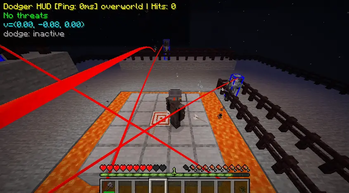
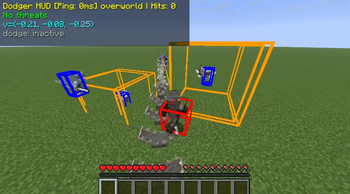
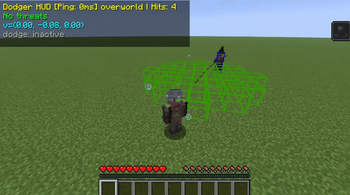
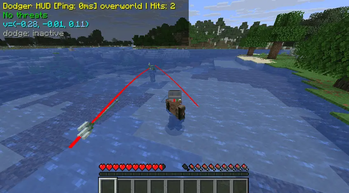
About this Mod
Dodger is a client-side Minecraft mod that automatically dodges projectiles from hostile mobs. With intelligent trajectory detection and precise movement algorithms, you'll never get hit by arrows, fireballs, or other projectiles again!
🎯 Smart Projectile Detection
• Real-time trajectory analysis - Intercepts and calculates projectile paths
• Multi-mob support - Works with 11 different hostile mobs
• Predictive targeting - Knows where projectiles will hit before they do
• Visual debug overlays - See exactly what the mod is tracking
🏃♂️ Intelligent Dodging System
• Minimal movement - Dodges with maximum 1-block displacement
• Safe positioning - Never moves into lava, void, or dangerous blocks
• Movement-aware - Considers your current direction to avoid jarring movements
• Perpendicular dodging - Moves sideways relative to incoming projectiles
🎮 Customizable Configuration
• Per-mob toggles - Enable/disable dodging for specific mobs
• Debug visualization - Toggle trajectory lines and target boxes
• Keybind support - Default 'O' key to open settings (customizable)
• Real-time stats - Track dodges and hits in the HUD
🛡️ Supported Mobs
• Skeleton - Bow attacks
• Stray - Bow attacks with slowness
• Pillager - Crossbow bolts
• Witch - Splash potions
• Drowned - Trident throws
• Evoker - Fang attacks
• Vex - Sword rushes
• Piglin - Crossbow bolts
• Ghast - Fireballs
• Blaze - Fire charges
• Shulker - Tracking projectiles
🎮 Usage
Quick Start
Install the mod and launch Minecraft
Join any world (works in both Creative and Survival)
Open settings with O key
Enable dodging for desired mobs
Watch as projectiles harmlessly fly past you!
Configuration GUI
Access the configuration screen by:
• O key - Default keybinding (customizable in Controls)
Settings Include:
• Enable/disable debug visual overlays
• Toggle the on-screen HUD
• View and reset statistics
Debug Visualization
When enabled, you'll see:
• Blue boxes - Aggressive mobs targeting you
• Red lines - Projectile trajectories
• Red boxes - Predicted impact locations
• HUD display - Real-time stats and active threats
🔧 Installation
Requirements
• Minecraft 1.21.8 or 1.21.10
• Fabric Loader 0.16.14+
• Fabric API 0.129.0+
Steps
Install Fabric Loader
Download Fabric API
Download Dodger mod
Place both JARs in your mods folder
Launch Minecraft with Fabric profile
⚠️ Important Disclaimer
Please read before using:
• Not 100% Perfect - The dodging mechanic is not foolproof. You will still occasionally be hit by projectiles due to timing, positioning, or complex scenarios.
• Server Usage Warning - This mod may be considered cheating on some public multiplayer servers. We strongly recommend:
- Using it only on local/single-player worlds
- Checking server rules before use on multiplayer servers
- Being respectful of server communities and their policies
• Use Responsibly - This mod is intended for enhancing single-player gameplay and should not be used to gain unfair advantages in competitive multiplayer environments.
⚙️ Technical Details
Performance
• Response Time: <20ms projectile detection
• Memory Usage: <5MB additional RAM
• CPU Impact: Minimal overhead during gameplay
• Network: Client-side only, works on any server
Compatibility
• ✅ Single Player - Full feature set
• ✅ Multiplayer - Complete compatibility
• ✅ Dedicated Servers - No server-side requirements
• ✅ Cross-Version - Supports 1.21.8 and 1.21.10
Safety Features
The mod includes multiple safety checks:
• Block validation - Never dodges into dangerous blocks
• Fall protection - Avoids creating dangerous drops
• Movement preservation - Maintains your intended direction when possible
• Multiplayer compatibility - Works on all servers (client-side only)
License
This project is licensed under CC0-1.0 - see the LICENSE file for details.
👥 Authors
• GPT5 - AI Architecture & Design • Claude 4.5 - Implementation & Development
• Grok Code Fast - Code Optimization • RikkTheGaijin - Project Management & Testing
Available Versions
How to Install Dodger on Your Server
Order Server
Order a Minecraft Java server with at least 3 GB RAM (4 GB recommended).
Set fabric Loader
In the panel under "Egg", select the fabric loader and matching Minecraft version (1.21.10).
Install Mod
Open the mod browser in the dashboard and search for "Dodger". Click "Install" – done! Alternatively, upload the .jar via SFTP to the /mods folder.
Compatibility
Mod Loaders
Minecraft Versions
1.21.10, 1.21.8
Server-side
✗ UnsupportedRecommended RAM
4 GB(min. 3 GB)Frequently Asked Questions
Dodger server crashes on startup – what to do?
Most common cause: wrong fabric version or insufficient RAM. Check the server log (latest.log) for "OutOfMemoryError" or "Mixin" errors. With Mado Hosting: ensure at least 3 GB RAM is allocated and the loader matches the mod version (1.21.10). You can switch loaders with one click in the panel.
Is Dodger compatible with fabric?
Dodger officially supports fabric for Minecraft 1.21.10, 1.21.8. The Mado dashboard automatically detects incompatible loader combinations.
Server lagging with Dodger – how to optimize performance?
Recommended RAM: 4 GB (per 8 players). Use /spark profiler to check if Dodger consumes the most tick time. Common fixes: reduce server view-distance to 8-10, install "performant" or "starlight" as supplementary mods on Forge. With Mado Hosting, your server runs on NVMe SSDs with dedicated CPU cores for minimal latency.
Similar Mods




Rent Modded Server
Install Dodger with just one click on your server.