
Don't Go Too Far
The further you go, the worse it gets.
Screenshots
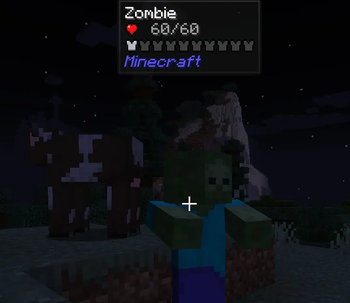



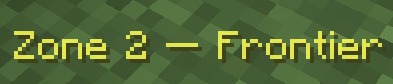

About this Mod




Don't Go Too Far is a server-side mod that divides the Overworld into 5 danger zones based on distance from spawn. The further players venture from civilization, the stronger, faster, and more numerous the zombies become.
Designed for post-apocalyptic zombie survival servers
✦ How it works
The Overworld is divided into 5 concentric zones centered on (0, 0). Each zone applies independent multipliers to zombie damage, health, speed, and spawn rate. The further you go, the harder it gets — and there's no hand-holding about it.
| Zone | Distance from spawn | Difficulty |
|---|---|---|
| 1 — Safe Lands | 0 – 500 | Normal |
| 2 — Frontier | 500 – 1500 | Moderate |
| 3 — Wildlands | 1500 – 3000 | Hard |
| 4 — The Abyss | 3000 – 5000 | Extreme |
| 5 — Beyond | 5000+ | Maximum |
All zone boundaries and multipliers are fully configurable.
✦ Features
- Damage scaling — zombies hit harder the further they are from spawn
- Health scaling — zombies have more HP in outer zones
- Speed scaling — zombies move faster in outer zones
- Spawn rate scaling — more zombies in outer zones, fewer in inner ones
- Night hordes — waves of zombies assault players each night, scaling with zone (up to 5 waves in zone 5)
- Fire-immune zombies — zombies don't burn in daylight and won't flee the sun
- Admin commands —
/dgtf infoand/dgtf zone <player>
✦ Commands
| Command | Permission | Description |
|---|---|---|
/dgtf info |
All players | Shows your current zone and active multipliers |
/dgtf zone <player> |
OP (level 2) | Shows another player's current zone |
✦ Configuration
A dontgotoofar-server.toml file is auto-generated in your serverconfig/ folder on first launch. Everything is configurable: zone boundaries, all multipliers per zone, horde settings, affected mobs, and more.
You are free to include this mod in any modpack, public or private, with or without permission.
Available Versions
How to Install Don't Go Too Far on Your Server
Order Server
Order a Minecraft Java server with at least 3 GB RAM (4 GB recommended).
Set forge Loader
In the panel under "Egg", select the forge loader and matching Minecraft version (1.20.1).
Install Mod
Open the mod browser in the dashboard and search for "Don't Go Too Far". Click "Install" – done! Alternatively, upload the .jar via SFTP to the /mods folder.
Compatibility
Mod Loaders
Minecraft Versions
1.20.1
Server-side
✓ RequiredRecommended RAM
4 GB(min. 3 GB)Frequently Asked Questions
Don't Go Too Far server crashes on startup – what to do?
Most common cause: wrong forge version or insufficient RAM. Check the server log (latest.log) for "OutOfMemoryError" or "Mixin" errors. With Mado Hosting: ensure at least 3 GB RAM is allocated and the loader matches the mod version (1.20.1). You can switch loaders with one click in the panel.
Is Don't Go Too Far compatible with forge?
Don't Go Too Far officially supports forge for Minecraft 1.20.1. The Mado dashboard automatically detects incompatible loader combinations.
Server lagging with Don't Go Too Far – how to optimize performance?
Recommended RAM: 4 GB (per 8 players). Use /spark profiler to check if Don't Go Too Far consumes the most tick time. Common fixes: reduce server view-distance to 8-10, install "performant" or "starlight" as supplementary mods on Forge. With Mado Hosting, your server runs on NVMe SSDs with dedicated CPU cores for minimal latency.
Similar Mods




Rent Modded Server
Install Don't Go Too Far with just one click on your server.