
dotMod
Client-side Fabric PvP/survival utility mod with quick craft, draggable HUD editor, local player name colors, and toggle sneak.
Screenshots
About this Mod
dotMOD
dotMOD is a lightweight client-side Fabric utility mod for Minecraft 1.21.11, focused on PvP and survival quality-of-life features.
The mod adds a small set of configurable client tools: quick crafting from selected inventory slots, a draggable HUD editor, local player name coloring, and toggle sneak.
Features
Quick Craft
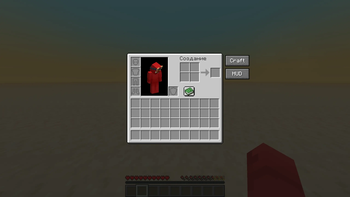
Adds a Craft button to the player inventory and crafting table screen.
When pressed, dotMOD moves items from configured inventory slots into the crafting grid using normal client click actions.
Default source slots:
2x2 player inventory:
- 9
- 10
- 18
- 19
3x3 crafting table:
- 9
- 10
- 11
- 18
- 19
- 20
- 27
- 28
- 29
Source slots are configured as logical player inventory slots, not raw GUI slot ids.
HUD Editor
Adds a HUD button to the inventory and creative inventory.
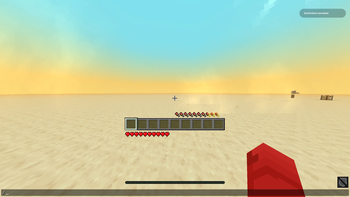
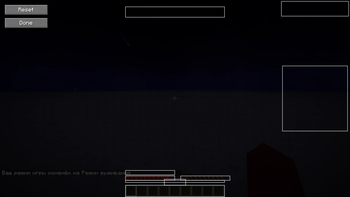
The HUD Editor lets you move selected vanilla HUD elements by dragging them with the mouse.
Supported elements include:
- Hearts
- Armor
- Hunger
- Hotbar
- Experience bar / level positions in config
- Status effects
- Bossbar
- Scoreboard
The editor includes:
- draggable element frames
- element labels
- reset button
- optional grid snapping
- saved
dx/dyoffsets
Name Colors
dotMOD lets you locally recolor the name of the player you are looking at.
Default keybinds:
G- color targeted player greenR- color targeted player redV- reset targeted player's name color
Colors are stored by player UUID and only affect your own client.
Supported displays:
- Nameplate above the player
- Tab list name, when possible
Optional chat notifications can be enabled in the config.
Toggle Shift
Adds a toggle sneak keybind.
Default keybind:
Right Shift
When enabled, your sneak key is held client-side until you toggle it off again. Normal physical sneak still works as usual.
Configuration
dotMOD has a Mod Menu + Cloth Config settings screen.
Config sections:
- General
- Quick Craft
- HUD Editor
- Name Colors
- Toggle Shift
- Keybinds info
The config is client-only and saved between game launches.
Requirements
- Minecraft 1.21.11
- Fabric Loader
- Fabric API
- Mod Menu
- Cloth Config API
Notes
dotMOD is fully client-side.
It does not add server-side content and does not require installation on the server.
HUD movement is designed for vanilla HUD behavior. Compatibility with large HUD overhaul mods may vary.
Available Versions
How to Install dotMod on Your Server
Order Server
Order a Minecraft Java server with at least 3 GB RAM (4 GB recommended).
Set fabric Loader
In the panel under "Egg", select the fabric loader and matching Minecraft version (1.21.11).
Install Mod
Open the mod browser in the dashboard and search for "dotMod". Click "Install" – done! Alternatively, upload the .jar via SFTP to the /mods folder.
Compatibility
Mod Loaders
Minecraft Versions
1.21.11
Server-side
✗ UnsupportedRecommended RAM
4 GB(min. 3 GB)Frequently Asked Questions
dotMod server crashes on startup – what to do?
Most common cause: wrong fabric version or insufficient RAM. Check the server log (latest.log) for "OutOfMemoryError" or "Mixin" errors. With Mado Hosting: ensure at least 3 GB RAM is allocated and the loader matches the mod version (1.21.11). You can switch loaders with one click in the panel.
Is dotMod compatible with fabric?
dotMod officially supports fabric for Minecraft 1.21.11. The Mado dashboard automatically detects incompatible loader combinations.
Server lagging with dotMod – how to optimize performance?
Recommended RAM: 4 GB (per 8 players). Use /spark profiler to check if dotMod consumes the most tick time. Common fixes: reduce server view-distance to 8-10, install "performant" or "starlight" as supplementary mods on Forge. With Mado Hosting, your server runs on NVMe SSDs with dedicated CPU cores for minimal latency.
Similar Mods




![[ETF] Entity Texture Features](https://cdn.modrinth.com/data/BVzZfTc1/af683d206d50b05258d865b0d6e4aa2f2cee12f2_96.webp)

Rent Modded Server
Install dotMod with just one click on your server.