double-doors-lite
This is a lightweight mod which allows doors to open together when next to each other.
Screenshots
About this Mod

Double Doors Lite
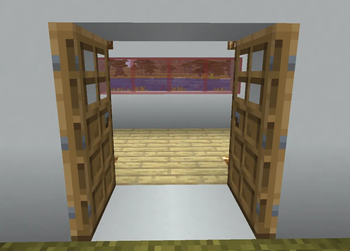
Open one door and the door beside it opens too — just like a real set of double doors.
Place two doors side by side, open one, and its neighbour swings open with it (and closes with it). The two leaves automatically mirror, so they swing apart like a proper double door instead of both swinging the same way.
No items, no recipes, no config — drop it in and your doors just work the way you always wanted them to.
Features
- Automatic double doors — open or close one door and the adjacent door follows, in the same tick, with no lag.
- Mirrored swing — a matched pair flips to opposite hinges so the two leaves open apart, the way double doors should.
- Any orientation — pairs adjacent doors whether they face the same way or opposite ways. As long as they're side by side, they're connected.
- Wooden & copper doors — every hand-openable door is supported. Iron doors are left entirely to redstone, untouched.
- Single pair, no surprises — only the door's direct left/right neighbour responds. No runaway chains down a row of doors.
- Lightweight & server-side — all the logic runs on the server, so it works in singleplayer and on multiplayer servers, with no performance overhead and nothing extra for the world to track.
How it works
When you open or close a door by hand, Double Doors Lite looks at the doors immediately to its left and right and matches them to the one you just used — and nothing else. It never consumes your click or changes normal door behaviour; it just adds the second leaf. If a neighbour shares the clicked door's facing, its hinge is flipped so the pair opens symmetrically.
Compatibility
- Minecraft: 26.2 (also available for 26.1)
- Loaders: Fabric and NeoForge
- Fabric builds require Fabric API.
"Lite" by design — it does one thing, and does it cleanly.
Available Versions
How to Install double-doors-lite on Your Server
Order Server
Order a Minecraft Java server with at least 3 GB RAM (4 GB recommended).
Set fabric Loader
In the panel under "Egg", select the fabric loader and matching Minecraft version (26.2).
Install Mod
Open the mod browser in the dashboard and search for "double-doors-lite". Click "Install" – done! Alternatively, upload the .jar via SFTP to the /mods folder.
Compatibility
Mod Loaders
Minecraft Versions
26.2, 26.1.2, 26.1.1 (+1 more)
Server-side
✓ RequiredRecommended RAM
4 GB(min. 3 GB)Frequently Asked Questions
double-doors-lite server crashes on startup – what to do?
Most common cause: wrong fabric version or insufficient RAM. Check the server log (latest.log) for "OutOfMemoryError" or "Mixin" errors. With Mado Hosting: ensure at least 3 GB RAM is allocated and the loader matches the mod version (26.2). You can switch loaders with one click in the panel.
Is double-doors-lite compatible with fabric and neoforge?
double-doors-lite officially supports fabric, neoforge for Minecraft 26.2, 26.1.2, 26.1.1. The Mado dashboard automatically detects incompatible loader combinations.
Server lagging with double-doors-lite – how to optimize performance?
Recommended RAM: 4 GB (per 8 players). Use /spark profiler to check if double-doors-lite consumes the most tick time. Common fixes: reduce server view-distance to 8-10, install "performant" or "starlight" as supplementary mods on Forge. With Mado Hosting, your server runs on NVMe SSDs with dedicated CPU cores for minimal latency.
Similar Mods




Rent Modded Server
Install double-doors-lite with just one click on your server.