
Drop Stacker
Fabric mod for Minecraft that automatically merges dropped item entities on the ground into stacked entities — reducing item lag on servers and singleplayer worlds. Configurable stack size, scan radius, and scan interval.
Screenshots
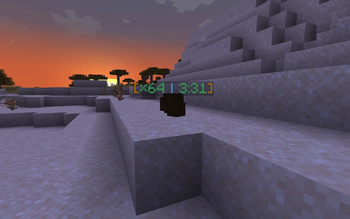
About this Mod
Drop Stacker
A Fabric mod for Minecraft that automatically stacks dropped item entities on the ground into a single entity, reducing entity lag and keeping your world tidy.
Features
- Dropped items of the same type and NBT automatically merge within a configurable radius
- Stacks beyond vanilla's 64-item limit — up to your configured
maxStackSize - Colorful stack count label displayed above items:
- 🟢 Green — 64 or below
- 🟡 Yellow — 65 to 500
- 🔴 Red — above 500
- Optional despawn countdown timer on the label:
- 🟢 Green — plenty of time remaining
- 🟡 Yellow — under 2 minutes
- 🔴 Red — under 30 seconds
- Server-side merge logic only, no client-side desync
- New config fields are added automatically on server restart — no manual editing needed
Requirements
- Minecraft 26.1.2
- Fabric Loader 0.19.1+
- Fabric API
- Fabric Language Kotlin
- Java 25+
Configuration
Config file is created automatically at .minecraft/config/drop-stacker.json on first launch:
{
  "maxStackSize": 1000,
  "scanRadiusX": 5.0,
  "scanRadiusY": 2.0,
  "scanRadiusZ": 5.0,
  "scanInterval": 5,
  "showDespawnTimer": true
}
| Field | Description | Default |
|---|---|---|
maxStackSize |
Maximum items per stacked entity | 1000 |
scanRadiusX |
Scan radius on X axis (blocks) | 5.0 |
scanRadiusY |
Scan radius on Y axis (blocks) | 2.0 |
scanRadiusZ |
Scan radius on Z axis (blocks) | 5.0 |
scanInterval |
Ticks between each scan | 5 |
showDespawnTimer |
Show despawn countdown on the label | true |
Building
./gradlew build
Output JAR is in build/libs/.
License
MIT — see LICENSE.
[!CAUTION]
I am not great at Kotlin and this project was built with AI assistance. There may be bad code, wrong patterns, or things that could be done much better. If you spot anything — please open an issue or a pull request. I genuinely appreciate it and will learn from it. Thank you.
Available Versions
How to Install Drop Stacker on Your Server
Order Server
Order a Minecraft Java server with at least 3 GB RAM (4 GB recommended).
Set fabric Loader
In the panel under "Egg", select the fabric loader and matching Minecraft version (26.1.2).
Install Mod
Open the mod browser in the dashboard and search for "Drop Stacker". Click "Install" – done! Alternatively, upload the .jar via SFTP to the /mods folder.
Compatibility
Mod Loaders
Minecraft Versions
26.1.2
Server-side
✓ RequiredRecommended RAM
4 GB(min. 3 GB)Frequently Asked Questions
Drop Stacker server crashes on startup – what to do?
Most common cause: wrong fabric version or insufficient RAM. Check the server log (latest.log) for "OutOfMemoryError" or "Mixin" errors. With Mado Hosting: ensure at least 3 GB RAM is allocated and the loader matches the mod version (26.1.2). You can switch loaders with one click in the panel.
Is Drop Stacker compatible with fabric?
Drop Stacker officially supports fabric for Minecraft 26.1.2. The Mado dashboard automatically detects incompatible loader combinations.
Server lagging with Drop Stacker – how to optimize performance?
Recommended RAM: 4 GB (per 8 players). Use /spark profiler to check if Drop Stacker consumes the most tick time. Common fixes: reduce server view-distance to 8-10, install "performant" or "starlight" as supplementary mods on Forge. With Mado Hosting, your server runs on NVMe SSDs with dedicated CPU cores for minimal latency.
Similar Mods




Rent Modded Server
Install Drop Stacker with just one click on your server.