
DrownForReal
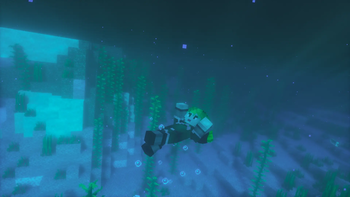
Drown For Real adds realistic player panic animations when your underwater oxygen bar hits zero. Built for Fabric, it features custom flailing animations that smoothly blend in and out over a fraction of a second using player-animation-lib.
Screenshots

About this Mod
Drown For Real 🌊
[Player Animation Mod]
Animate Your Panic!
Ever noticed how your Minecraft character stays completely calm while actively running out of air underwater? Drown For Real fixes this immersion-breaker by replacing the static, rigid vanilla behavior with a dynamic, realistic drowning panic animation!
When your oxygen level hits zero and you start taking suffocation damage, your character will enter a realistic, high-stress struggle—flailing their limbs and reclining backward as they fight to reach the surface.
✨ Features
Realistic Panic Animation: Features a custom, hand-crafted immersion loop for the body, head, arms, and legs that dynamically kicks in during drowning states.
Client-Side Visual Polish: Fully optimized for smooth multiplayer and singleplayer performance without impacting server tick rates.
📦 Setup & Dependencies
To run this mod smoothly, ensure you have the following installed in your mods folder:
Fabric Loader
Fabric API
player-animation-lib
Perfect for hardcore survival enthusiasts, realism modpacks, or players who just want their character's body language to match the actual danger they are in!
Available Versions
How to Install DrownForReal on Your Server
Order Server
Order a Minecraft Java server with at least 3 GB RAM (4 GB recommended).
Set fabric Loader
In the panel under "Egg", select the fabric loader and matching Minecraft version (1.21.1).
Install Mod
Open the mod browser in the dashboard and search for "DrownForReal". Click "Install" – done! Alternatively, upload the .jar via SFTP to the /mods folder.
Compatibility
Mod Loaders
Minecraft Versions
1.21.1
Server-side
✗ UnsupportedRecommended RAM
4 GB(min. 3 GB)Frequently Asked Questions
DrownForReal server crashes on startup – what to do?
Most common cause: wrong fabric version or insufficient RAM. Check the server log (latest.log) for "OutOfMemoryError" or "Mixin" errors. With Mado Hosting: ensure at least 3 GB RAM is allocated and the loader matches the mod version (1.21.1). You can switch loaders with one click in the panel.
Is DrownForReal compatible with fabric?
DrownForReal officially supports fabric for Minecraft 1.21.1. The Mado dashboard automatically detects incompatible loader combinations.
Server lagging with DrownForReal – how to optimize performance?
Recommended RAM: 4 GB (per 8 players). Use /spark profiler to check if DrownForReal consumes the most tick time. Common fixes: reduce server view-distance to 8-10, install "performant" or "starlight" as supplementary mods on Forge. With Mado Hosting, your server runs on NVMe SSDs with dedicated CPU cores for minimal latency.
Similar Mods




Rent Modded Server
Install DrownForReal with just one click on your server.