
Duplication Table
Adds a very important new table to Minecraft! (it's too op, believe me. Absolutely when combined with the phone mod)
Screenshots
About this Mod
Version 1.17.1 support arrived!
1.17 Now allows you to craft the special block. In order to craft it, fill the entire Crafting Grid with Cobblestone. It's easy as that.
There was a problem that it showed the mod was for Fabric, but that is now fixed. This mod allows Forge only.
NEW: 1.16.5 version fixed, added crafting recipe, and removed "X" slot.
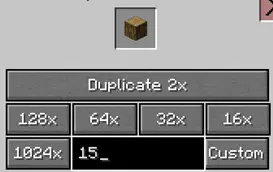
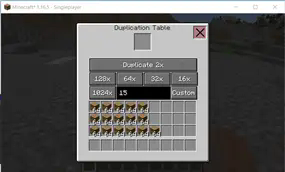
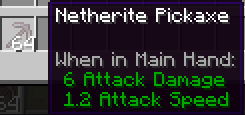
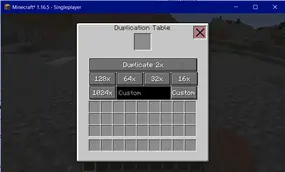
This mod gives you the opportunity to clone, duplicate or whatever you call it. You have a LOT of different buttons, 16x the current amount, 32x, 64x, 128x and 1024 And, off course, the main button: 2x the amount. You can clone every item you want, with this mod. It's extremely helpful in survival, and it can be lots of fun to play with. The maximum duplication size per item is 1024. But i think that isn't a really big of a problem. There's also a bug; if you duplicate tools, or armor, to 64, and if you then drop it directly from the dupe table, you will get stacked tools. It's actually a bug of Minecraft. But there are many cool things you can do with it.
Available Versions
How to Install Duplication Table on Your Server
Order Server
Order a Minecraft Java server with at least 3 GB RAM (4 GB recommended).
Set forge Loader
In the panel under "Egg", select the forge loader and matching Minecraft version (1.17.1).
Install Mod
Open the mod browser in the dashboard and search for "Duplication Table". Click "Install" – done! Alternatively, upload the .jar via SFTP to the /mods folder.
Compatibility
Mod Loaders
Minecraft Versions
1.17.1, 1.16.5
Server-side
✓ RequiredRecommended RAM
4 GB(min. 3 GB)Frequently Asked Questions
Duplication Table server crashes on startup – what to do?
Most common cause: wrong forge version or insufficient RAM. Check the server log (latest.log) for "OutOfMemoryError" or "Mixin" errors. With Mado Hosting: ensure at least 3 GB RAM is allocated and the loader matches the mod version (1.17.1). You can switch loaders with one click in the panel.
Is Duplication Table compatible with forge?
Duplication Table officially supports forge for Minecraft 1.17.1, 1.16.5. The Mado dashboard automatically detects incompatible loader combinations.
Server lagging with Duplication Table – how to optimize performance?
Recommended RAM: 4 GB (per 8 players). Use /spark profiler to check if Duplication Table consumes the most tick time. Common fixes: reduce server view-distance to 8-10, install "performant" or "starlight" as supplementary mods on Forge. With Mado Hosting, your server runs on NVMe SSDs with dedicated CPU cores for minimal latency.
Similar Mods




![[ETF] Entity Texture Features](https://cdn.modrinth.com/data/BVzZfTc1/af683d206d50b05258d865b0d6e4aa2f2cee12f2_96.webp)
![[EMF] Entity Model Features](https://cdn.modrinth.com/data/4I1XuqiY/6e5bbd0d06b1741bfdab6c0cfab6de8fdaf0064c_96.webp)
Rent Modded Server
Install Duplication Table with just one click on your server.