
Durability Alerts
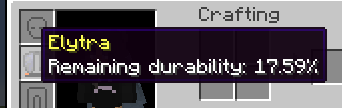
Durability Alert is a Minecraft mod designed to keep your tools in check! With real-time alerts, this mod ensures you're always aware when any item falls below 20% durability. Additionally, you can hover over items to see their current percentage.
Screenshots

About this Mod




Welcome to Durability Alert - a Minecraft mod that enhances your gameplay by providing essential features related to item durability!
🎮 Features
- ⚠️ Durability Alert: Whenever any item or tool you are using in the game falls below 20% durability, the mod will now alert you. Never let your favorite tools break unexpectedly again! Stay informed and take action before it's too late.

- 🔍 Hover-over Durability Percentage: From now on, when you hover over any item or tool with durability, you can see its current percentage. This information will help you manage your inventory more efficiently and make informed decisions during intense gameplay.

🚀 Installation
To use Durability Alert, you'll need:
- Minecraft Version: 1.20.1
- Fabric Loader: 0.14.22 or higher
- Fabric API
- Make sure you have the required Minecraft version installed.
- Download and install the latest Fabric Loader from here.
- Place the Durability Alert mod JAR file along with the Fabric API in the "mods" folder in your Minecraft installation directory.
CurseForge:
Download the mod on CurseForge: Durability Alert on CurseForge
❤️ Feedback and Contributions
I value your feedback! If you encounter any issues or have suggestions for improvement, please don't hesitate to open an issue. Contributions in the form of pull requests are also most welcome!
📝 License
This mod is open-source and distributed under the MIT License.
🎉 Enjoy the Game!
Thank you for choosing Durability Alert! We hope you have a fantastic time exploring, crafting, and surviving in the world of Minecraft with this mod. Happy gaming! 🎮
Available Versions
How to Install Durability Alerts on Your Server
Order Server
Order a Minecraft Java server with at least 3 GB RAM (4 GB recommended).
Set fabric Loader
In the panel under "Egg", select the fabric loader and matching Minecraft version (1.20.1).
Install Mod
Open the mod browser in the dashboard and search for "Durability Alerts". Click "Install" – done! Alternatively, upload the .jar via SFTP to the /mods folder.
Compatibility
Mod Loaders
Minecraft Versions
1.20.1
Server-side
✗ UnsupportedRecommended RAM
4 GB(min. 3 GB)Frequently Asked Questions
Durability Alerts server crashes on startup – what to do?
Most common cause: wrong fabric version or insufficient RAM. Check the server log (latest.log) for "OutOfMemoryError" or "Mixin" errors. With Mado Hosting: ensure at least 3 GB RAM is allocated and the loader matches the mod version (1.20.1). You can switch loaders with one click in the panel.
Is Durability Alerts compatible with fabric?
Durability Alerts officially supports fabric for Minecraft 1.20.1. The Mado dashboard automatically detects incompatible loader combinations.
Server lagging with Durability Alerts – how to optimize performance?
Recommended RAM: 4 GB (per 8 players). Use /spark profiler to check if Durability Alerts consumes the most tick time. Common fixes: reduce server view-distance to 8-10, install "performant" or "starlight" as supplementary mods on Forge. With Mado Hosting, your server runs on NVMe SSDs with dedicated CPU cores for minimal latency.
Similar Mods




![[ETF] Entity Texture Features](https://cdn.modrinth.com/data/BVzZfTc1/af683d206d50b05258d865b0d6e4aa2f2cee12f2_96.webp)
![[EMF] Entity Model Features](https://cdn.modrinth.com/data/4I1XuqiY/6e5bbd0d06b1741bfdab6c0cfab6de8fdaf0064c_96.webp)
Rent Modded Server
Install Durability Alerts with just one click on your server.