
Durability Helper
Never lose your favorite tools to durability again!
Screenshots
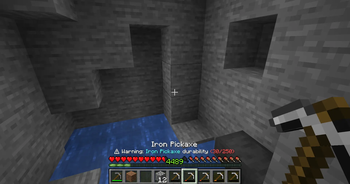
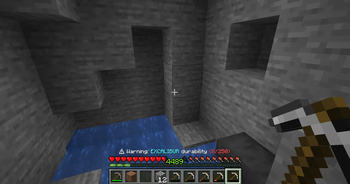
About this Mod
Durability Helper
Never lose your favorite tools to durability again!
Durability Helper is a lightweight client-side mod that displays real-time durability warnings for your tools, weapons, and armor directly on your HUD. No more accidentally breaking that perfectly enchanted pickaxe!
Features
Smart Warning System: Get visual alerts when your items reach critical durability levels
- 🔴 Red Alert (Below 15% durability)
Clean HUD Display: Non-intrusive warning text positioned on top of the health bar
- Compact, scaled text that doesn't clutter your screen
- Durability counter shows exactly how many uses remain
Real-time Updates: Warnings update every second, keeping you informed without spam
Client-Side Only:
- Works on any server, even vanilla ones!
- No server installation required
- Other players aren't affected by your choice to use this mod
How It Works
Simply hold any damageable item and Durability Helper will automatically monitor its condition. When durability drops into the warning zones, you'll see:
⚠ Warning: Iron Pickaxe durability (30/250)
The warning disappears when you switch to a healthy tool or repair the damaged one.
Perfect For
- Survival players who want to protect valuable enchanted gear
- Miners who need to track pickaxe durability during long mining sessions
- Anyone tired of tools breaking at the worst possible moment
Available Versions
How to Install Durability Helper on Your Server
Order Server
Order a Minecraft Java server with at least 3 GB RAM (4 GB recommended).
Set forge Loader
In the panel under "Egg", select the forge loader and matching Minecraft version (1.20.4).
Install Mod
Open the mod browser in the dashboard and search for "Durability Helper". Click "Install" – done! Alternatively, upload the .jar via SFTP to the /mods folder.
Compatibility
Mod Loaders
Minecraft Versions
1.20.4, 1.20.2, 1.20.1
Server-side
✗ UnsupportedRecommended RAM
4 GB(min. 3 GB)Frequently Asked Questions
Durability Helper server crashes on startup – what to do?
Most common cause: wrong forge version or insufficient RAM. Check the server log (latest.log) for "OutOfMemoryError" or "Mixin" errors. With Mado Hosting: ensure at least 3 GB RAM is allocated and the loader matches the mod version (1.20.4). You can switch loaders with one click in the panel.
Is Durability Helper compatible with forge?
Durability Helper officially supports forge for Minecraft 1.20.4, 1.20.2, 1.20.1. The Mado dashboard automatically detects incompatible loader combinations.
Server lagging with Durability Helper – how to optimize performance?
Recommended RAM: 4 GB (per 8 players). Use /spark profiler to check if Durability Helper consumes the most tick time. Common fixes: reduce server view-distance to 8-10, install "performant" or "starlight" as supplementary mods on Forge. With Mado Hosting, your server runs on NVMe SSDs with dedicated CPU cores for minimal latency.
Similar Mods




![[ETF] Entity Texture Features](https://cdn.modrinth.com/data/BVzZfTc1/af683d206d50b05258d865b0d6e4aa2f2cee12f2_96.webp)
![[EMF] Entity Model Features](https://cdn.modrinth.com/data/4I1XuqiY/6e5bbd0d06b1741bfdab6c0cfab6de8fdaf0064c_96.webp)
Rent Modded Server
Install Durability Helper with just one click on your server.