
Dynamic Views
Automatically adjusts render distance to match your FPS. Low FPS = less view distance, high FPS = more. Fully configurable in-game.
Screenshots
About this Mod
Dynamic View Distance
No more manually fiddling with your render distance. Dynamic View
Distance monitors your framerate in real time and adjusts the view
distance automatically — giving you the best possible view your PC can
currently run smoothly.
How it works
The mod measures your FPS at regular intervals and compares it against two
thresholds:
- FPS too low → render distance is decreased by one chunk until things
run smoothly again. - FPS high enough → render distance is increased by one chunk to show
more of the world. - FPS in the sweet spot → everything stays as it is.
This way the mod finds the optimal balance between view range and
performance on its own — whether you're running across a simple plains
biome or standing in a complex redstone base.
Features
- Automatic adjustment of render distance based on your current
framerate - Custom in-game settings menu — no Cloth Config or ModMenu required
- Freely configurable limits: minimum and maximum view distance, lower
and upper FPS thresholds - Cooldown system prevents the view distance from constantly flickering
back and forth - Adjustable check interval — how often your FPS is measured
- Settings are saved to a simple JSON file and persist across game
sessions
How to use
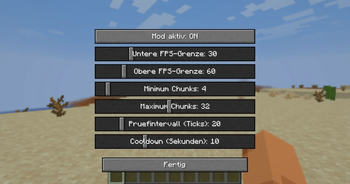
Press V in-game to open the settings menu (the key can be rebound under
Options → Controls). There you can adjust the following with sliders:
| Setting | What it does |
|---|---|
| Mod enabled | Turns automatic adjustment on/off |
| Lower FPS threshold | Below this, view distance is decreased |
| Upper FPS threshold | Above this, view distance is increased |
| Minimum chunks | View distance never goes below this value |
| Maximum chunks | View distance never goes above this value |
| Check interval | How often FPS is measured (in ticks) |
| Cooldown | Pause after each change (in seconds) |
Installation
- Install Fabric Loader for Minecraft 26.1.2
- Download Fabric API and place it in your
modsfolder - Place Dynamic View Distance in your
modsfolder as well - Launch the game — done!
Notes
- This is a client-side mod — it works on any server, even ones that
don't have the mod installed. - Requires Fabric API.
- Built for Minecraft 26.1.2.
Available Versions
How to Install Dynamic Views on Your Server
Order Server
Order a Minecraft Java server with at least 3 GB RAM (4 GB recommended).
Set fabric Loader
In the panel under "Egg", select the fabric loader and matching Minecraft version (26.1.2).
Install Mod
Open the mod browser in the dashboard and search for "Dynamic Views". Click "Install" – done! Alternatively, upload the .jar via SFTP to the /mods folder.
Compatibility
Mod Loaders
Minecraft Versions
26.1.2
Server-side
✗ UnsupportedRecommended RAM
4 GB(min. 3 GB)Frequently Asked Questions
Dynamic Views server crashes on startup – what to do?
Most common cause: wrong fabric version or insufficient RAM. Check the server log (latest.log) for "OutOfMemoryError" or "Mixin" errors. With Mado Hosting: ensure at least 3 GB RAM is allocated and the loader matches the mod version (26.1.2). You can switch loaders with one click in the panel.
Is Dynamic Views compatible with fabric?
Dynamic Views officially supports fabric for Minecraft 26.1.2. The Mado dashboard automatically detects incompatible loader combinations.
Server lagging with Dynamic Views – how to optimize performance?
Recommended RAM: 4 GB (per 8 players). Use /spark profiler to check if Dynamic Views consumes the most tick time. Common fixes: reduce server view-distance to 8-10, install "performant" or "starlight" as supplementary mods on Forge. With Mado Hosting, your server runs on NVMe SSDs with dedicated CPU cores for minimal latency.
Similar Mods


Rent Modded Server
Install Dynamic Views with just one click on your server.