
DynamicHUD
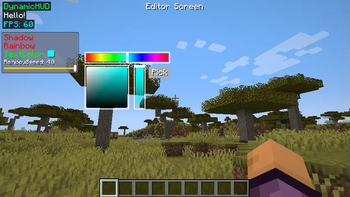
A dynamic HUD library to create, display, load and save, interact and do much more with HUD elements - widgets.
Screenshots

About this Mod
DynamicHUD for Minecraft Fabric
DynamicHUD is a library for Minecraft mod creators using Fabric (Minecraft 1.19.4+). It lets developers create customizable HUD elements that players can modify and interact with, enhancing both visuals and gameplay.
Features
- Automatic Loading & Saving: Widgets automatically save their state and reload upon game restart, providing a seamless experience for players.
- Dynamic Values: Widgets can display real-time information, adapting to in-game events and data changes.
- Inbuilt Widgets: Start with
TextWidgetfor easy text display and expand with more specialized widgets. - Utility Classes: Utilize
DrawHelper,ColorHelper, andTextureHelperfor efficient and streamlined development. - ContextMenu: A general context menu featuring boolean, slider, runnable, color options, and list/enum selections for widget customization.
- Screen Border Control: Keeps widgets within screen boundaries.
- Snapping: Hold
Shiftto snap widgets to an imaginary grid. - Multi-Mod Support: Built for compatibility across mods.
- Easy Integration: Simple setup for quick implementation into your projects.
- Comprehensive Wiki: A detailed guide and reference for all features of DynamicHUD, available at https://tanishisherewith.gitbook.io/dynamic-hud.
Disclaimer
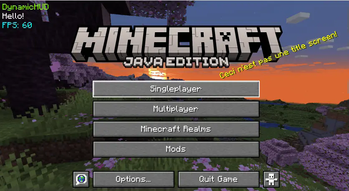
DynamicHUD provides tools for developers but does not add HUD elements by itself.
Users looking for in-game HUD elements should refer to mods that use DynamicHUD.
Fabric only — no plans for Forge support.
Installation for Users
To ensure mods that depend on DynamicHUD work correctly, follow these steps to add DynamicHUD to your Minecraft installation:
- Make sure you have Fabric and Fabric-API installed.
- Download the
dynamichud-<version>.jarfile from the official release page. - Navigate to your Minecraft directory. The default path is usually:
- Windows:
%APPDATA%\.minecraft - macOS:
~/Library/Application Support/minecraft - Linux:
~/.minecraft
- Windows:
- Locate the
modsfolder within your Minecraft directory. If it doesn't exist, create it. - Place the downloaded DynamicHUD
.jarfile into themodsfolder. - Run Minecraft with the Fabric loader. DynamicHUD will now be loaded, and any mods with DynamicHUD as a dependency can function properly.
Enjoy the enhanced HUD experience provided by mods utilizing DynamicHUD!
Getting Started For Developers
Visit our wiki for more detailed information about the library!
To integrate DynamicHUD into your mod, add it as a dependency in your build.gradle file:
allprojects {
	repositories {
		maven { url 'https://jitpack.io' }
	}
	maven {
		name 'Xander Maven'
		url 'https://maven.isxander.dev/releases'
	}
}

dependencies {
	// Dynamic HUD
	modImplementation 'com.github.V-Fast:DynamicHUD:<Version>'
}
Old archived wiki
https://tanishisherewith.gitbook.io/archived-legacy-dynamichud/
Contributing
Contributions are welcome! If you’re interested in improving DynamicHUD or adding new features, please review our contributing guidelines.
License
DynamicHUD is released under the MIT License. Feel free to use and modify it in your mods, with proper attribution back to this repository.
Support
Need assistance or have suggestions? Join our Discord community or submit an issue on our GitHub repository.
Showcase
Showcase Video
Available Versions
How to Install DynamicHUD on Your Server
Order Server
Order a Minecraft Java server with at least 3 GB RAM (4 GB recommended).
Set fabric Loader
In the panel under "Egg", select the fabric loader and matching Minecraft version (1.21.5).
Install Mod
Open the mod browser in the dashboard and search for "DynamicHUD". Click "Install" – done! Alternatively, upload the .jar via SFTP to the /mods folder.
Compatibility
Mod Loaders
Minecraft Versions
1.21.5, 1.21.4, 1.21.1 (+8 more)
Server-side
✗ UnsupportedRecommended RAM
4 GB(min. 3 GB)Frequently Asked Questions
DynamicHUD server crashes on startup – what to do?
Most common cause: wrong fabric version or insufficient RAM. Check the server log (latest.log) for "OutOfMemoryError" or "Mixin" errors. With Mado Hosting: ensure at least 3 GB RAM is allocated and the loader matches the mod version (1.21.5). You can switch loaders with one click in the panel.
Is DynamicHUD compatible with fabric?
DynamicHUD officially supports fabric for Minecraft 1.21.5, 1.21.4, 1.21.1. The Mado dashboard automatically detects incompatible loader combinations.
Server lagging with DynamicHUD – how to optimize performance?
Recommended RAM: 4 GB (per 8 players). Use /spark profiler to check if DynamicHUD consumes the most tick time. Common fixes: reduce server view-distance to 8-10, install "performant" or "starlight" as supplementary mods on Forge. With Mado Hosting, your server runs on NVMe SSDs with dedicated CPU cores for minimal latency.
Similar Mods




Rent Modded Server
Install DynamicHUD with just one click on your server.