
Dynmap Radar
Display Dynmap data on Xaero's Minimap and World Map.
Screenshots
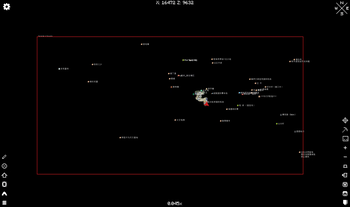
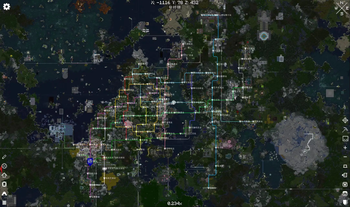
About this Mod
Dynmap Radar
Display Dynmap players and markers directly
on Xaero's World Map
and Xaero's Minimap.
Features
Player Tracking
- Shows all online players from a Dynmap server on Xaero's World Map and Minimap
- Renders player heads using real Minecraft skins (vanilla
PlayerFaceRenderer) - Displays player names below heads (supports NAME / ACCOUNT display mode)
- Configurable head size, scale, and update interval
- Automatically excludes locally-loaded (nearby) players
- Minimap distance culling — hides players beyond configurable radius (default 200 blocks)
Marker Rendering
- Full support for four Dynmap marker types:
- Area — filled polygons with outline
- Circle — filled circles with outline
- Polyline — multi-segment lines (thick line via vertex quads)
- Point — custom icons downloaded from Dynmap with labels
- Icons auto-downloaded asynchronously and cached to disk
- Configurable marker scale, point icon scale, and follow-zoom behavior
- Separate layer visibility for world map and minimap — show/hide individual marker sets independently
- Minimap distance culling — hides distant markers beyond configurable radius (default 200 blocks)
Right-Click Menu (World Map)
- Copy Name — copy marker/player name to clipboard
- Copy Coordinates — copy
x y zto clipboard - Copy Full Info — copy name + coordinates + description (markers only)
- Teleport — teleport to the marker/player using Xaero's built-in teleporter (respects Xaero's teleport command
settings) - Create Waypoint — instantly create a Xaero Minimap waypoint at the marker/player location (configurable color)
Minimap Support
- Optional rendering of markers and player heads on Xaero's Minimap
- Shape rendering on minimap (area/circle/polyline) can be toggled separately
- Configurable distance culling radius to keep minimap clean
Dependencies
- Xaero's World Map
- Xaero's Minimap
- A server running Dynmap
Quick Start
- Install the mod and dependencies
- Join a server that has Dynmap running
- Set the Dynmap URL:
/dradar settings url set http://yourserver.com:8123 - Open Xaero's World Map — players and markers will appear
- Right-click any marker or player for options (copy, teleport, create waypoint)
Important Notes
- Rendering non-point markers in minimap is buggy, use with caution (toggle
minimapShapessetting) - Currently only supports servers which can see online map without authentication. Support for auth-protected servers may
be added in the future.
Commands
All commands use /dradar
Settings
| Command | Description |
|---|---|
/dradar status |
Show current config |
/dradar settings <key> get |
Read a setting value |
/dradar settings <key> set <value> |
Write a setting value |
/dradar reload |
Reload the config file |
/dradar clearCache |
Clear all cached data and re-fetch |
Available settings keys:
| Key | Type | Default | Range | Description |
|---|---|---|---|---|
url |
string | "" |
— | Dynmap server base URL (e.g. http://example.com:8123) |
mode |
string | NAME |
NAME / ACCOUNT |
Player display mode |
headSize |
int | 24 |
8–64 | Player head icon size |
markerScale |
double | 2.0 |
0.1–10 | Overall marker render scale |
pointScale |
double | 1.0 |
0.25–10 | Point icon scale multiplier |
pointFollowZoom |
bool | true |
— | Point icon size follows map zoom |
headFollowZoom |
bool | false |
— | Head icon size follows map zoom |
showInMinimap |
bool | false |
— | Show markers/players on minimap |
minimapShapes |
bool | false |
— | Render area/circle/polyline shapes on minimap |
minimapCullRadius |
double | 200 |
10–10000 | Hide minimap elements beyond this radius (blocks) |
waypointColor |
int | 0xFFFFFF |
0–0xFFFFFF | Color of created waypoints (hex RGB, e.g. 0xFF5555) |
interval |
int | 1000 |
100–60000 | Data fetch interval in ms |
Layer Management
Layer visibility is managed separately for world map and minimap.
| Command | Description |
|---|---|
/dradar layer world list |
List all marker sets with world map visibility |
/dradar layer world show <setId> |
Show a marker set on world map |
/dradar layer world hide <setId> |
Hide a marker set on world map |
/dradar layer world showAll |
Show all marker sets on world map |
/dradar layer minimap list |
List all marker sets with minimap visibility |
/dradar layer minimap show <setId> |
Show a marker set on minimap |
/dradar layer minimap hide <setId> |
Hide a marker set on minimap |
/dradar layer minimap showAll |
Show all marker sets on minimap |
/dradar layer reset <setId> |
Reset layer to Dynmap server defaults |
Dimension Mapping
| Command | Description |
|---|---|
/dradar dim list |
Show current dimension mappings |
/dradar dim map <dynmapWorld> <xaeroDim> |
Map a Dynmap world to a dimension |
/dradar dim unmap <dynmapWorld> |
Remove a dimension mapping |
/dradar dim mapCurrent |
Map Dynmap "world" to current dimension |
Available Versions
How to Install Dynmap Radar on Your Server
Order Server
Order a Minecraft Java server with at least 3 GB RAM (4 GB recommended).
Set fabric Loader
In the panel under "Egg", select the fabric loader and matching Minecraft version (1.20.1).
Install Mod
Open the mod browser in the dashboard and search for "Dynmap Radar". Click "Install" – done! Alternatively, upload the .jar via SFTP to the /mods folder.
Compatibility
Mod Loaders
Minecraft Versions
1.20.1
Server-side
✗ UnsupportedRecommended RAM
4 GB(min. 3 GB)Frequently Asked Questions
Dynmap Radar server crashes on startup – what to do?
Most common cause: wrong fabric version or insufficient RAM. Check the server log (latest.log) for "OutOfMemoryError" or "Mixin" errors. With Mado Hosting: ensure at least 3 GB RAM is allocated and the loader matches the mod version (1.20.1). You can switch loaders with one click in the panel.
Is Dynmap Radar compatible with fabric?
Dynmap Radar officially supports fabric for Minecraft 1.20.1. The Mado dashboard automatically detects incompatible loader combinations.
Server lagging with Dynmap Radar – how to optimize performance?
Recommended RAM: 4 GB (per 8 players). Use /spark profiler to check if Dynmap Radar consumes the most tick time. Common fixes: reduce server view-distance to 8-10, install "performant" or "starlight" as supplementary mods on Forge. With Mado Hosting, your server runs on NVMe SSDs with dedicated CPU cores for minimal latency.
Similar Mods




![[ETF] Entity Texture Features](https://cdn.modrinth.com/data/BVzZfTc1/af683d206d50b05258d865b0d6e4aa2f2cee12f2_96.webp)
![[EMF] Entity Model Features](https://cdn.modrinth.com/data/4I1XuqiY/6e5bbd0d06b1741bfdab6c0cfab6de8fdaf0064c_96.webp)
Rent Modded Server
Install Dynmap Radar with just one click on your server.