
Dynocaps
Travel with the comfort of your own home
Screenshots

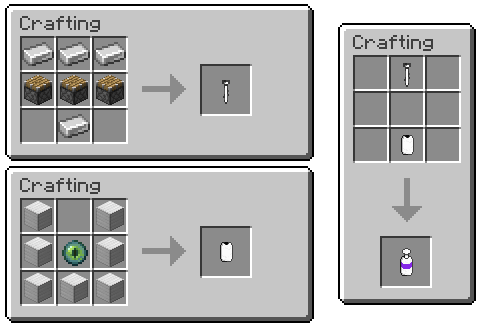
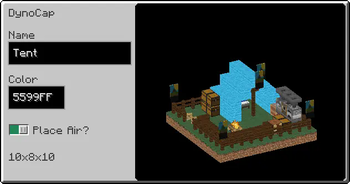
About this Mod
Dynocaps

About
Dynocaps are handheld items that allow you to "capture" and transport large areas with to power of End technology. Some common use cases would be having a traveling house so you can explore more areas or keeps a secret and secure cache of items on you as all times
Features
- Builtin color-coding for dynocaps(ingui)
- Capule Case for compacting or grouping dynocaps
For Pack developers
- Prefab(rusty caps) that and be saved and added to loottables
- this is enabled by a custom loot table entry type
- Loottable Tweaker - builtin json tool for adding entries to loot tables
- Capabilities of dynocaps are highly configurable
- Multiple template dynocap can be registered with different capabilities
Issues
If you find an issue please report it at my Gitlab.
Feel free to request new features also.
If your issue is related to a crash: please provide a crash log link hosted on pastebin/hastebin/etc
If you like my work and would like to support me consider donating to my Ko-fi!

Available Versions
How to Install Dynocaps on Your Server
Order Server
Order a Minecraft Java server with at least 3 GB RAM (4 GB recommended).
Set fabric Loader
In the panel under "Egg", select the fabric loader and matching Minecraft version (1.19.3).
Install Mod
Open the mod browser in the dashboard and search for "Dynocaps". Click "Install" – done! Alternatively, upload the .jar via SFTP to the /mods folder.
Compatibility
Mod Loaders
Minecraft Versions
1.19.3
Server-side
✓ RequiredRecommended RAM
4 GB(min. 3 GB)Frequently Asked Questions
Dynocaps server crashes on startup – what to do?
Most common cause: wrong fabric version or insufficient RAM. Check the server log (latest.log) for "OutOfMemoryError" or "Mixin" errors. With Mado Hosting: ensure at least 3 GB RAM is allocated and the loader matches the mod version (1.19.3). You can switch loaders with one click in the panel.
Is Dynocaps compatible with fabric and quilt?
Dynocaps officially supports fabric, quilt for Minecraft 1.19.3. The Mado dashboard automatically detects incompatible loader combinations.
Server lagging with Dynocaps – how to optimize performance?
Recommended RAM: 4 GB (per 8 players). Use /spark profiler to check if Dynocaps consumes the most tick time. Common fixes: reduce server view-distance to 8-10, install "performant" or "starlight" as supplementary mods on Forge. With Mado Hosting, your server runs on NVMe SSDs with dedicated CPU cores for minimal latency.
Similar Mods

![[ETF] Entity Texture Features](https://cdn.modrinth.com/data/BVzZfTc1/af683d206d50b05258d865b0d6e4aa2f2cee12f2_96.webp)
![[EMF] Entity Model Features](https://cdn.modrinth.com/data/4I1XuqiY/6e5bbd0d06b1741bfdab6c0cfab6de8fdaf0064c_96.webp)



Rent Modded Server
Install Dynocaps with just one click on your server.