
Easy Block Editor
EasyBlockEditor is a Minecraft construction editor mod inspired by the Litematica mod and developed using the LDLib2 framework.
Screenshots
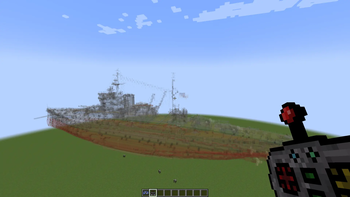
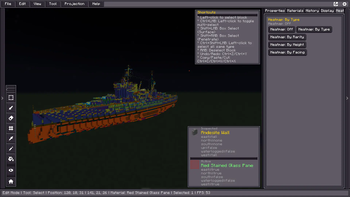
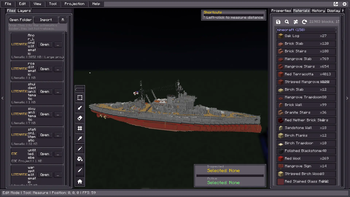
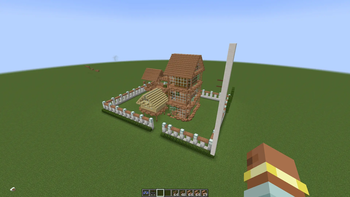
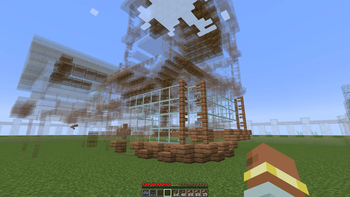
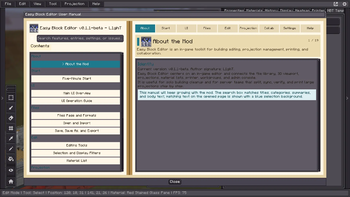
About this Mod
EasyBlockEditor
EasyBlockEditor is a building editor mod for Minecraft NeoForge 1.21.1, inspired by Litematica, developed with the LDLib2 framework.
It serves as both a building editor and a building management platform. The core concept: provide an in-game full-screen 3D UI editor, allowing players to design, edit, manage, and share buildings in a non-destructive way.
Features
- 3D UI Editor — Full-screen in-game editor with FlexBox layout, powered by LDLib2
- Non-destructive Editing — Edit buildings virtually before applying to the real world
- Multi-format Support — Compatible with
.litematic,.schem(Sponge),.nbt(Vanilla Structure),.schematic(Schematica), and native.ebeformat - Layer System — Organize buildings with layers (foundation, walls, roof, etc.)
- Workgroup Collaboration — Real-time collaboration with permission management
- Projection System — Preview buildings as holographic projections in the world
- Printer Mode — Auto or manual block placement consuming player inventory
- Version History — Full undo/redo with version snapshots
- Material Statistics — Real-time material cost calculation
- Block Heatmap — Visualize block type distribution with colors
- NBT Editing — Full block entity NBT editing and filtering
- Theming — Customizable UI themes via LSS stylesheets
- i18n — Supports English and Chinese (中文)
Requirements
- Minecraft 1.21.1
- NeoForge 21.1.x
- LDLib2 (required)
Installation
- Download the latest release from Releases
- Place the
.jarfile in your Minecraftmods/directory - Launch the game
Usage
- Use
/ebecommand or right-click the Architect Toolbox item to open the editor - Place schematic files in
config/ebe/client/schematics/for the editor to detect
Building from Source
git clone https://github.com/huangzilu/EasyBlockEditor.git
cd EasyBlockEditor
./gradlew build
The built jar will be in build/libs/.
License
This project is licensed under the MIT License — see the LICENSE file for details.
Credits
- Author: L1ghT
- Inspired by: Litematica by masa
- Powered by: LDLib2 by Low-Drag-MC
Available Versions
How to Install Easy Block Editor on Your Server
Order Server
Order a Minecraft Java server with at least 3 GB RAM (4 GB recommended).
Set neoforge Loader
In the panel under "Egg", select the neoforge loader and matching Minecraft version (1.21.1).
Install Mod
Open the mod browser in the dashboard and search for "Easy Block Editor". Click "Install" – done! Alternatively, upload the .jar via SFTP to the /mods folder.
Compatibility
Mod Loaders
Minecraft Versions
1.21.1
Server-side
✓ RequiredRecommended RAM
4 GB(min. 3 GB)Frequently Asked Questions
Easy Block Editor server crashes on startup – what to do?
Most common cause: wrong neoforge version or insufficient RAM. Check the server log (latest.log) for "OutOfMemoryError" or "Mixin" errors. With Mado Hosting: ensure at least 3 GB RAM is allocated and the loader matches the mod version (1.21.1). You can switch loaders with one click in the panel.
Is Easy Block Editor compatible with neoforge?
Easy Block Editor officially supports neoforge for Minecraft 1.21.1. The Mado dashboard automatically detects incompatible loader combinations.
Server lagging with Easy Block Editor – how to optimize performance?
Recommended RAM: 4 GB (per 8 players). Use /spark profiler to check if Easy Block Editor consumes the most tick time. Common fixes: reduce server view-distance to 8-10, install "performant" or "starlight" as supplementary mods on Forge. With Mado Hosting, your server runs on NVMe SSDs with dedicated CPU cores for minimal latency.
Similar Mods




Rent Modded Server
Install Easy Block Editor with just one click on your server.