
Easy Enchant
Easily and optimally enchant your items at anvils!
Screenshots
About this Mod
What is it?
Easy Enchant is a simple mod that finds the optimal way to enchant your selected items to save XP/Levels, inspired by projects like iamcal's Enchantment Ordering Tool. It provides simple macros/buttons to do the actual enchanting quickly.
To use
First, select your items to enchant by hovering over them and pressing Space.
Easy Enchant will not allow you to select certain books or gear if it deems them incompatible, or if it would make an already selected book useless.

After selecting your items, you can choose to either click:
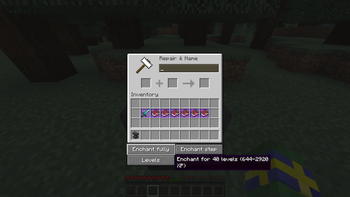
- Enchant fully: This combines all your selected items in one process.
- Enchant step: This does only one step/combination of the optimized plan for combining all your items.
Easy Enchant will NOT let you do combination steps/processes if you do not have the levels to do so.
You can always hover over the different enchanting buttons to see how many levels or XP they would take.
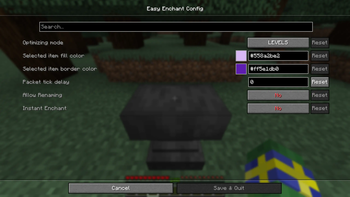
Finally, you can toggle the current optimizing mode. The two options are Levels and XP. This decies what Easy Enchant optimizes to be lowest.
Recommendations
- If you already have enough levels and want to just use the Enchant fully button, then you should optimize for Levels.
- If you are planning to obtain XP/levels, do one Enchant step, repeat, etc... then you should optimize for XP.
Finally, be wary that Easy Enchant currently doesn't fully support combining many low level enchants to higher level enchants, e.g 4 Looting I books to 1 Looting III book!
For more info, check out the friggin github yo! :P
Available Versions
How to Install Easy Enchant on Your Server
Order Server
Order a Minecraft Java server with at least 3 GB RAM (4 GB recommended).
Set fabric Loader
In the panel under "Egg", select the fabric loader and matching Minecraft version (26.1.2).
Install Mod
Open the mod browser in the dashboard and search for "Easy Enchant". Click "Install" – done! Alternatively, upload the .jar via SFTP to the /mods folder.
Compatibility
Mod Loaders
Minecraft Versions
26.1.2, 26.1.1, 26.1 (+8 more)
Server-side
✗ UnsupportedRecommended RAM
4 GB(min. 3 GB)Frequently Asked Questions
Easy Enchant server crashes on startup – what to do?
Most common cause: wrong fabric version or insufficient RAM. Check the server log (latest.log) for "OutOfMemoryError" or "Mixin" errors. With Mado Hosting: ensure at least 3 GB RAM is allocated and the loader matches the mod version (26.1.2). You can switch loaders with one click in the panel.
Is Easy Enchant compatible with fabric?
Easy Enchant officially supports fabric for Minecraft 26.1.2, 26.1.1, 26.1. The Mado dashboard automatically detects incompatible loader combinations.
Server lagging with Easy Enchant – how to optimize performance?
Recommended RAM: 4 GB (per 8 players). Use /spark profiler to check if Easy Enchant consumes the most tick time. Common fixes: reduce server view-distance to 8-10, install "performant" or "starlight" as supplementary mods on Forge. With Mado Hosting, your server runs on NVMe SSDs with dedicated CPU cores for minimal latency.
Similar Mods




![[ETF] Entity Texture Features](https://cdn.modrinth.com/data/BVzZfTc1/af683d206d50b05258d865b0d6e4aa2f2cee12f2_96.webp)
![[EMF] Entity Model Features](https://cdn.modrinth.com/data/4I1XuqiY/6e5bbd0d06b1741bfdab6c0cfab6de8fdaf0064c_96.webp)
Rent Modded Server
Install Easy Enchant with just one click on your server.