
Easy2Trade
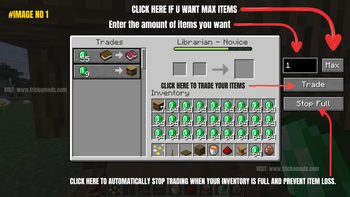
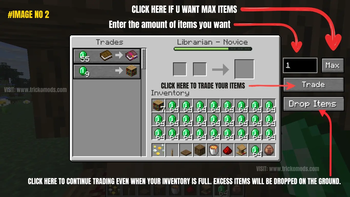
Automate villager trading with a single click. Set a trade amount, choose the items you need, or use Max Trade for the best possible result.
Screenshots
About this Mod

Easy Villager Trading
This mod is designed to save players time by automating repetitive villager trading.
Normally, trading with villagers requires selecting items and clicking through trades repeatedly, which can become tedious. This mod simplifies the entire process.
Features
- Set the exact number of villager trades you want to perform
- Enter the amount of items you need, and the mod will automatically calculate and complete the required trades.
- Use Max Trade to scan your inventory and calculate the best possible trading outcome.
- Complete all trades with a single click.
- Stop trading at any time.
- Works with all vanilla trading entities and professions, including farmers, librarians, armorers, toolsmiths, weaponsmiths, clerics, cartographers, wandering traders, and more.
- Works with any trade type, whether it gives food, emeralds, books, tools, armor, enchanted items, or other rewards.
Perfect For
- Emerald farming
- Villager trading halls
- Automated trading
- Large-scale villager setups
- Minecraft survival worlds
- Multiplayer servers
- Speeding up repetitive trades
Recommended
For the best experience, we recommend using this mod together with any compatible Unlimited Trading mod.
Compatibility
- Client-side only — only players need to install the mod.
- No installation is required on the server.
- Works in both Singleplayer and Multiplayer.
Support
Discord: https://dsc.gg/trickomods
Available Versions
How to Install Easy2Trade on Your Server
Order Server
Order a Minecraft Java server with at least 3 GB RAM (4 GB recommended).
Set fabric Loader
In the panel under "Egg", select the fabric loader and matching Minecraft version (26.1.2).
Install Mod
Open the mod browser in the dashboard and search for "Easy2Trade". Click "Install" – done! Alternatively, upload the .jar via SFTP to the /mods folder.
Compatibility
Mod Loaders
Minecraft Versions
26.1.2, 26.1.1, 26.1 (+12 more)
Server-side
✗ UnsupportedRecommended RAM
4 GB(min. 3 GB)Frequently Asked Questions
Easy2Trade server crashes on startup – what to do?
Most common cause: wrong fabric version or insufficient RAM. Check the server log (latest.log) for "OutOfMemoryError" or "Mixin" errors. With Mado Hosting: ensure at least 3 GB RAM is allocated and the loader matches the mod version (26.1.2). You can switch loaders with one click in the panel.
Is Easy2Trade compatible with fabric and forge?
Easy2Trade officially supports fabric, forge for Minecraft 26.1.2, 26.1.1, 26.1. Note: Forge and Fabric mods are NOT cross-compatible – pick one loader and stick with it. The Mado dashboard automatically detects incompatible loader combinations.
Server lagging with Easy2Trade – how to optimize performance?
Recommended RAM: 4 GB (per 8 players). Use /spark profiler to check if Easy2Trade consumes the most tick time. Common fixes: reduce server view-distance to 8-10, install "performant" or "starlight" as supplementary mods on Forge. With Mado Hosting, your server runs on NVMe SSDs with dedicated CPU cores for minimal latency.
Similar Mods




Rent Modded Server
Install Easy2Trade with just one click on your server.