
Effect Manager (Block Any Effect)
A powerful utility tool for modpack developers to easily block, filter, and forcefully remove any potion or mob effect from the game.
Screenshots
About this Mod
English description
Descripción: Are you building a hardcore modpack and want to disable the "Strength" or "Regeneration" effect entirely? Did you install a mod that adds an overpowered or broken potion effect that ruins your server's economy or balance? Effect Manager is the lightweight, highly configurable utility mod you need.
Designed specifically for Modpack Developers and Server Admins, Effect Manager acts as an impenetrable shield. It prevents specific potion/mob effects from being applied to entities, regardless of how they are given (potions, beacons, commands, or even other mods). If an entity already has the blocked effect, the mod will forcefully remove it.
🌟 Key Features
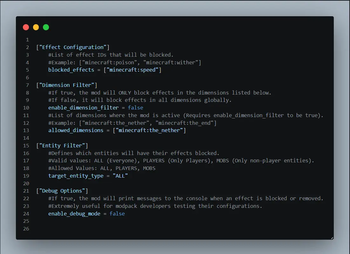
Absolute Blocking: Block any effect from Vanilla Minecraft or any other mod simply by adding its ID (e.g., minecraft:speed or alexsmobs:soul_steal) to the config file.
Live Reloading: No more restarting the game! Edit your config file and use the /effectmanager reload command in-game to apply changes instantly.
Target Entity Filter: Choose exactly who suffers the restrictions. Block effects for everyone (ALL), only for players (PLAYERS), or only for monsters and animals (MOBS).
Dimension Whitelist: Want to make the Nether an absolute nightmare? You can configure the mod to only block effects in specific dimensions while allowing them in others.
Developer Debug Mode: Toggle a debug mode in the config to print detailed logs to the console every time an effect is blocked or removed. Perfect for testing your modpack's balance!
🛠️ How to Use
Run the game once to generate the config file.
Go to your instance folder: config/effectmanager-common.toml.
Add the IDs of the effects you want to ban to the blocked_effects list.
Tweak the filters to your liking.
Save the file and type /effectmanager reload in the game chat.
💻 Commands & Permissions
/effectmanager reload - Reloads the configuration file. (Requires OP / Permission Level 2).
Descripción en español
¿Estás creando un modpack hardcore y quieres desactivar por completo el efecto de "Fuerza" o "Regeneración"? ¿Instalaste un mod que añade un efecto roto o demasiado poderoso que arruina el balance de tu servidor? Effect Manager es el mod de utilidad ligero y altamente configurable que necesitas.
Diseñado específicamente para Creadores de Modpacks y Administradores de Servidores, Effect Manager actúa como un escudo impenetrable. Evita que efectos específicos sean aplicados a las entidades, sin importar de dónde provengan (pociones, faros, comandos, o incluso otros mods). Si una entidad ya tiene el efecto bloqueado activo, el mod se lo quitará a la fuerza.
🌟 Características Principales
Bloqueo Absoluto: Bloquea cualquier efecto de Minecraft Vanilla o de cualquier otro mod simplemente añadiendo su ID (ej. minecraft:speed o alexsmobs:soul_steal) a la lista de configuración.
Recarga en Vivo: ¡Se acabaron los reinicios! Edita tu archivo de configuración y usa el comando /effectmanager reload en el juego para aplicar los cambios al instante.
Filtro de Entidades: Elige exactamente quién sufre las restricciones. Bloquea efectos para todos (ALL), solo para jugadores (PLAYERS), o solo para monstruos y animales (MOBS).
Filtro por Dimensiones: ¿Quieres hacer que el Nether sea una verdadera pesadilla? Puedes configurar el mod para que solo bloquee efectos en dimensiones específicas.
Modo Debug para Desarrolladores: Activa el modo de depuración en la configuración para imprimir mensajes detallados en la consola cada vez que un efecto es bloqueado o removido. ¡Perfecto para probar el balance de tu modpack!
🛠️ Cómo Usar
Ejecuta el juego una vez para generar el archivo de configuración.
Ve a la carpeta de tu instancia: config/effectmanager-common.toml.
Añade los IDs de los efectos que quieres prohibir en la lista blocked_effects.
Ajusta los filtros de dimensiones y entidades a tu gusto.
Guarda el archivo y escribe /effectmanager reload en el chat del juego.
💻 Comandos y Permisos
/effectmanager reload - Recarga el archivo de configuración. (Requiere OP / Nivel de Permiso 2).
Available Versions
How to Install Effect Manager (Block Any Effect) on Your Server
Order Server
Order a Minecraft Java server with at least 3 GB RAM (4 GB recommended).
Set forge Loader
In the panel under "Egg", select the forge loader and matching Minecraft version (1.20.1).
Install Mod
Open the mod browser in the dashboard and search for "Effect Manager (Block Any Effect)". Click "Install" – done! Alternatively, upload the .jar via SFTP to the /mods folder.
Compatibility
Mod Loaders
Minecraft Versions
1.20.1
Server-side
~ OptionalRecommended RAM
4 GB(min. 3 GB)Frequently Asked Questions
Effect Manager (Block Any Effect) server crashes on startup – what to do?
Most common cause: wrong forge version or insufficient RAM. Check the server log (latest.log) for "OutOfMemoryError" or "Mixin" errors. With Mado Hosting: ensure at least 3 GB RAM is allocated and the loader matches the mod version (1.20.1). You can switch loaders with one click in the panel.
Is Effect Manager (Block Any Effect) compatible with forge?
Effect Manager (Block Any Effect) officially supports forge for Minecraft 1.20.1. The Mado dashboard automatically detects incompatible loader combinations.
Server lagging with Effect Manager (Block Any Effect) – how to optimize performance?
Recommended RAM: 4 GB (per 8 players). Use /spark profiler to check if Effect Manager (Block Any Effect) consumes the most tick time. Common fixes: reduce server view-distance to 8-10, install "performant" or "starlight" as supplementary mods on Forge. With Mado Hosting, your server runs on NVMe SSDs with dedicated CPU cores for minimal latency.
Similar Mods




![[ETF] Entity Texture Features](https://cdn.modrinth.com/data/BVzZfTc1/af683d206d50b05258d865b0d6e4aa2f2cee12f2_96.webp)
![[EMF] Entity Model Features](https://cdn.modrinth.com/data/4I1XuqiY/6e5bbd0d06b1741bfdab6c0cfab6de8fdaf0064c_96.webp)
Rent Modded Server
Install Effect Manager (Block Any Effect) with just one click on your server.