
Effortless Building: Sophisticated
Advanced building QoL mod with mirror/array/shape modes, expanded reach, per-axis placement limits, backpack-based building upgrades, compact HUD counts, and clear missing-item feedback for survival building.
Screenshots
About this Mod
Sophisticated Building
High-level: A stability-focused, feature-rich fork of Effortless Building tailored for large-scale survival builds. It delivers streamlined placement modes, reach scaling, upgrade-capped backpack sourcing, clearer HUD, and tighter sync so big projects stay predictable and performant.
Highlights
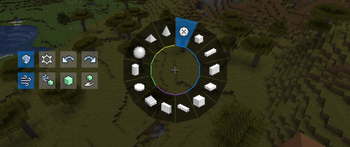
- Shape builder: Pick from lines, walls, floors, cubes, circles, cylinders, spheres, cones, pyramids, diagonals, slopes, and more.
- Terraforming (alpha): Terrain Mound mode sculpts hills, slopes, plateaus, mountains, or cliffs, with optional noise for natural edges. Marked alpha—expect tweaks.
- Mirrors & arrays: Mirror across axes, spin shapes around a center (radial mirror), or repeat with custom offsets.
- Smart replace modes: Air-only, blocks-only, both, or offhand-filtered; optional tile-entity protection and mini previews.
- Undo / redo: Mistakes are reversible.
- Material awareness: Live cost overlay and inventory checks prevent ghost builds.
Items
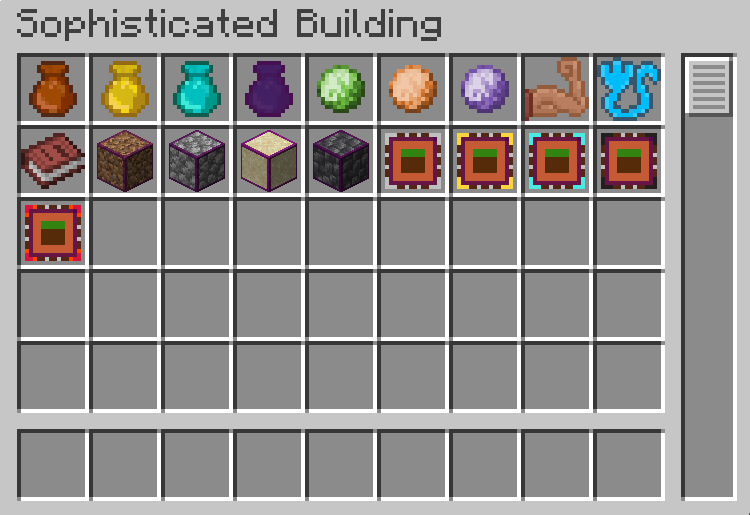
- Randomizer Bags (5 / 9 / 27 / 54 slots): store block templates and build with randomized picks from what you actually have. Omega bags support per-slot weights for biased randomness.
- Reach Upgrades: consume to extend your build reach (tiers 1–3).
- Compressed Blocks: crafting mats for the upgrade line.
- Building Upgrade (SophisticatedBackpacks): slot into a backpack to raise the max blocks you can place at once (tiers 1–4 and Omega). Only one building upgrade per backpack.
Build Modes (quick list)
- Single block, Line, Wall (solid/hollow), Floor (solid/outline), Cube (solid/hollow/skeleton), Circle/Cylinder (corner or center start; solid/ring), Sphere (solid/shell), Pyramid, Cone, Diagonal Line/Wall, Slope Floor, Terrain Mound (alpha).
Modifiers
- Mirror (X/Y/Z planes), Radial Mirror (slice around a pivot), Array (repeat with offsets). Stack them to multiply results.
Dependencies
- Works standalone. The Building Upgrade item needs SophisticatedBackpacks to function (otherwise it’s just a decorative placeholder). effortlessbuilding-sophisticated)
Attribution
- Original mod and concept: Effortless Building by Requios
- https://modrinth.com/mod/effortless-building
Available Versions
How to Install Effortless Building: Sophisticated on Your Server
Order Server
Order a Minecraft Java server with at least 3 GB RAM (4 GB recommended).
Set fabric Loader
In the panel under "Egg", select the fabric loader and matching Minecraft version (1.21.1).
Install Mod
Open the mod browser in the dashboard and search for "Effortless Building: Sophisticated". Click "Install" – done! Alternatively, upload the .jar via SFTP to the /mods folder.
Compatibility
Mod Loaders
Minecraft Versions
1.21.1
Server-side
✓ RequiredRecommended RAM
4 GB(min. 3 GB)Frequently Asked Questions
Effortless Building: Sophisticated server crashes on startup – what to do?
Most common cause: wrong fabric version or insufficient RAM. Check the server log (latest.log) for "OutOfMemoryError" or "Mixin" errors. With Mado Hosting: ensure at least 3 GB RAM is allocated and the loader matches the mod version (1.21.1). You can switch loaders with one click in the panel.
Is Effortless Building: Sophisticated compatible with fabric and neoforge?
Effortless Building: Sophisticated officially supports fabric, neoforge for Minecraft 1.21.1. The Mado dashboard automatically detects incompatible loader combinations.
Server lagging with Effortless Building: Sophisticated – how to optimize performance?
Recommended RAM: 4 GB (per 8 players). Use /spark profiler to check if Effortless Building: Sophisticated consumes the most tick time. Common fixes: reduce server view-distance to 8-10, install "performant" or "starlight" as supplementary mods on Forge. With Mado Hosting, your server runs on NVMe SSDs with dedicated CPU cores for minimal latency.
Similar Mods




Rent Modded Server
Install Effortless Building: Sophisticated with just one click on your server.