
Eggcat
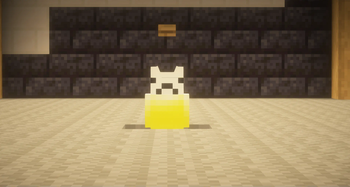
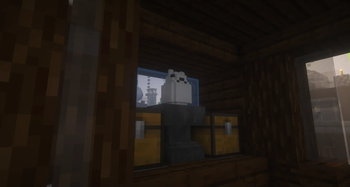
The Eggcat Mod is a simple Minecraft mod that adds a new decorative block to the game: the Eggcat. This block serves as a light source that can be turned on and off by clicking it.
Screenshots


About this Mod
Eggcat Mod
The Eggcat Mod is a simple Minecraft mod that adds a new decorative block to the game: the Eggcat. This block serves as
a light source that can be turned on and off by clicking it.
Getting Started
Prerequisites
To use the Eggcat Mod, you will need the following:
- Fabric Loader
- Fabric API
Installing
- Download and install Fabric Loader following the instructions on the Fabric website.
- Download the Eggcat Mod JAR file from the releases page.
- Move the JAR file to the
modsfolder in your Minecraft installation directory. - Launch Minecraft with the Fabric profile.
Crafting the Eggcat Block
Once you have installed the mod, you can find the Eggcat block in the creative inventory or craft it in a crafting table
like the pattern specified below:
   | |O| |
   |O|i|O|
   |O|O|O|

   O = Egg
   i = Redstone Torch
To turn the light on or off, simply right-click the block.
Source Code
The source code can be found on GitHub under
the CC-BY-NC 4.0 License. More information about the license can be
found under the License section.
License
The Eggcat Mod is released under the CC-BY-NC 4.0 License. This
license allows you to use, modify, and distribute the mod for non-commercial purposes, as long as you credit the
original author and include a copy of the license in any redistributed versions.
Bugs and Feedback
Bug reports can be submitted either through the GitHub Issues page of
the Eggcat Mod repository or by contacting me
personally over Discord (WinterWolfSV#9577). Please provide as much information as possible, including steps to
reproduce the
issue, error
messages, and any relevant screenshots or log files. Your feedback is greatly appreciated and will help improve the mod
for all users.
Available Versions
How to Install Eggcat on Your Server
Order Server
Order a Minecraft Java server with at least 3 GB RAM (4 GB recommended).
Set fabric Loader
In the panel under "Egg", select the fabric loader and matching Minecraft version (1.20).
Install Mod
Open the mod browser in the dashboard and search for "Eggcat". Click "Install" – done! Alternatively, upload the .jar via SFTP to the /mods folder.
Compatibility
Mod Loaders
Minecraft Versions
1.20, 1.20-pre7, 1.19.4 (+1 more)
Server-side
✓ RequiredRecommended RAM
4 GB(min. 3 GB)Frequently Asked Questions
Eggcat server crashes on startup – what to do?
Most common cause: wrong fabric version or insufficient RAM. Check the server log (latest.log) for "OutOfMemoryError" or "Mixin" errors. With Mado Hosting: ensure at least 3 GB RAM is allocated and the loader matches the mod version (1.20). You can switch loaders with one click in the panel.
Is Eggcat compatible with fabric?
Eggcat officially supports fabric for Minecraft 1.20, 1.20-pre7, 1.19.4. The Mado dashboard automatically detects incompatible loader combinations.
Server lagging with Eggcat – how to optimize performance?
Recommended RAM: 4 GB (per 8 players). Use /spark profiler to check if Eggcat consumes the most tick time. Common fixes: reduce server view-distance to 8-10, install "performant" or "starlight" as supplementary mods on Forge. With Mado Hosting, your server runs on NVMe SSDs with dedicated CPU cores for minimal latency.
Similar Mods

![[ETF] Entity Texture Features](https://cdn.modrinth.com/data/BVzZfTc1/af683d206d50b05258d865b0d6e4aa2f2cee12f2_96.webp)
![[EMF] Entity Model Features](https://cdn.modrinth.com/data/4I1XuqiY/6e5bbd0d06b1741bfdab6c0cfab6de8fdaf0064c_96.webp)



Rent Modded Server
Install Eggcat with just one click on your server.
Details
- License
- Creative Commons Attribution Non Commercial 4.0 International
- Server-side
- Required