
Entity ID Monitor
Monitors Minecraft Entity ID counter with a real-time HUD overlay showing creation rate, remaining IDs, and ETA to overflow. Includes tools for debugging entity creation and testing Entity ID Suppression.
Screenshots
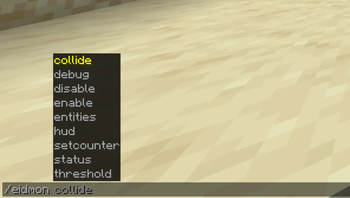

About this Mod
Entity ID Monitor (eidmon)
A Fabric mod that provides real-time visibility into Minecraft's internal Entity ID counter. Shows the current counter value, entity creation rate, and how far the counter is from a configurable threshold — with optional automation and debug tooling for players who need to work with the counter directly.
Overview
Every entity Minecraft spawned increments a single global integer: Entity.CURRENT_ID. For most players this number is invisible and irrelevant. For anyone investigating entity behavior, profiling spawn-heavy farms, or working on low-level entity research, it's the number that matters most — and the vanilla game gives you no "simple" way to see it.
eidmon makes it visible.
HUD
A persistent on-screen display showing:
- Counter — current value of the Entity ID counter
- Remaining — entities until the counter reaches your configured threshold
- Rate — entities created per second (wall-clock, unaffected by
/tick rate) - ETA — estimated time until threshold at current rate
- Mode —
[SERVER]or[SINGLEPLAYER] - Armed status —
[ARMED]or[DISARMED]
Color changes as the counter approaches the threshold:
- White — normal
- Yellow (pulsing) — within alert distance (default: 1,000,000 remaining)
- Red — within warning distance (default: 10,000 remaining), with a center-screen warning
Toggle with F9 (rebindable).
Commands
| Command | Description |
|---|---|
/eidmon status |
Show counter, rate, ETA, armed status, and sync mode |
/eidmon hud [on|off] |
Toggle HUD overlay |
/eidmon threshold <value> |
Set the entity ID value at which the trigger fires |
/eidmon enable / disable |
Arm or disarm the auto-trigger |
/eidmon entities list [type] |
List loaded entities by ID, optionally filtered by type |
/eidmon debug |
Toggle per-player logging of every server-side entity creation to chat |
/eidmon setcounter <value> |
Directly set the Entity ID counter — see warning |
/eidmon collide |
Set the counter so the next entity creation collides with the entity in your crosshair — see warning |
Auto-Trigger
When armed, the mod performs a right-click at the player's crosshair the moment the counter reaches the configured threshold. The trigger is opt-in and the mod operates fully without ever arming it.
/eidmon threshold <value>— set the target- Aim your crosshair at whatever should be clicked (e.g. a lever)
/eidmon enable— arm- The mod fires the click when the counter hits the threshold
A sound plays when entering alert range and when the trigger fires.
Server Sync
When installed on both client and server, the mod syncs the real Entity.CURRENT_ID value from the server to all connected clients each tick — so the counter you see is exact, not estimated.
If the server doesn't have the mod, the client falls back to estimating the counter from the highest entity ID it has observed. Monitoring still works, but setcounter, collide, and debug are unavailable.
Configuration
Available via Mod Menu (requires Cloth Config) or in config/eidmon.json:
| Setting | Default | Description |
|---|---|---|
| Enabled | true |
Master on/off |
| Show HUD | true |
HUD overlay |
| Threshold | 0 |
Entity ID value at which the auto-trigger fires |
| Alert Distance | 1,000,000 |
HUD turns yellow and plays a sound at this distance from threshold |
| Warning Distance | 10,000 |
Center-screen warning appears at this distance from threshold |
Installation
- Client + Server (recommended): install on both for exact counter values and full command support.
- Client only: works in singleplayer. On a dedicated server without the mod, the counter is estimated from observed entity IDs — monitoring works, but
setcounter,collide, anddebugare disabled.
Requires Fabric API. Optionally supports Cloth Config and Mod Menu for the settings screen.
Advanced Commands — Use At Your Own Risk
/eidmon setcounter and /eidmon collide directly manipulate the server's internal Entity ID counter. They require OP on servers and exist for testing and research into Entity ID Suppression.
If you don't know what Entity ID Suppression is, or what to expect from these commands, this mod is probably not for you. The monitoring and HUD features are completely safe — only setcounter and collide carry risk.
Misuse can cause:
- Entity ID collisions that crash the server
- Corrupted entity data that persists in saved chunks
- Worlds that become unloadable or irrecoverable
Always back up your world before experimenting. There is no undo.
On the Auto-Trigger
The arm/disarm auto-trigger exists to keep survival play mechanically vanilla. The mod never needs to touch server internals to use it — it simply watches the counter and simulates a right-click at the threshold, the same action a player would otherwise time by hand. setcounter and collide remain the escape hatch for testing and research, not the primary path.
Further Reading
What is Entity ID Suppression? That is out of scope for this description. If you wish to learn more, see Mikarific's channel — the person who first discovered and showcased it.
Available Versions
How to Install Entity ID Monitor on Your Server
Order Server
Order a Minecraft Java server with at least 3 GB RAM (4 GB recommended).
Set fabric Loader
In the panel under "Egg", select the fabric loader and matching Minecraft version (1.21.11).
Install Mod
Open the mod browser in the dashboard and search for "Entity ID Monitor". Click "Install" – done! Alternatively, upload the .jar via SFTP to the /mods folder.
Compatibility
Mod Loaders
Minecraft Versions
1.21.11
Server-side
✓ RequiredRecommended RAM
4 GB(min. 3 GB)Frequently Asked Questions
Entity ID Monitor server crashes on startup – what to do?
Most common cause: wrong fabric version or insufficient RAM. Check the server log (latest.log) for "OutOfMemoryError" or "Mixin" errors. With Mado Hosting: ensure at least 3 GB RAM is allocated and the loader matches the mod version (1.21.11). You can switch loaders with one click in the panel.
Is Entity ID Monitor compatible with fabric?
Entity ID Monitor officially supports fabric for Minecraft 1.21.11. The Mado dashboard automatically detects incompatible loader combinations.
Server lagging with Entity ID Monitor – how to optimize performance?
Recommended RAM: 4 GB (per 8 players). Use /spark profiler to check if Entity ID Monitor consumes the most tick time. Common fixes: reduce server view-distance to 8-10, install "performant" or "starlight" as supplementary mods on Forge. With Mado Hosting, your server runs on NVMe SSDs with dedicated CPU cores for minimal latency.
Similar Mods




![[ETF] Entity Texture Features](https://cdn.modrinth.com/data/BVzZfTc1/af683d206d50b05258d865b0d6e4aa2f2cee12f2_96.webp)
![[EMF] Entity Model Features](https://cdn.modrinth.com/data/4I1XuqiY/6e5bbd0d06b1741bfdab6c0cfab6de8fdaf0064c_96.webp)
Rent Modded Server
Install Entity ID Monitor with just one click on your server.