
Elytra Autopilot
This mod allows you to fly as far as you want to set locations without using rockets!
Screenshots

About this Mod
This is a fork of TheMegax's implementation of the mod. However, TheMegax quit the project. HumanoidSandvichDispenser and R4z0rX contributed to the 1.20 implementation. Many people were involved, so check the mod author list for a full list of contributors.
Here is the link to TheMegax's mod page: https://www.curseforge.com/minecraft/mc-mods/elytra-autopilot.
How to Use
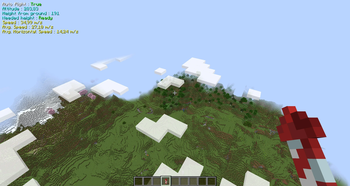
Press the assigned key (default "R") while flying at a sufficient altitude to enable 'Auto Flight'. In Auto Flight mode, the mod will adjust your pitch between ascending and descending, resulting in a net altitude gain.
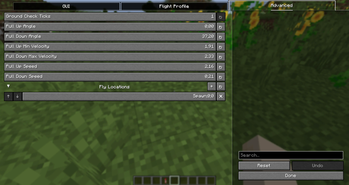
To open the config screen and enable Mod Menu, go into the mod menu and open the configuration screen there.
/flyto Command
Syntax: /flyto X Z or /flyto <name>
While flying, use this command to automatically fly to the specified coordinates. When near the destination, the mod will attempt to slow you down by circling around the target to avoid fall damage. You can disable this at any time by turning off Auto Flight or toggling the setting in the config.
/takeoff Command
Syntax: /takeoff or /takeoff X Z or /takeoff <name>
If you have an Elytra equipped and fireworks in either your main or off-hand, this command will launch you upwards to a configurable height (default: 180 blocks) before activating Auto Flight. If coordinates are provided, it will then use /flyto to navigate to the specified location automatically.
/flylocation Command
Syntax: /flylocation set <name> X Z or /flylocation remove <name>
Use this command to add or remove quick fly locations.
/land Command
Syntax: /land
While flying, use this command to force a landing at any time. Useful for quickly returning to the ground!
Risky Landing
Disabled by default but can be enabled in the config. When active, this setting modifies the landing behavior to a riskier approach, nosediving until the last moment before pulling up. Not recommended for laggy servers or clients!
Xaero Minimap Support
If you prefer not to use the built-in /flylocation command or are already managing waypoints with Xaero Minimap, good news! You can now use /flyto and /takeoff directly with your Xaero Minimap waypoints.
Auto equip elytra
There is an optional setting which you can enable that automatically switches your chestplate to your elytra when pressing spacebar in midair.
Available Versions
How to Install Elytra Autopilot on Your Server
Order Server
Order a Minecraft Java server with at least 3 GB RAM (4 GB recommended).
Set fabric Loader
In the panel under "Egg", select the fabric loader and matching Minecraft version (26.1.2).
Install Mod
Open the mod browser in the dashboard and search for "Elytra Autopilot". Click "Install" – done! Alternatively, upload the .jar via SFTP to the /mods folder.
Compatibility
Mod Loaders
Minecraft Versions
26.1.2, 26.1.1, 26.1 (+10 more)
Server-side
✗ UnsupportedRecommended RAM
4 GB(min. 3 GB)Frequently Asked Questions
Elytra Autopilot server crashes on startup – what to do?
Most common cause: wrong fabric version or insufficient RAM. Check the server log (latest.log) for "OutOfMemoryError" or "Mixin" errors. With Mado Hosting: ensure at least 3 GB RAM is allocated and the loader matches the mod version (26.1.2). You can switch loaders with one click in the panel.
Is Elytra Autopilot compatible with fabric?
Elytra Autopilot officially supports fabric for Minecraft 26.1.2, 26.1.1, 26.1. The Mado dashboard automatically detects incompatible loader combinations.
Server lagging with Elytra Autopilot – how to optimize performance?
Recommended RAM: 4 GB (per 8 players). Use /spark profiler to check if Elytra Autopilot consumes the most tick time. Common fixes: reduce server view-distance to 8-10, install "performant" or "starlight" as supplementary mods on Forge. With Mado Hosting, your server runs on NVMe SSDs with dedicated CPU cores for minimal latency.
Similar Mods




Rent Modded Server
Install Elytra Autopilot with just one click on your server.