
Elytra Cam
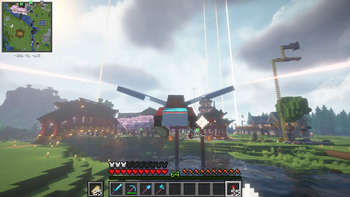
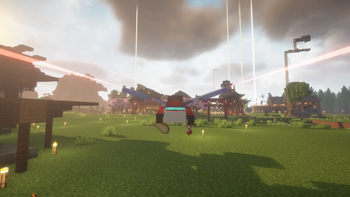
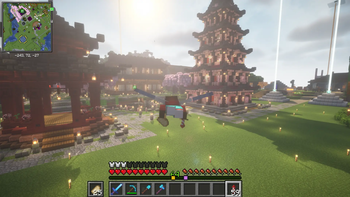
Cinematic camera transitions, dynamic camera roll, and warp-speed FOV for the ultimate elytra experience.
Screenshots
About this Mod

Mod Functionality
To be very honest, the vanilla Perspective switch is insanely janky and annoying. One frame you're in first person, and the next you're suddenly looking at your player in third person with zero transition.
This mod fixes that. It introduces an automatic camera shift smoothly whenever you use your elytra or firework rockets. Instead of that janky camera teleport, the camera smoothly zooms out to third person. When you land, it eases right back into your eyes. :P
Features
Smooth Camera Transition: The camera seamlessly scales its distance based on your config, creating a clean zoom-in and zoom-out transition.
Dynamic Camera Roll (Banking): When moving your screen while flying, the camera smoothly tilts and banks into the turn based on your rotation speed, and angle that you can customise.
Dynamic FOV Warp Speed: Firing a firework rocket gives you an epic warp-speed effect! Your FOV will smoothly expand for a brief burst of speed and gently ease back down when the rocket burn ends.
Independent Landing Speed: You can customise the landing zoom speed completely separate from the takeoff speed!
Smart Delays: Set a custom tick delay so the mod only triggers when you're actually committing to a long travel, so you can jump off a ledge without the camera instantly shifting on you!
Rocket-Only Trigger (Optional): Toggle an option to only shift into third-person after you fire your first firework rocket.
Persistent Flight Mode: If you use a rocket, the mod can be configured to keep you in third-person for the entire duration of the flight, even after the rocket burn ends. It only returns to first-person the moment your player hits the ground.
F5 Compatibility: If you manually press F5 to look around after the automatic camera shift has triggered, the automation backs off and lets you control your perspective manually as you would in Vanilla. But, if you cycle back to third-person while still in the air, the mod seamlessly takes the control again and handles your smooth landing!
Configuration
Everything is configurable. You can adjust the transition speeds (both takeoff and landing!), tweak the camera roll intensity and angle limits, change the trigger delays, and toggle the rocket behavior directly from the in-game config menu.
(Note: Make sure you have ModMenu and Cloth Config installed to access the settings screen!)
Available Versions
How to Install Elytra Cam on Your Server
Order Server
Order a Minecraft Java server with at least 3 GB RAM (4 GB recommended).
Set fabric Loader
In the panel under "Egg", select the fabric loader and matching Minecraft version (1.21.11).
Install Mod
Open the mod browser in the dashboard and search for "Elytra Cam". Click "Install" – done! Alternatively, upload the .jar via SFTP to the /mods folder.
Compatibility
Mod Loaders
Minecraft Versions
1.21.11, 1.21.10, 1.21.9 (+2 more)
Server-side
✗ UnsupportedRecommended RAM
4 GB(min. 3 GB)Frequently Asked Questions
Elytra Cam server crashes on startup – what to do?
Most common cause: wrong fabric version or insufficient RAM. Check the server log (latest.log) for "OutOfMemoryError" or "Mixin" errors. With Mado Hosting: ensure at least 3 GB RAM is allocated and the loader matches the mod version (1.21.11). You can switch loaders with one click in the panel.
Is Elytra Cam compatible with fabric?
Elytra Cam officially supports fabric for Minecraft 1.21.11, 1.21.10, 1.21.9. The Mado dashboard automatically detects incompatible loader combinations.
Server lagging with Elytra Cam – how to optimize performance?
Recommended RAM: 4 GB (per 8 players). Use /spark profiler to check if Elytra Cam consumes the most tick time. Common fixes: reduce server view-distance to 8-10, install "performant" or "starlight" as supplementary mods on Forge. With Mado Hosting, your server runs on NVMe SSDs with dedicated CPU cores for minimal latency.
Similar Mods




Rent Modded Server
Install Elytra Cam with just one click on your server.