
Elytra+
Adds various quality of life improvements around the Elytra. Including a dedicated inventory slot
Screenshots
About this Mod
ElytraPlus
A dedicated elytra slot — wear your wings and your chestplate — plus a full suite of flight tools, all in a clean in-game menu.
Slot an elytra in its own equipment slot (next to your armor) and glide while wearing a chestplate, then customize everything from the ElytraPlus screen. Open your inventory and click the ⚙ gear next to the elytra slot — or run /elytraplus — to explore all of it. Every feature below is toggleable in-game.
The dedicated slot
- A new equipment slot just for your elytra (or any glider) — fly while wearing a chestplate
- Works in the creative inventory too
- Auto-equip a picked-up elytra into the slot
- Render your wings from the slot on your back
- Slot-only gliding option (ignore a chest-worn elytra)
- Quick-swap keybind to move an elytra in/out of the slot
- Wear % display — on the slot and/or a draggable on-screen indicator, colour-coded green→red
Flight HUD & info
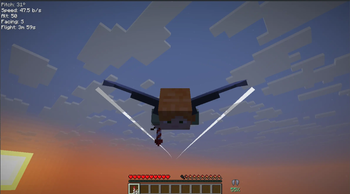
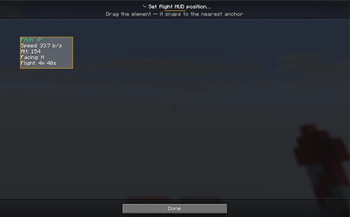
- In-flight HUD: pitch (with optimal-angle colouring), speed, altitude, heading, and estimated flight time — fully draggable
- Flight-time estimate in elytra tooltips
- Low-durability alert (HUD flash + optional chime) before your wings break
Particle trails (with a live editor)
- Stream a trail behind any gliding player — Particles, a solid swept Ribbon, or Both
- Presets (End Rod, Flame, Soul Flame, Cloud, Snowflake, Heart, Rainbow) or a custom colour picker; adjustable length, density, and thickness
- A two-pane editor with a live preview of your character: place emitters by dragging them onto body parts or wing tips — trails ride your actual animated wings in flight
Flight assists
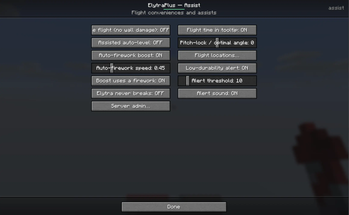
- Easy takeoff — launch into a glide from the ground (no cliff needed)
- Pitch-lock (hold) and auto-level autopilot
- Boost keybind (fire a rocket) and auto-firework when you slow down
- Safe flight — no more lethal wall-smack/kinetic damage
- Unbreakable elytra option
Fly-to autopilot & locations
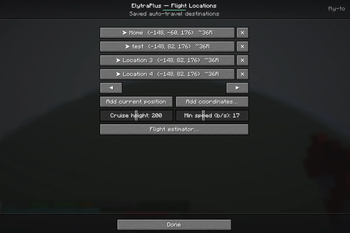
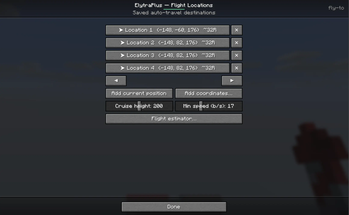
- Save flight locations; each shows its estimated rockets needed
- Click a location for a detail view (name it, see distance / rockets / elytra durability) and Go
- Auto-takeoff, rocket-powered cruise to a configurable cruise height and min speed, then a gentle no-rocket float-down landing
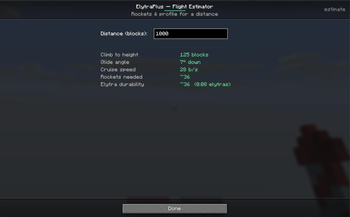
- Flight estimator tool — enter a distance to get the optimal height, angle, speed, rockets, and elytra usage
Server / operator controls
- A built-in Server Admin menu (operators only) to allow/disable each cheaty function server-wide — easy takeoff, fly-to, item-less boost, quick-swap, safe flight, unbreakable elytra
- All assists are opt-in; the cheaty ones are server-enforceable
Command & keybinds
/elytraplusopens the settings menu (handy if you can't reach the inventory button)- Keybinds are unbound by default (set them in Options → Controls → Gameplay): Takeoff, Firework boost, Quick-swap elytra, Pitch lock (hold), Toggle auto-level
Client vs. server
- Pure client-side (work on any server): flight HUD, tooltips, particle trails, pitch-lock/auto-level, alerts, all the menus.
- Gameplay features (the slot itself, takeoff, boost, quick-swap, safe-flight, never-breaks, fly-to): need ElytraPlus installed on the server too (or single-player). On a vanilla server, only the client cosmetics work.
Requirements
- Minecraft 26.1.2 · Fabric / Forge / NeoForge
- CodxLib (required, like Fabric API) — powers the UI, networking, config, and update checks
- Fabric API on Fabric
Short description
A dedicated elytra slot so you can glide while wearing a chestplate — plus a flight HUD, customizable trails with a live emitter editor, easy takeoff, fly-to autopilot with a rocket estimator, flight assists, and operator controls. Explore it all from the in-game menu. Fabric / Forge / NeoForge.
Available Versions
How to Install Elytra+ on Your Server
Order Server
Order a Minecraft Java server with at least 3 GB RAM (4 GB recommended).
Set fabric Loader
In the panel under "Egg", select the fabric loader and matching Minecraft version (26.1.2).
Install Mod
Open the mod browser in the dashboard and search for "Elytra+". Click "Install" – done! Alternatively, upload the .jar via SFTP to the /mods folder.
Compatibility
Mod Loaders
Minecraft Versions
26.1.2, 26.1.1, 26.1
Server-side
~ OptionalRecommended RAM
4 GB(min. 3 GB)Frequently Asked Questions
Elytra+ server crashes on startup – what to do?
Most common cause: wrong fabric version or insufficient RAM. Check the server log (latest.log) for "OutOfMemoryError" or "Mixin" errors. With Mado Hosting: ensure at least 3 GB RAM is allocated and the loader matches the mod version (26.1.2). You can switch loaders with one click in the panel.
Is Elytra+ compatible with fabric and forge and neoforge?
Elytra+ officially supports fabric, forge, neoforge for Minecraft 26.1.2, 26.1.1, 26.1. Note: Forge and Fabric mods are NOT cross-compatible – pick one loader and stick with it. The Mado dashboard automatically detects incompatible loader combinations.
Server lagging with Elytra+ – how to optimize performance?
Recommended RAM: 4 GB (per 8 players). Use /spark profiler to check if Elytra+ consumes the most tick time. Common fixes: reduce server view-distance to 8-10, install "performant" or "starlight" as supplementary mods on Forge. With Mado Hosting, your server runs on NVMe SSDs with dedicated CPU cores for minimal latency.
Similar Mods




Rent Modded Server
Install Elytra+ with just one click on your server.
Details
- License
- Creative Commons Attribution Non Commercial No Derivatives 4.0 International
- Server-side
- Optional