
ElytraWarn
A blinking banner and alert sound when your elytra drops below 10% durability while gliding, so you don't lose your wings mid-flight. Toggle with Y.
Screenshots
About this Mod
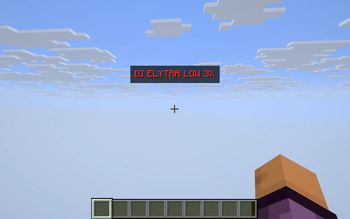
ElytraWarn watches your elytra only when it matters: while you're actually gliding. The instant your equipped elytra's remaining durability falls below 10%, a red [!] ELYTRA LOW x% banner blinks in the upper-center of your screen and a short alert sound plays — repeating every few seconds while you stay in the danger zone — so you can land or swap before your wings break in the air.
What it does
- Only warns while gliding. No nagging on the ground, no banner when the elytra is fine — the alert appears exactly when a break would actually drop you out of the sky.
- Blinking banner + sound. The flashing red text is hard to miss in your peripheral vision, and the audio cue catches you even if your eyes are on the horizon.
- Live percentage. The banner shows the remaining durability so you know how much margin you have left.
- Auto-resets. Repair or swap to a fresh elytra and the warning clears itself.
Why it's different
The vanilla durability bar is a tiny sliver at the bottom of the hotbar — useless when you're cruising at altitude. ElytraWarn ties the alert to the gliding state, so it speaks up precisely when a break means a long fall.
How it works
- Reads
getDamage()/getMaxDamage()on your chest-slot elytra and checksisGliding()every client tick — no mixins, no packets, no server component. - Drawn via Fabric's
HudRenderCallback, so it respects F1 (hide HUD) and pauses/screens automatically.
Controls
- Y — toggle the warning on / off (default: on).
Compatibility
Works on Minecraft 1.21.8, 1.21.9, 1.21.10, and 1.21.11 (Fabric Loader 0.16+). One JAR for all four versions — install alongside Fabric API. Pure client-side; zero config.
Available Versions
How to Install ElytraWarn on Your Server
Order Server
Order a Minecraft Java server with at least 3 GB RAM (4 GB recommended).
Set fabric Loader
In the panel under "Egg", select the fabric loader and matching Minecraft version (1.21.11).
Install Mod
Open the mod browser in the dashboard and search for "ElytraWarn". Click "Install" – done! Alternatively, upload the .jar via SFTP to the /mods folder.
Compatibility
Mod Loaders
Minecraft Versions
1.21.11, 1.21.10, 1.21.9 (+1 more)
Server-side
✗ UnsupportedRecommended RAM
4 GB(min. 3 GB)Frequently Asked Questions
ElytraWarn server crashes on startup – what to do?
Most common cause: wrong fabric version or insufficient RAM. Check the server log (latest.log) for "OutOfMemoryError" or "Mixin" errors. With Mado Hosting: ensure at least 3 GB RAM is allocated and the loader matches the mod version (1.21.11). You can switch loaders with one click in the panel.
Is ElytraWarn compatible with fabric?
ElytraWarn officially supports fabric for Minecraft 1.21.11, 1.21.10, 1.21.9. The Mado dashboard automatically detects incompatible loader combinations.
Server lagging with ElytraWarn – how to optimize performance?
Recommended RAM: 4 GB (per 8 players). Use /spark profiler to check if ElytraWarn consumes the most tick time. Common fixes: reduce server view-distance to 8-10, install "performant" or "starlight" as supplementary mods on Forge. With Mado Hosting, your server runs on NVMe SSDs with dedicated CPU cores for minimal latency.
Similar Mods




![[ETF] Entity Texture Features](https://cdn.modrinth.com/data/BVzZfTc1/af683d206d50b05258d865b0d6e4aa2f2cee12f2_96.webp)
![[EMF] Entity Model Features](https://cdn.modrinth.com/data/4I1XuqiY/6e5bbd0d06b1741bfdab6c0cfab6de8fdaf0064c_96.webp)
Rent Modded Server
Install ElytraWarn with just one click on your server.