
emberborn
A Fabric mod inspired by Brandon Sanderson’s Mistborn saga, adding Embercraft — a magic system powered by ingesting and “burning” metals.
Screenshots
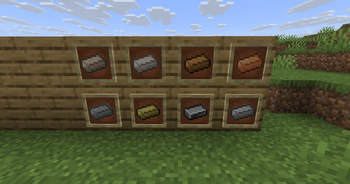

About this Mod
🔥 Emberborn — A Mistborn-Inspired Magic Mod
Emberborn is a Fabric mod for Minecraft 1.21.8 that adds a powerful metal-based magic system inspired by Brandon Sanderson’s Mistborn series.
⚠️ Fan Project Notice: This is an unofficial mod. It is not affiliated with or endorsed by Brandon Sanderson or Dragonsteel Entertainment.
✨ Features
Harness the powers of Allomancy by consuming special metal vials:
🧪 8 Burnable Metals:
Currently implimented:
- 🔹 Tin – Enhanced senses
- 🔸 Pewter – Super strength and durability
To be added:
- 🔩 Steel – Push yourself or metal objects
- 🧲 Iron – Pull yourself toward metal
- 🧠 Zinc – Agitate mobs
- 💨 Brass – Soothe hostile mobs
- 🕵️ Copper – Hide your powers
- 🔔 Bronze – Detect other magic users
Additional Features:
- 🧪 Custom Metal Vials: Right-click to consume and activate powers
- 📦 Dedicated Creative Tab for easy access to mod items
🛠️ Installation
- Install Fabric Loader for Minecraft 1.21.8
- Install Fabric API
- Download this mod’s
.jarfile - Place it into your
mods/folder - Launch Minecraft and enjoy!
💬 Community & Contributions
Feedback, feature suggestions, and pull requests are always welcome! If you're a fan of Mistborn or Minecraft magic mods, this is your chance to help shape a unique experience.
📜 License
Licensed under the MIT License.
🔗 Links
⚠️ Legal Disclaimer
This is a fan-made mod inspired by Mistborn. No official Cosmere names, lore, or assets are used without permission. If permission is granted, those elements will be clearly attributed.
Available Versions
How to Install emberborn on Your Server
Order Server
Order a Minecraft Java server with at least 3 GB RAM (4 GB recommended).
Set fabric Loader
In the panel under "Egg", select the fabric loader and matching Minecraft version (1.21.8).
Install Mod
Open the mod browser in the dashboard and search for "emberborn". Click "Install" – done! Alternatively, upload the .jar via SFTP to the /mods folder.
Compatibility
Mod Loaders
Minecraft Versions
1.21.8
Server-side
✓ RequiredRecommended RAM
4 GB(min. 3 GB)Frequently Asked Questions
emberborn server crashes on startup – what to do?
Most common cause: wrong fabric version or insufficient RAM. Check the server log (latest.log) for "OutOfMemoryError" or "Mixin" errors. With Mado Hosting: ensure at least 3 GB RAM is allocated and the loader matches the mod version (1.21.8). You can switch loaders with one click in the panel.
Is emberborn compatible with fabric?
emberborn officially supports fabric for Minecraft 1.21.8. The Mado dashboard automatically detects incompatible loader combinations.
Server lagging with emberborn – how to optimize performance?
Recommended RAM: 4 GB (per 8 players). Use /spark profiler to check if emberborn consumes the most tick time. Common fixes: reduce server view-distance to 8-10, install "performant" or "starlight" as supplementary mods on Forge. With Mado Hosting, your server runs on NVMe SSDs with dedicated CPU cores for minimal latency.
Similar Mods





Rent Modded Server
Install emberborn with just one click on your server.