
EarthMC Essentials
A fabric mod designed for EarthMC that provides info on people, places and more.
Screenshots
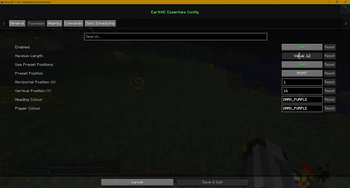
About this Mod
EarthMC Essentials


A fabric mod designed for EarthMC that provides info on people, places and more.
Features
Commands
Alliance(s)
/alliance <name>- Displays info on the specified alliance./alliance top- Displays the top 10 alliances and their stats.
News
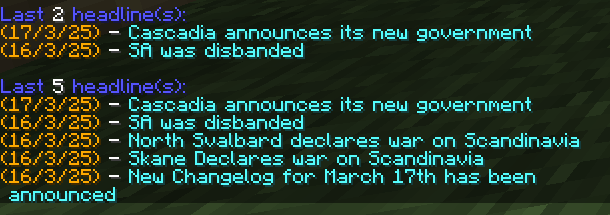
/news latest- Displays the most recent headline and the date it was reported./news summary- Displays the last 15 headlines with their respective date reported./news <amount>- Displays a custom amount of news headlines and their dates.
Route
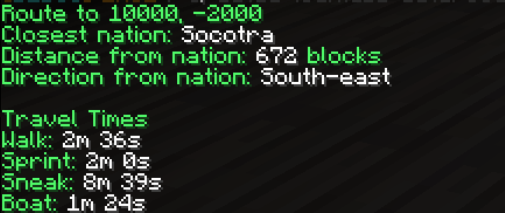
All of the following commands display the closest nation distance, direction and travel times from itself to the coords. There is currently no information that displays the direct route to avoid teleporting (maybe in future).
/route <x> <z>- Get a route to the specified coords. Nearest nation capital must be public and can be PVP enabled./route fastest <x> <z>- Get a route to the specified coords. Nearest nation capital can be private and have PVP enabled./route safest <x> <z>- Get a route to the specified coords. Nearest nation capital must be public and have PVP disabled./route self- Get a route to your own coords so you can tell others how to get to you.
Misc
/nether <x> <z>- Quickly convert overworld coordinates into their nether counterpart.
On-Screen Info
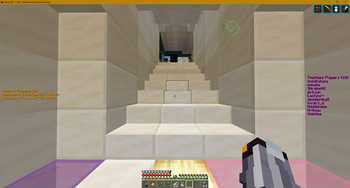
- Townless - Show a list of online townless players and their (optional) coords.
- Nearby - See anyone whose close to you without checking the map! Configurable options include: radius, rank and distance.
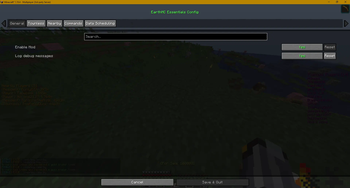
Config screen (F4)
- API Intervals - Set the rate at which you want data to be updated.
- Data - Toggle on/off, screen x/y position, text colors, radius and more.
Installation
- Download the latest release.
- If you haven't already, download the Fabric Loader and API via this guide.
- Make sure you also have the correct Fabric API for your MC version.
- Make sure that you have both EMCE and the Fabric API jars inside
%AppData%/Roaming/.minecraft/mods/and launch the game!
FAQ
Why am I crashing on startup?
I recommend you use the latest EMCE version, with
Fabric API 0.118.0andFabric Loader 0.16.10, delete the fileemc-essentials.jsonin your config folder and reboot MC. It is also worth checking the output log since some mods may conflict with EMCE.
Client or Server?
Everything in this mod is ran on the client-side and the only data sources are the Official API, Squaremap (via
the purpose-made EMC-Wrapper library) with news and alliances being acquired from the toolkit API.
Is there a Forge version?
Not right now. There may be a re-write using the Architectuary API, but this won't be any time soon.
Can I use OptiFine?
Yes, but you will need to install OptiFabric in addition.
How can I register an alliance?
Head to our Discord and provide your alliance's info in the appropriate channel.
Support
If you have a problem that the FAQ does not address, you can reach us at our discord.
If you encounter a bug, report it in the #mod-bugs channel in our discord above, or create a new issue.
Available Versions
How to Install EarthMC Essentials on Your Server
Order Server
Order a Minecraft Java server with at least 3 GB RAM (4 GB recommended).
Set fabric Loader
In the panel under "Egg", select the fabric loader and matching Minecraft version (1.19.4).
Install Mod
Open the mod browser in the dashboard and search for "EarthMC Essentials". Click "Install" – done! Alternatively, upload the .jar via SFTP to the /mods folder.
Compatibility
Mod Loaders
Minecraft Versions
1.19.4, 1.19.3
Server-side
✗ UnsupportedRecommended RAM
4 GB(min. 3 GB)Frequently Asked Questions
EarthMC Essentials server crashes on startup – what to do?
Most common cause: wrong fabric version or insufficient RAM. Check the server log (latest.log) for "OutOfMemoryError" or "Mixin" errors. With Mado Hosting: ensure at least 3 GB RAM is allocated and the loader matches the mod version (1.19.4). You can switch loaders with one click in the panel.
Is EarthMC Essentials compatible with fabric?
EarthMC Essentials officially supports fabric for Minecraft 1.19.4, 1.19.3. The Mado dashboard automatically detects incompatible loader combinations.
Server lagging with EarthMC Essentials – how to optimize performance?
Recommended RAM: 4 GB (per 8 players). Use /spark profiler to check if EarthMC Essentials consumes the most tick time. Common fixes: reduce server view-distance to 8-10, install "performant" or "starlight" as supplementary mods on Forge. With Mado Hosting, your server runs on NVMe SSDs with dedicated CPU cores for minimal latency.
Similar Mods




![[ETF] Entity Texture Features](https://cdn.modrinth.com/data/BVzZfTc1/af683d206d50b05258d865b0d6e4aa2f2cee12f2_96.webp)
![[EMF] Entity Model Features](https://cdn.modrinth.com/data/4I1XuqiY/6e5bbd0d06b1741bfdab6c0cfab6de8fdaf0064c_96.webp)
Rent Modded Server
Install EarthMC Essentials with just one click on your server.