
EarthMC Map Addon
Xaero's minimap extension that is built for EarthMC.
Screenshots
About this Mod
EarthMC Map Addon
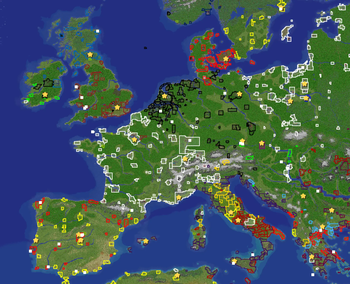
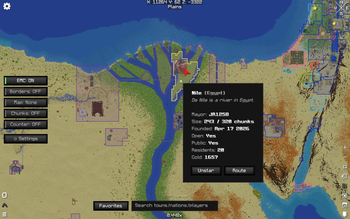
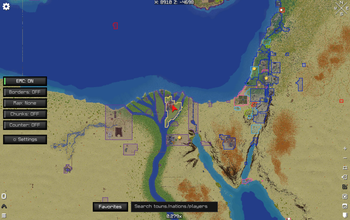
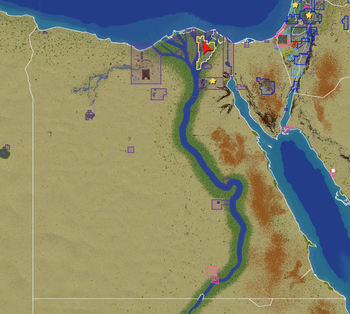
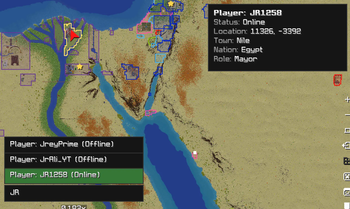
A client-side EarthMC map extension for Xaero's World Map and Xaero's Minimap. It overlays EarthMC Towny data directly onto your in-game maps so you can read towns, nations, players, borders, and claims without leaving Minecraft.
Highlights
- Town claims on the World Map with configurable border thickness and fill opacity, plus an optional Squaremap background layer.
- Info panel under the minimap — your current town & nation, nearby players with live distance (players who leave view linger in red at their last-known spot), and the nearest town when you're in the wilderness. Every line is individually toggleable and stacks below Xaero's own info without overlapping.
- Right-click town info — mayor, nation, residents (including how many are inactive), gold, claimed chunk count, open/public status, and founded date.
- Search for towns, nations, and players from the map UI, with rich detail panels (nation bonus, king/capital, outlaws, enemies; player online/last-seen/town/nation/role).
- Online player dots on both maps, coloured by relation (your town, your nation, others), with configurable name and label ranges.
- Minimap overlays — town borders, town names, player dots, chunk-grid options, nation capital stars, and a wilderness player alert for nearby outsiders. Direction markers match your chosen Xaero frame colour.
- Persistent multi-group chunk counter with right-click drag selection for planning claims or regions — now clipped cleanly to the circular minimap.
- Town status map modes — public towns, open towns, towns for sale, and towns without nations.
- Real-world country/state border overlays and optional RGB/custom-colour highlighting.
- Favourite towns, Xaero waypoint routes to map targets, and optional hiding of the minimap in the Nether.
- Searchable, sectioned settings screen (via Mod Menu) with per-row Reset and right-click-to-go-back.
- EarthMC-only mode so the addon only activates on EarthMC, plus
/townymapcommands for quick toggles and manual claim refresh.
Requirements
- Fabric Loader + Fabric API
- Xaero's Minimap and/or Xaero's World Map
- Mod Menu (optional, for the in-game settings screen)
Note on town claim limits
The town "X / max claims" display and the Overclaim map mode are temporarily disabled. EarthMC's API currently counts inactive residents toward a town's claim limit, so the calculated maximum is wrong. They will return once the API exposes active-resident counts (expected in ~2 weeks). The popup shows the actual claimed chunk count in the meantime.
Available Versions
How to Install EarthMC Map Addon on Your Server
Order Server
Order a Minecraft Java server with at least 3 GB RAM (4 GB recommended).
Set fabric Loader
In the panel under "Egg", select the fabric loader and matching Minecraft version (26.1.2).
Install Mod
Open the mod browser in the dashboard and search for "EarthMC Map Addon". Click "Install" – done! Alternatively, upload the .jar via SFTP to the /mods folder.
Compatibility
Mod Loaders
Minecraft Versions
26.1.2, 26.1.1, 26.1 (+1 more)
Server-side
✗ UnsupportedRecommended RAM
4 GB(min. 3 GB)Frequently Asked Questions
EarthMC Map Addon server crashes on startup – what to do?
Most common cause: wrong fabric version or insufficient RAM. Check the server log (latest.log) for "OutOfMemoryError" or "Mixin" errors. With Mado Hosting: ensure at least 3 GB RAM is allocated and the loader matches the mod version (26.1.2). You can switch loaders with one click in the panel.
Is EarthMC Map Addon compatible with fabric?
EarthMC Map Addon officially supports fabric for Minecraft 26.1.2, 26.1.1, 26.1. The Mado dashboard automatically detects incompatible loader combinations.
Server lagging with EarthMC Map Addon – how to optimize performance?
Recommended RAM: 4 GB (per 8 players). Use /spark profiler to check if EarthMC Map Addon consumes the most tick time. Common fixes: reduce server view-distance to 8-10, install "performant" or "starlight" as supplementary mods on Forge. With Mado Hosting, your server runs on NVMe SSDs with dedicated CPU cores for minimal latency.
Similar Mods




Rent Modded Server
Install EarthMC Map Addon with just one click on your server.