Enbeon's Custom Books
Yet another mod that gives Enchanted Books unique textures based on the enchantments they have.
Screenshots

About this Mod
Enbeon's Custom Books
Yet another Minecraft mod that gives Enchanted Books unique textures based on the enchantments they have.
Compatible with Fabric and Quilt. Sorry if you run Forge or NeoForge!
This mod is compatible with 1.21.4+. I probably won't backport unless there's demand for it.
Preamble
This mod is the product of wanting a solution to component-controlled textures for Enchanted Books,
when CIT is unavailable and Mojang's vanilla solution is infeasible.
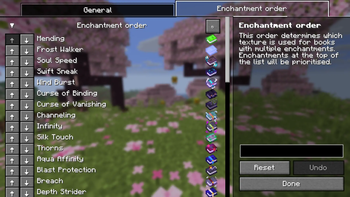
Enbeon's Custom Books uses a precedence-based system to decide which texture is used for books with multiple enchantments.
I've provided what I feel is a sensible default order, with rarer enchantments taking priority over more common ones
(for example, Mending has the highest priority, while Sharpness has the lowest).
The order is also fully configurable in the mod config.
I took inspiration from Even Better Enchants for some of the textures in this mod.
Dependencies
Fabric API is required to run this mod.
Additionally, to access the in-game config screen, you will need:
Textures
See the gallery for all of the book textures.
The animation for the Mending book texture can be disabled in the in-game config.
Language support
As of v1.0.4, Enbeon's Custom Books supports:
- English
- Simplified Chinese (thanks moqyng!)
Mod compatibility
If you find this mod useful and want me to add modded enchantments to it, feel free to create an issue or pull request.
I'm also happy to accept pull requests to add support for new languages.
Special thanks
This project uses the Stonecutter build tool, which allows compiling a single codebase to multiple different game versions.
Available Versions
How to Install Enbeon's Custom Books on Your Server
Order Server
Order a Minecraft Java server with at least 3 GB RAM (4 GB recommended).
Set fabric Loader
In the panel under "Egg", select the fabric loader and matching Minecraft version (26.1.2).
Install Mod
Open the mod browser in the dashboard and search for "Enbeon's Custom Books". Click "Install" – done! Alternatively, upload the .jar via SFTP to the /mods folder.
Compatibility
Mod Loaders
Minecraft Versions
26.1.2, 26.1.1, 26.1 (+23 more)
Server-side
✗ UnsupportedRecommended RAM
4 GB(min. 3 GB)Frequently Asked Questions
Enbeon's Custom Books server crashes on startup – what to do?
Most common cause: wrong fabric version or insufficient RAM. Check the server log (latest.log) for "OutOfMemoryError" or "Mixin" errors. With Mado Hosting: ensure at least 3 GB RAM is allocated and the loader matches the mod version (26.1.2). You can switch loaders with one click in the panel.
Is Enbeon's Custom Books compatible with fabric and quilt?
Enbeon's Custom Books officially supports fabric, quilt for Minecraft 26.1.2, 26.1.1, 26.1. The Mado dashboard automatically detects incompatible loader combinations.
Server lagging with Enbeon's Custom Books – how to optimize performance?
Recommended RAM: 4 GB (per 8 players). Use /spark profiler to check if Enbeon's Custom Books consumes the most tick time. Common fixes: reduce server view-distance to 8-10, install "performant" or "starlight" as supplementary mods on Forge. With Mado Hosting, your server runs on NVMe SSDs with dedicated CPU cores for minimal latency.
Similar Mods




![[ETF] Entity Texture Features](https://cdn.modrinth.com/data/BVzZfTc1/af683d206d50b05258d865b0d6e4aa2f2cee12f2_96.webp)
![[EMF] Entity Model Features](https://cdn.modrinth.com/data/4I1XuqiY/6e5bbd0d06b1741bfdab6c0cfab6de8fdaf0064c_96.webp)
Rent Modded Server
Install Enbeon's Custom Books with just one click on your server.