
Enchant Calculator
Find the cheapest way to combine enchantments on your items
Screenshots




About this Mod
Enchant Calculator

Find the cheapest way to combine enchantments. This mod calculates the optimal order to avoid wasting levels and hitting "too expensive" errors.
This mod is heavily inspired by the Enchantment Calculator mod created by FanyaOff. All credit goes to them for the original concept and design.
Overview
Enchant Calculator is a client-side mod that solves one of Minecraft's most annoying problems: combining multiple enchantments without wasting experience levels or hitting the anvil's "too expensive" limit.
When you place an item in an anvil, the mod automatically shows you exactly how to combine your enchantments in the most efficient order. No more guessing, no more wasted levels, and no more frustration.
Yes, i know the icon is AI, i suck at design..
How to Use
Step 1: Place your item in an anvil
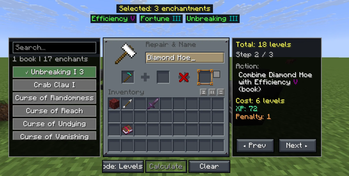
Two panels appear on the sides of your screen.
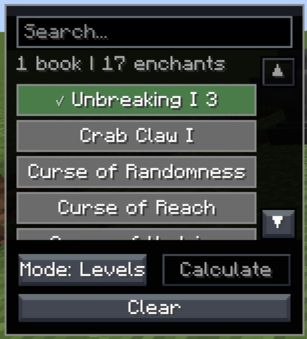
Step 2: Select enchantments from the left panel
The left panel displays all available enchantments you can add to your item. If you have enchanted books in your inventory, the mod shows which ones you have. Pick the enchantments you want and set their levels.
Step 3: Click Calculate
The mod instantly analyzes hundreds or thousands of possible combination orders to find the best one.
Step 4: Follow the steps
The right panel shows you the exact order to combine your items. Each step tells you what to put in the anvil and where. Use the arrow buttons to move between steps.
Optimization Modes
The mod offers three different ways to calculate the best order:
Levels Mode - Minimizes the total number of experience levels you spend. This is what most players want and is the default mode.
XP Mode - Minimizes the total experience points instead of levels. Because higher levels cost more XP per level, this mode sometimes gives different results than Levels mode.
Work Mode - Focuses on avoiding the "too expensive" error. When you want to add many enchantments to one item, the anvil can refuse to work because the cost is over 39 levels. This mode finds combinations that stay under the limit.
Switch between modes using the mode button. The mod recalculates instantly when you change modes.
Features
- Works with any enchantment in the game, including those from other mods
- Automatically detects enchanted books in your inventory
- Shows step by step instructions
- Tests all possible combination orders
- Three optimization modes
- Client-sided
- Responsive GUI that adapts to different GUI scales
GUI Scale Compatibility
The mod's interface should adapt to different GUI scales:
GUI Scale x4 and Below:
GUI Scale x5+:
Technical Details
The mod uses a smart algorithm to find the optimal combination order. For each set of enchantments you select, it generates all possible ways to combine them, calculates the cost for each way, and picks the cheapest one.
The algorithm accounts for:
- Enchantment rarity and level costs
- Prior work penalties from previous anvil uses
- The order items are placed in the anvil (left vs right slot)
- Compatibility between different enchantments (custom enchantment mods)
This means you always get the mathematically best solution for your chosen mode.
Requirements
Minecraft 1.21.8
Fabric Loader
Fabric API
Compatibility
Works with Minecraft 1.21.8 on Fabric. Requires Fabric API.
Available Versions
How to Install Enchant Calculator on Your Server
Order Server
Order a Minecraft Java server with at least 3 GB RAM (4 GB recommended).
Set fabric Loader
In the panel under "Egg", select the fabric loader and matching Minecraft version (1.21.8).
Install Mod
Open the mod browser in the dashboard and search for "Enchant Calculator". Click "Install" – done! Alternatively, upload the .jar via SFTP to the /mods folder.
Compatibility
Mod Loaders
Minecraft Versions
1.21.8
Server-side
✗ UnsupportedRecommended RAM
4 GB(min. 3 GB)Frequently Asked Questions
Enchant Calculator server crashes on startup – what to do?
Most common cause: wrong fabric version or insufficient RAM. Check the server log (latest.log) for "OutOfMemoryError" or "Mixin" errors. With Mado Hosting: ensure at least 3 GB RAM is allocated and the loader matches the mod version (1.21.8). You can switch loaders with one click in the panel.
Is Enchant Calculator compatible with fabric?
Enchant Calculator officially supports fabric for Minecraft 1.21.8. The Mado dashboard automatically detects incompatible loader combinations.
Server lagging with Enchant Calculator – how to optimize performance?
Recommended RAM: 4 GB (per 8 players). Use /spark profiler to check if Enchant Calculator consumes the most tick time. Common fixes: reduce server view-distance to 8-10, install "performant" or "starlight" as supplementary mods on Forge. With Mado Hosting, your server runs on NVMe SSDs with dedicated CPU cores for minimal latency.
Similar Mods




![[ETF] Entity Texture Features](https://cdn.modrinth.com/data/BVzZfTc1/af683d206d50b05258d865b0d6e4aa2f2cee12f2_96.webp)
![[EMF] Entity Model Features](https://cdn.modrinth.com/data/4I1XuqiY/6e5bbd0d06b1741bfdab6c0cfab6de8fdaf0064c_96.webp)
Rent Modded Server
Install Enchant Calculator with just one click on your server.