
Enchantment Custom Table
A Minecraft block allowing players to customize enchantments on items freely.
Screenshots
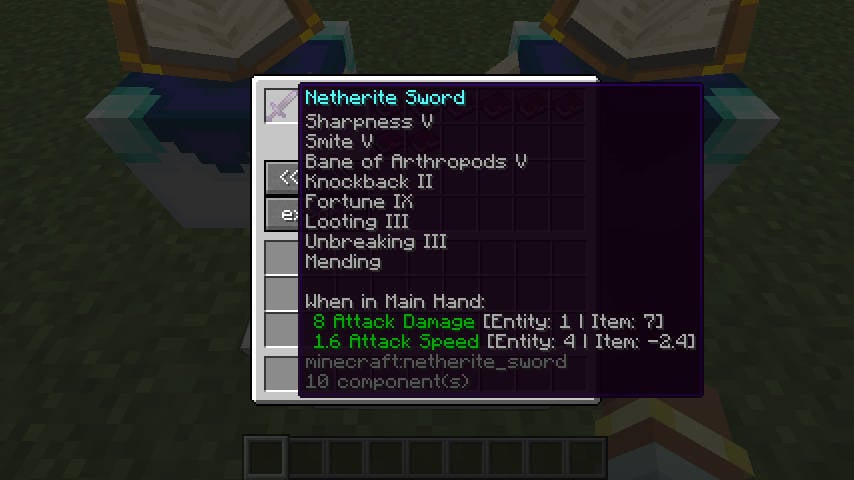
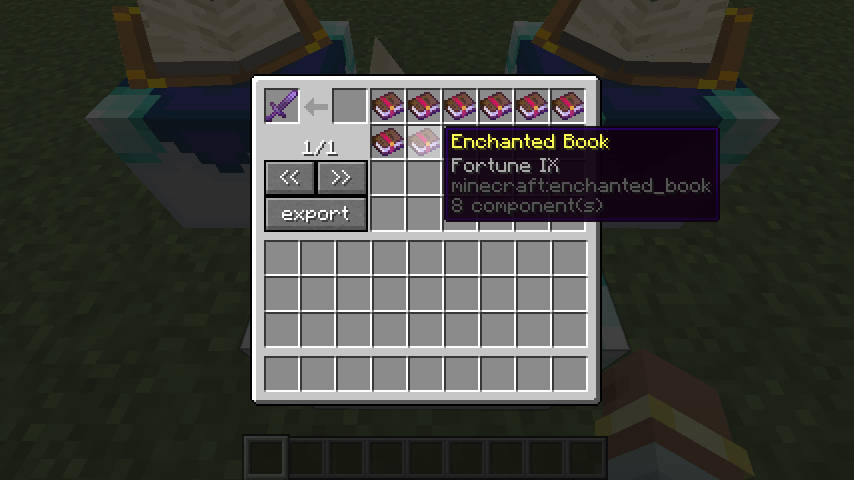
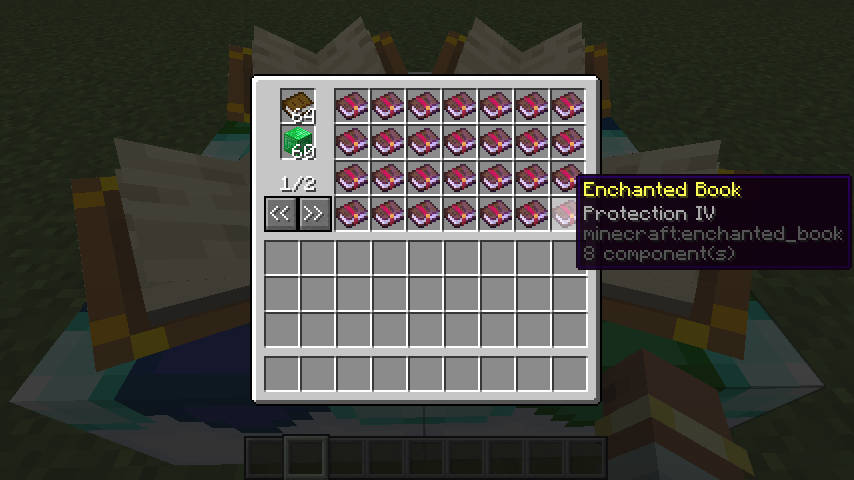
About this Mod
Enchantment Custom Table
Tired of grinding the vanilla enchanting table, building libraries, and hoarding XP just to land the enchantments you actually want? This mod gives you two new workstations that let you rearrange enchantments as freely as you sort your inventory.
- Enchanting Custom Table lets you "mod" the enchantments on a tool or enchanted book directly — add one, remove one, split a high-level enchantment into lower ones, or merge two matching books into something stronger.
- Enchantment Conversion Table turns plain books plus a few emeralds into the enchanted books you want — and can even "photocopy" an exact duplicate of a book you give it.
Out of the box, this mod is intentionally generous and easy to play with. If you (or a modpack you're building) want something more balanced and challenging, you can flip on a few stricter switches in the config — more on that below.
Grab a release from CurseForge or Modrinth. Found a bug or have an idea? Let us know on GitHub Issues.
Supported Versions
There are builds for both the NeoForge and Fabric loaders, covering Minecraft 1.21.1 through 1.21.11, plus 26.1, 26.1.1, and 26.1.2, also legacy 1.20.1.
Tip: when you download, make sure two things line up — your loader (NeoForge or Fabric) and your Minecraft version. Both have to match the jar, or the game won't load it.
Enchanting Custom Table: rearrange your enchantments
 !
!
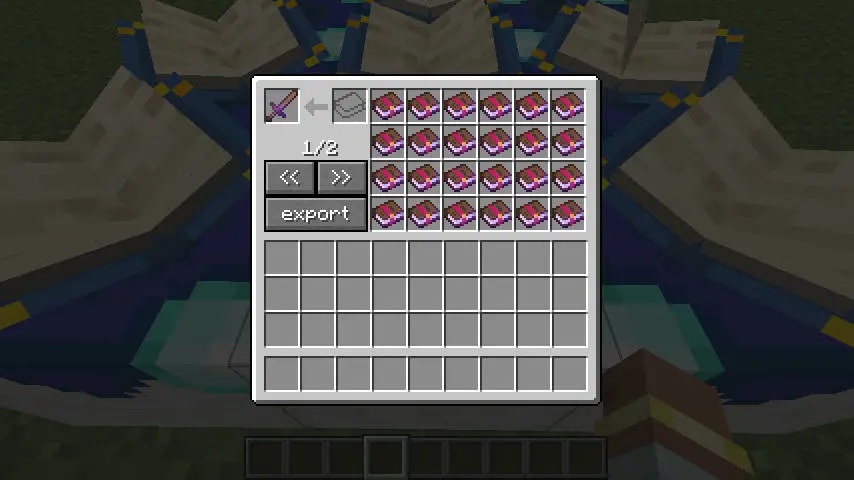
Drop a tool or an enchanted book into the top-left slot, and the table lays out every enchantment on it as a separate enchanted book on the right. From there you can:
- Want to remove an enchantment? Just take that book from the right side — the matching enchantment comes off the item.
- Want to add one? Put an enchanted book in the input slot, or into any empty slot on the right, and it gets applied to the item.
- Want to strengthen an enchantment you already have? Stack a book onto the matching one on the right and the two merge together.
- Want to break a high-level book apart? Put a book that holds a single enchantment into the top-left slot, and it splits into a few lower-level books to choose from.
- Want to clear everything at once? Hit the export button — all enchantments come off the item and are bundled into a single enchanted book for you.
By default, two of the same enchantment add their levels together when merged. So Sharpness IV + Sharpness IV becomes Sharpness VIII. (If that feels too strong, the stricter config options below can rein it in.)
Enchantment Conversion Table: trade plain books for enchanted ones
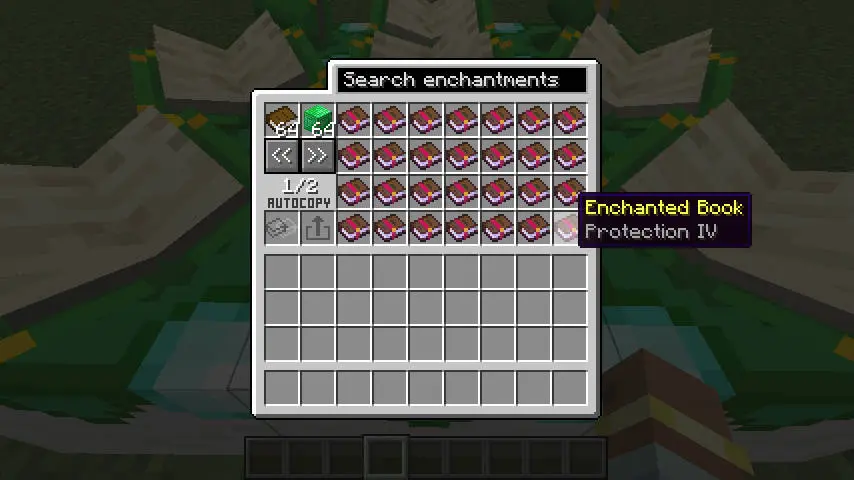
Normal trade mode is straightforward: add some plain books, then add enough emeralds or emerald blocks as the "fee." Once you've got enough, the right side lists the enchanted books you can get. Every book you take costs one plain book plus the emerald payment.
Too many books to scroll through? Use the search box at the top to filter by enchantment name.
What level you get is controlled by the convertOnlyLevelOneBook option: by default you get the highest available level; flip it on and you only get level-one books.
Copy Template Mode: photocopy a book
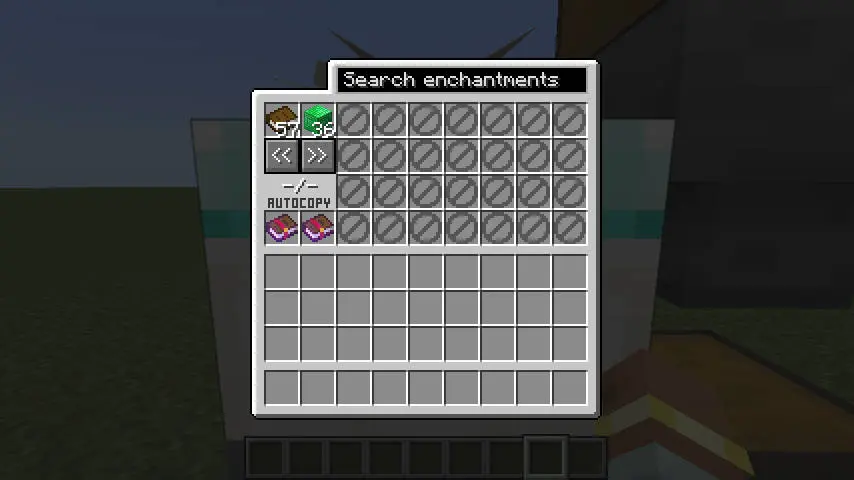
Put an enchanted book into the template slot and the table switches to copy mode. The right-side trade list turns off, and instead: as long as the table holds one plain book plus enough emeralds, the output slot produces an exact copy of your template.
A book can only be used as a template if it meets these rules:
- It must be an enchanted book (not a tool).
- It must hold exactly one enchantment, not several at once.
- The enchantment level must be greater than 0.
- The level must not exceed that enchantment's normal maximum.
Automation (hoppers, pipes, and the like)
Whatever you put in either table is really stored there — it stays put, and drops back out if the block is broken. Nothing disappears.
To keep hoppers and logistics mods from sneaking around the rules you'd follow by hand, automation is deliberately limited:
- Enchanting Custom Table: a hopper can feed enchanted books into the input slot, and they merge onto whatever item is already in the table — but the main tool/book inside can't be pulled out by automation.
- Enchantment Conversion Table: you can auto-feed plain books and emerald payment, but you can only pull items out of the copy output slot.
- The template slot must be set by a player by hand — automation can't insert or swap it.
- The trade books on the right are just on-screen choices for players, not real items, so automation can't touch them.
- To auto-produce the same book over and over, use Copy Template Mode rather than the right-side trade list.
The one rule worth memorizing: a template book must hold a single enchantment whose level doesn't go above that enchantment's normal maximum.
Configuration: tune it to be more balanced
- On NeoForge: edit it right in-game through the Mod config screen, or in the loader-managed common config file.
- On Fabric: the config file lives in your Fabric
configfolder, namedenchantment_custom_table.json.
| Option | Default | What it does |
|---|---|---|
minimumEmeraldCost |
36 |
How many emeralds the conversion table charges. Set it to 0 to drop the emerald cost entirely. |
minimumEmeraldBlockCost |
4 |
How many emerald blocks it charges. Set it to 0 to drop the emerald-block cost. |
enforceEnchantmentLevelLimit |
false |
When on, merging duplicate enchantments can't go above that enchantment's normal max level. Note: adding a brand-new enchantment isn't limited by this, so over-level books made by other mods still work. |
incrementalSameLevelMerge |
false |
A more balanced merge rule. When on, two same-name books only merge if their levels match exactly, and a merge bumps the level by just +1. So Sharpness V + Sharpness V becomes Sharpness VI instead of Sharpness X. |
convertOnlyLevelOneBook |
false |
When on, the conversion table only produces level-one books instead of max-level ones. |
A couple of things to know:
enforceEnchantmentLevelLimitandincrementalSameLevelMergeare independent — turn on either or both. With both on, same-level merges still won't exceed the normal max.- Turning on
incrementalSameLevelMergealso changes how books split: a Sharpness V book splits into two Sharpness IV books, instead of the default "split in half" options.
Retired (deprecated) options
These are old option names that no longer do anything. If your old config file still has them, regenerate the file or rename them by hand:
ignoreEnchantmentLevelLimit→ nowenforceEnchantmentLevelLimit(the meaning is reversed).convert_max_level_book→ nowconvertOnlyLevelOneBook(the meaning is reversed).enableXpRequirement→ removed, with no replacement.
How to craft the two tables
In both recipes, the starred (*) slots accept any kind of quartz block — specifically these (the enchantment_custom_table:quartz_blocks item tag):
- Quartz Block
- Chiseled Quartz Block
- Smooth Quartz Block
- Quartz Pillar
- Quartz Bricks
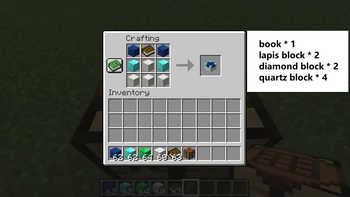
Enchanting Custom Table recipe
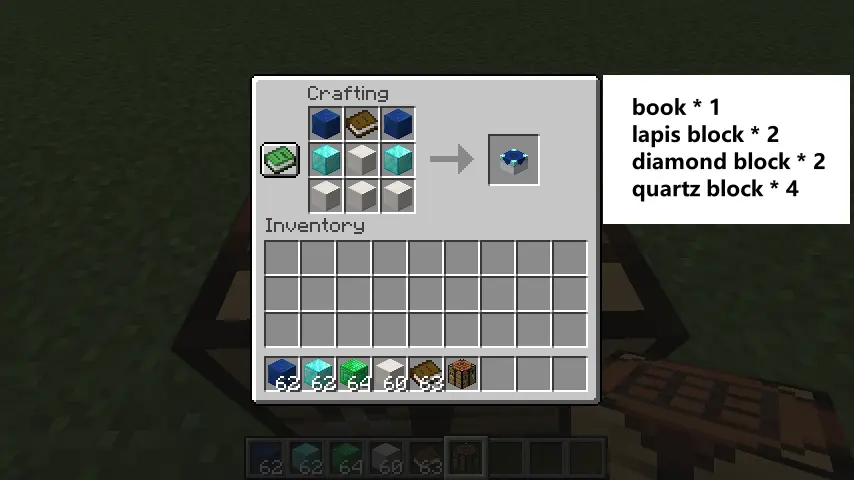
Lay it out on the 3×3 crafting grid like this:
| Left | Middle | Right |
|---|---|---|
| Lapis Block | Book | Lapis Block |
| Diamond Block | Quartz Block* | Diamond Block |
| Quartz Block* | Quartz Block* | Quartz Block* |
* Starred slots take any of the quartz blocks listed above.
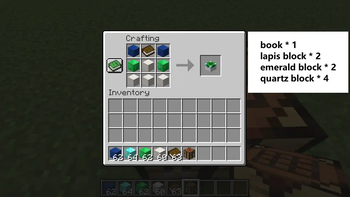
Enchantment Conversion Table recipe
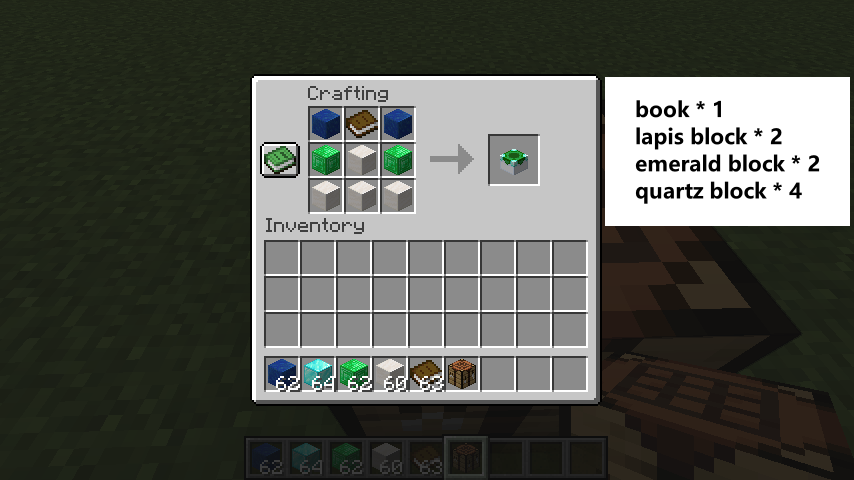
Lay it out on the 3×3 crafting grid like this:
| Left | Middle | Right |
|---|---|---|
| Lapis Block | Book | Lapis Block |
| Emerald Block | Quartz Block* | Emerald Block |
| Quartz Block* | Quartz Block* | Quartz Block* |
* Starred slots take any of the quartz blocks listed above.
Available Versions
How to Install Enchantment Custom Table on Your Server
Order Server
Order a Minecraft Java server with at least 3 GB RAM (4 GB recommended).
Set fabric Loader
In the panel under "Egg", select the fabric loader and matching Minecraft version (26.1.2).
Install Mod
Open the mod browser in the dashboard and search for "Enchantment Custom Table". Click "Install" – done! Alternatively, upload the .jar via SFTP to the /mods folder.
Compatibility
Mod Loaders
Minecraft Versions
26.1.2, 26.1.1, 26.1 (+12 more)
Server-side
✓ RequiredRecommended RAM
4 GB(min. 3 GB)Frequently Asked Questions
Enchantment Custom Table server crashes on startup – what to do?
Most common cause: wrong fabric version or insufficient RAM. Check the server log (latest.log) for "OutOfMemoryError" or "Mixin" errors. With Mado Hosting: ensure at least 3 GB RAM is allocated and the loader matches the mod version (26.1.2). You can switch loaders with one click in the panel.
Is Enchantment Custom Table compatible with fabric and forge and neoforge?
Enchantment Custom Table officially supports fabric, forge, neoforge for Minecraft 26.1.2, 26.1.1, 26.1. Note: Forge and Fabric mods are NOT cross-compatible – pick one loader and stick with it. The Mado dashboard automatically detects incompatible loader combinations.
Server lagging with Enchantment Custom Table – how to optimize performance?
Recommended RAM: 4 GB (per 8 players). Use /spark profiler to check if Enchantment Custom Table consumes the most tick time. Common fixes: reduce server view-distance to 8-10, install "performant" or "starlight" as supplementary mods on Forge. With Mado Hosting, your server runs on NVMe SSDs with dedicated CPU cores for minimal latency.
Similar Mods




![[ETF] Entity Texture Features](https://cdn.modrinth.com/data/BVzZfTc1/af683d206d50b05258d865b0d6e4aa2f2cee12f2_96.webp)
![[EMF] Entity Model Features](https://cdn.modrinth.com/data/4I1XuqiY/6e5bbd0d06b1741bfdab6c0cfab6de8fdaf0064c_96.webp)
Rent Modded Server
Install Enchantment Custom Table with just one click on your server.