
Enchantment Harmony
Let the Enchanted Book solve the mutex according to the player's custom configuration
Screenshots
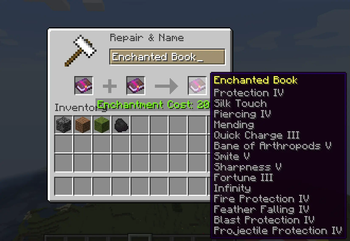
About this Mod
Overview
Enchantment Harmony is a Minecraft mod that liberates the enchantment system from traditional constraints, offering players the freedom to customize enchantment compatibilities through an intuitive configuration file. This mod empowers you to shape your gameplay experience by creating unique equipment setups tailored to your strategies and preferences.
Key Features
Configurable Enchantments: Easily adjust which enchantments can coexist using the mod's configuration file, allowing for a personalized gaming experience.
Strategic Customization: With the ability to define enchantment interactions, you can optimize your gear for specific challenges and playstyles.
Flexible Gameplay: Enchantment Harmony supports a broad range of enchantment combinations, fostering a more flexible and dynamic Minecraft experience.
User-Friendly Configuration: The configuration file is designed to be accessible, enabling players to modify enchantment compatibilities without coding knowledge.
Usage
Installation: Simply place the Enchantment Harmony mod file into your Minecraft mods folder.
Customization: Navigate to the mod's configuration file to set your desired enchantment compatibilities. The file is straightforward, ensuring easy adjustments for all players.
In-Game: Post-configuration, combine enchantments at the enchantment table or with enchanted books, following your customized rules.
Compatibility
Designed with compatibility in mind, Enchantment Harmony works seamlessly with vanilla Minecraft and a multitude of other mods. However, due to its nature of altering core game mechanics, testing in a clean game environment is advised for optimal compatibility.
Updates and Support
We are dedicated to keeping Enchantment Harmony current with the latest Minecraft updates and to resolving any issues promptly. For any problems or suggestions, please engage with us on our official forum or community page.
Conclusion
Enchantment Harmony provides a distinct modding experience by putting the control of enchantment customization directly into your hands. We hope you enjoy the freedom to mold your Minecraft world to your liking. Venture forth and uncover the endless possibilities that Enchantment Harmony offers!
Available Versions
How to Install Enchantment Harmony on Your Server
Order Server
Order a Minecraft Java server with at least 3 GB RAM (4 GB recommended).
Set forge Loader
In the panel under "Egg", select the forge loader and matching Minecraft version (1.20.6).
Install Mod
Open the mod browser in the dashboard and search for "Enchantment Harmony". Click "Install" – done! Alternatively, upload the .jar via SFTP to the /mods folder.
Compatibility
Mod Loaders
Minecraft Versions
1.20.6, 1.20.5, 1.20.4 (+3 more)
Server-side
✓ RequiredRecommended RAM
4 GB(min. 3 GB)Frequently Asked Questions
Enchantment Harmony server crashes on startup – what to do?
Most common cause: wrong forge version or insufficient RAM. Check the server log (latest.log) for "OutOfMemoryError" or "Mixin" errors. With Mado Hosting: ensure at least 3 GB RAM is allocated and the loader matches the mod version (1.20.6). You can switch loaders with one click in the panel.
Is Enchantment Harmony compatible with forge?
Enchantment Harmony officially supports forge for Minecraft 1.20.6, 1.20.5, 1.20.4. The Mado dashboard automatically detects incompatible loader combinations.
Server lagging with Enchantment Harmony – how to optimize performance?
Recommended RAM: 4 GB (per 8 players). Use /spark profiler to check if Enchantment Harmony consumes the most tick time. Common fixes: reduce server view-distance to 8-10, install "performant" or "starlight" as supplementary mods on Forge. With Mado Hosting, your server runs on NVMe SSDs with dedicated CPU cores for minimal latency.
Similar Mods




Rent Modded Server
Install Enchantment Harmony with just one click on your server.