
Enchantment Insights
Pretty enchantment tooltips with colorful names and clear descriptions. No mystery, just magic!
Screenshots

About this Mod








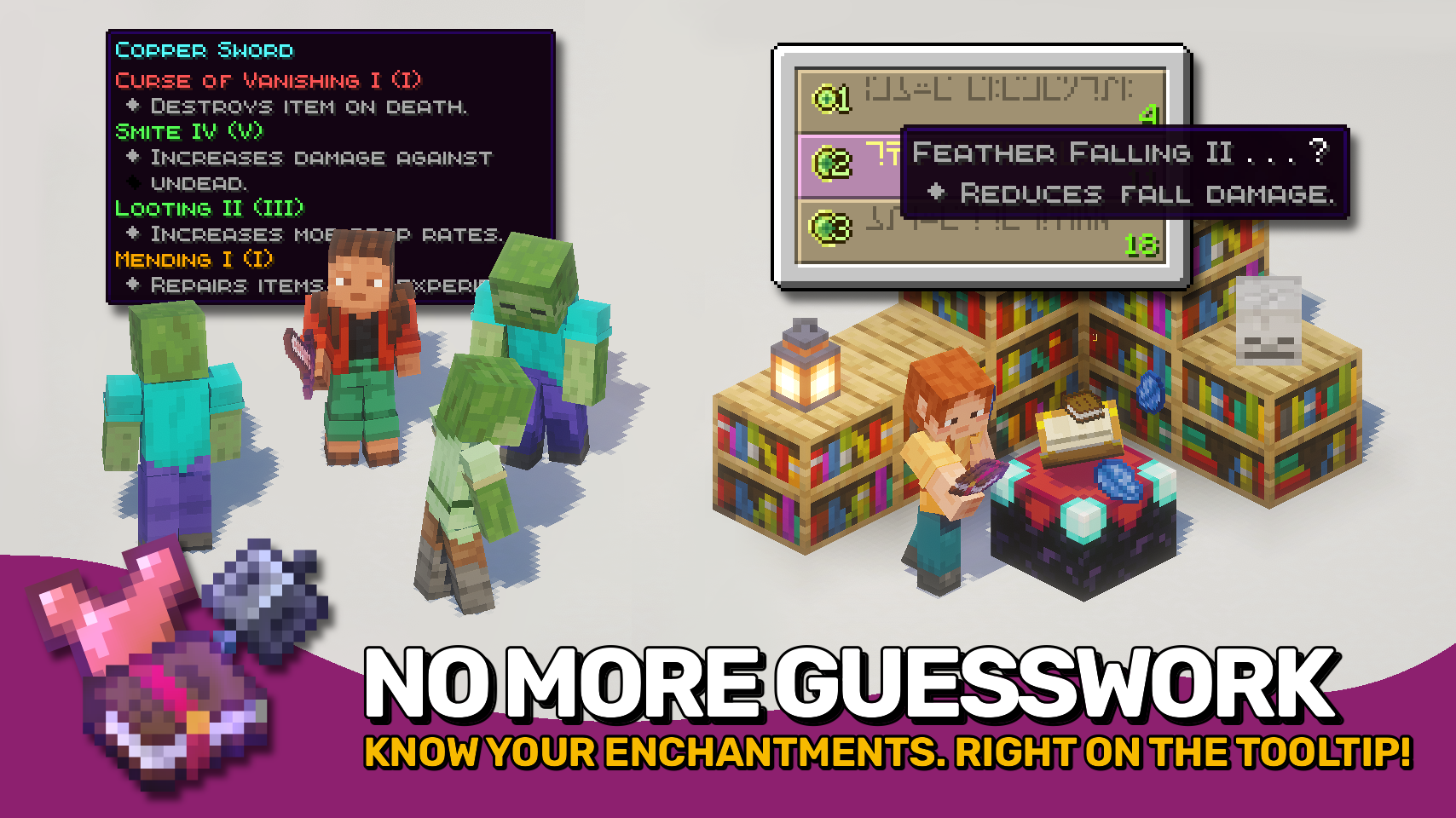
Enchantment Insights adds enchantment descriptions directly to your item tooltips, so you always know what each enchantment does. Enchantment entries look great too: dyed names, max levels, and fancy formatting with clean indentation make tooltips both clear and stylish. The enchanting table isn’t left behind either: its hints include the same descriptions, so you know exactly what you’re getting.
Looking for neat effect descriptions too? Check out the wonderful Effect Insights mod!

- ✨ Clear Descriptions: Every enchantment comes with an easy-to-understand explanation in item tooltips.
- 🧭 Extra Info: Optionally display compatible item tags, source mod, and enchantment ID.
- 🎨 Beautiful Formatting: Dyed names, colored bullet points, and neat indentation make tooltips look clean and polished.
- 🔢 Level Display: Shows both the current and max level for each enchantment.
- 💡 Helpful in Enchanting Table: Displays the same descriptions for enchantment hints while choosing enchantments.
- ⚙️ Configurable: Control when to show descriptions and which details to include. Even formatting is fully customizable.


⏩ INSTALLATION REQUIRED ON CLIENT
⏩ REQUIRES PUZZLES LIB TO BE INSTALLED (FABRIC & NEOFORGE)
⏩ REQUIRES FABRIC API TO BE INSTALLED (FABRIC)
⏩ REQUIRES FORGE CONFIG API PORT TO BE INSTALLED (FABRIC)

If available for a mod, configuration is possible directly from in-game using the mod menu (requires Mod Menu by Prospector to be installed on Fabric). Please note that on older Minecraft versions installing Forge Config Screens is also a requirement.
For manual configuration using an external text editor all files are found at .minecraft/config, named as MOD_ID-client.toml, MOD_ID-common.toml, or MOD_ID-server.toml, depending on the type of config. Not all types might exist for a mod, if any at all.

🌟 Huge thanks to Darkhax for the original Enchantment Descriptions mod. A great concept that’s been around for years and now shines again having been fully revamped for modern Minecraft.
🌟 Thanks to Stal for their stylish Clean Tooltips mod, which inspired the dyed enchantment names.
🌟 Thanks to gliscowo for Idwtialsimmoedm, which served as a foundation for the tooltip style.

Available Versions
How to Install Enchantment Insights on Your Server
Order Server
Order a Minecraft Java server with at least 3 GB RAM (4 GB recommended).
Set fabric Loader
In the panel under "Egg", select the fabric loader and matching Minecraft version (26.1.2).
Install Mod
Open the mod browser in the dashboard and search for "Enchantment Insights". Click "Install" – done! Alternatively, upload the .jar via SFTP to the /mods folder.
Compatibility
Mod Loaders
Minecraft Versions
26.1.2, 26.1.1, 26.1 (+4 more)
Server-side
✗ UnsupportedRecommended RAM
4 GB(min. 3 GB)Frequently Asked Questions
Enchantment Insights server crashes on startup – what to do?
Most common cause: wrong fabric version or insufficient RAM. Check the server log (latest.log) for "OutOfMemoryError" or "Mixin" errors. With Mado Hosting: ensure at least 3 GB RAM is allocated and the loader matches the mod version (26.1.2). You can switch loaders with one click in the panel.
Is Enchantment Insights compatible with fabric and neoforge?
Enchantment Insights officially supports fabric, neoforge for Minecraft 26.1.2, 26.1.1, 26.1. The Mado dashboard automatically detects incompatible loader combinations.
Server lagging with Enchantment Insights – how to optimize performance?
Recommended RAM: 4 GB (per 8 players). Use /spark profiler to check if Enchantment Insights consumes the most tick time. Common fixes: reduce server view-distance to 8-10, install "performant" or "starlight" as supplementary mods on Forge. With Mado Hosting, your server runs on NVMe SSDs with dedicated CPU cores for minimal latency.
Similar Mods




![[ETF] Entity Texture Features](https://cdn.modrinth.com/data/BVzZfTc1/af683d206d50b05258d865b0d6e4aa2f2cee12f2_96.webp)
![[EMF] Entity Model Features](https://cdn.modrinth.com/data/4I1XuqiY/6e5bbd0d06b1741bfdab6c0cfab6de8fdaf0064c_96.webp)
Rent Modded Server
Install Enchantment Insights with just one click on your server.