
Enchantment Switch
Swap active enchantments on your items on the fly! Toggle between otherwise incompatible enchantments.
Screenshots

About this Mod








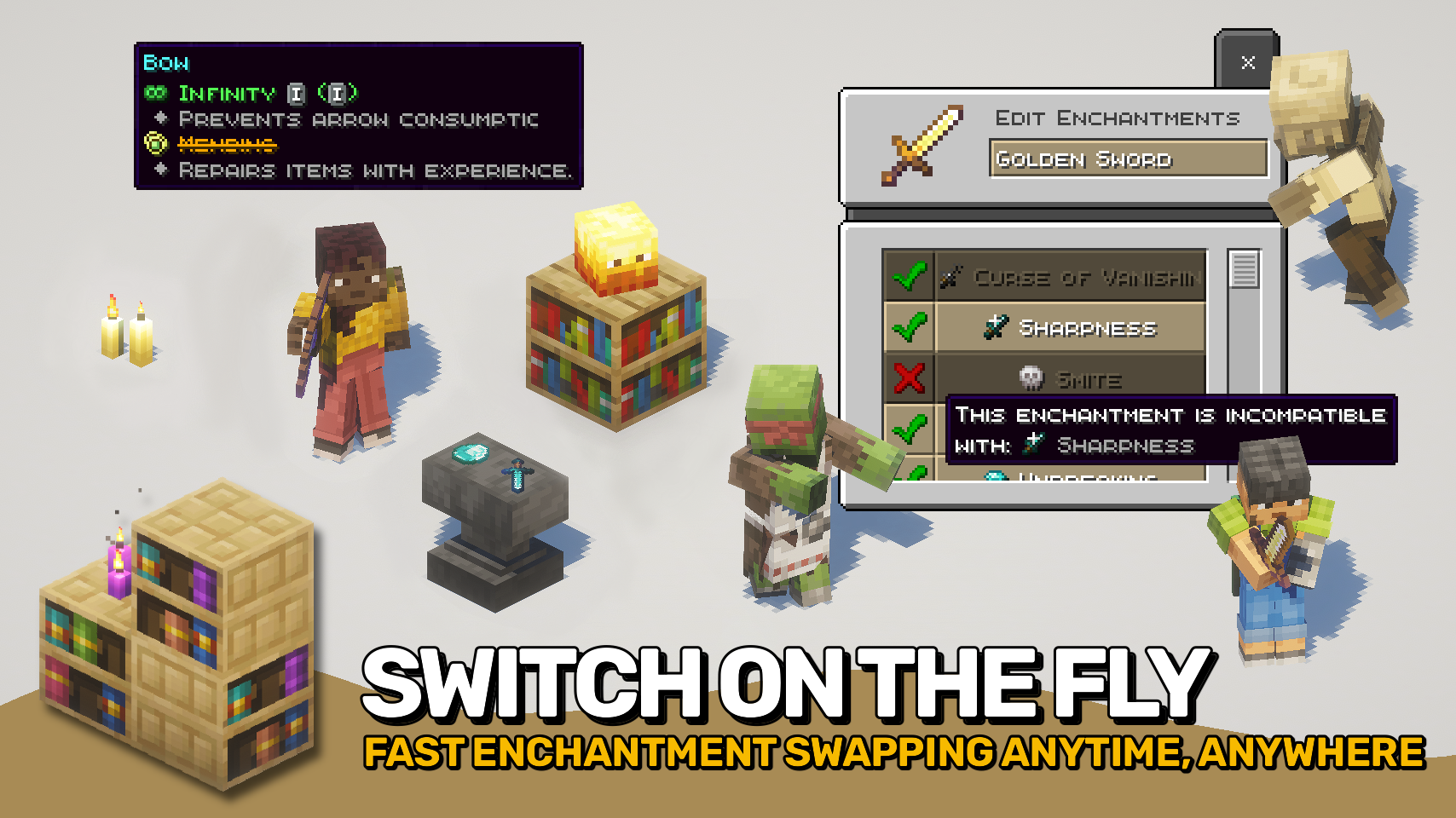
Enchantment Switch lets you control which enchantments are active on your tools, weapons, and armor. With a simple key press while hovering your mouse cursor over an enchanted item, a menu appears showing all enchantments on that item. You can then turn each one on or off to match the situation.
This makes it possible to combine enchantments that normally cannot exist together, as long as only one is active at a time. For example, switch between Mending and Infinity on your bow, or Sharpness and Smite on your sword. Even Frost Walker can be toggled off when you want to go swimming again.
Curses and other special enchantments cannot be turned off, keeping gameplay fair. Disabled enchantments still appear on the tooltip with a clear strike-through effect so you always know what is active.

- ⚙️ Quick Switching: Open the enchantment menu from your inventory with a simple key press.
- 🔄 Combine Incompatible Enchantments: Swap between Mending and Infinity on one bow, or toggle from Piercing to Multishot on your crossbow.
- 🧊 Smart Switching: Turn enchantments like Thorns or Soul Speed off when not needed, then back on anytime.
- 🚫 Fair Gameplay: Special enchantments stay permanently active and cannot be disabled.
- 👁️ Clear Tooltips: Disabled enchantments show with strike-through text so nothing is confusing.
- 🧩 Fully Tag Driven: Mod support and compatibility handled through the
enchantmentswitch:persistent_enchantmentstag.


⏩ INSTALLATION REQUIRED ON CLIENT & REQUIRED ON SERVER
⏩ REQUIRES PUZZLES LIB TO BE INSTALLED (FABRIC & NEOFORGE)
⏩ REQUIRES FABRIC API TO BE INSTALLED (FABRIC)
⏩ REQUIRES FORGE CONFIG API PORT TO BE INSTALLED (FABRIC)

If available for a mod, configuration is possible directly from in-game using the mod menu (requires Mod Menu by Prospector to be installed on Fabric). Please note that on older Minecraft versions installing Forge Config Screens is also a requirement.
For manual configuration using an external text editor all files are found at .minecraft/config, named as MOD_ID-client.toml, MOD_ID-common.toml, or MOD_ID-server.toml, depending on the type of config. Not all types might exist for a mod, if any at all.

Available Versions
How to Install Enchantment Switch on Your Server
Order Server
Order a Minecraft Java server with at least 3 GB RAM (4 GB recommended).
Set fabric Loader
In the panel under "Egg", select the fabric loader and matching Minecraft version (26.1.2).
Install Mod
Open the mod browser in the dashboard and search for "Enchantment Switch". Click "Install" – done! Alternatively, upload the .jar via SFTP to the /mods folder.
Compatibility
Mod Loaders
Minecraft Versions
26.1.2, 26.1.1, 26.1 (+7 more)
Server-side
✓ RequiredRecommended RAM
4 GB(min. 3 GB)Frequently Asked Questions
Enchantment Switch server crashes on startup – what to do?
Most common cause: wrong fabric version or insufficient RAM. Check the server log (latest.log) for "OutOfMemoryError" or "Mixin" errors. With Mado Hosting: ensure at least 3 GB RAM is allocated and the loader matches the mod version (26.1.2). You can switch loaders with one click in the panel.
Is Enchantment Switch compatible with fabric and neoforge?
Enchantment Switch officially supports fabric, neoforge for Minecraft 26.1.2, 26.1.1, 26.1. The Mado dashboard automatically detects incompatible loader combinations.
Server lagging with Enchantment Switch – how to optimize performance?
Recommended RAM: 4 GB (per 8 players). Use /spark profiler to check if Enchantment Switch consumes the most tick time. Common fixes: reduce server view-distance to 8-10, install "performant" or "starlight" as supplementary mods on Forge. With Mado Hosting, your server runs on NVMe SSDs with dedicated CPU cores for minimal latency.
Similar Mods




![[ETF] Entity Texture Features](https://cdn.modrinth.com/data/BVzZfTc1/af683d206d50b05258d865b0d6e4aa2f2cee12f2_96.webp)
![[EMF] Entity Model Features](https://cdn.modrinth.com/data/4I1XuqiY/6e5bbd0d06b1741bfdab6c0cfab6de8fdaf0064c_96.webp)
Rent Modded Server
Install Enchantment Switch with just one click on your server.