
EnchantSense
Intelligent enchantment guidance directly in tooltips for all weapons, armor, and tools. Supports swords, mace, trident, spear, bows, and more.”
Screenshots
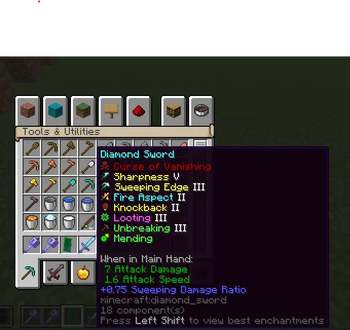
About this Mod
EnchantSense – Intelligent Enchantment Guidance

EnchantSense is a lightweight, client-side Fabric mod that shows the best enchantment combinations directly inside item tooltips.
No GUIs. No menus. No gameplay changes.
Just clear, intelligent enchantment guidance exactly where you need it.
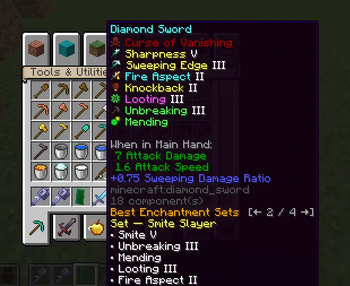
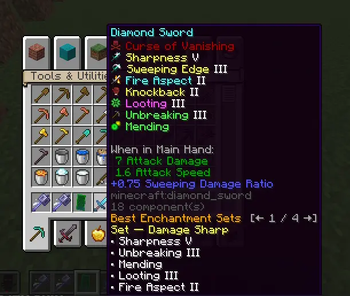
Hover an item, press Left Shift, and instantly see optimized enchantment sets tailored to that item.
🔹 What Does This Mod Do?
EnchantSense enhances item tooltips to display:
The best enchantment sets for each weapon, tool, and armor piece
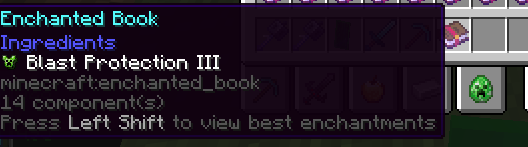
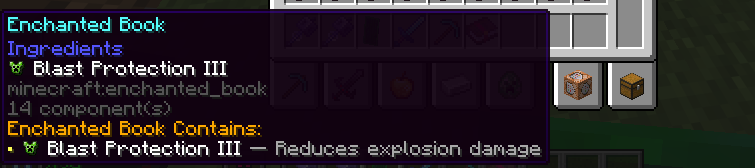
Clear explanations for enchanted books
Multiple optimized builds you can cycle through
All information appears inside the tooltip, keeping the vanilla experience clean and immersive.

🔹 Features
⚔ Weapons & Tools
Supports:
Swords
Axes
Mace
Spear
Tridents
Bows & Crossbows
Each item shows optimal enchant combinations designed for real gameplay use.
🛡 Armor Enchantment Sets
Every armor piece includes four specialized builds:
Stealth
Mobility
Water
Ice
Perfect for different playstyles and situations.
📘 Enchantment Coverage
All vanilla enchantments
Newer enchantments such as:
Mace: Density, Breach, Wind Burst
Spear: Lunge
🧠 Lightweight & Safe
Client-only
No servers required
Multiplayer-safe
Tooltip-only (no screens, no UI clutter)
⚙ Version Support
Minecraft 1.21.11
Fabric Loader
🔹 How to Use
Install Fabric Loader (1.21.11)
Place the EnchantSense .jar file into your mods folder
Launch Minecraft
Hover over any supported item in your inventory
(Elytra and Shield are not included)
Press Left Shift to expand enchantment details
Use Left Arrow / Right Arrow keys to cycle through enchantment sets
Read the tooltip to choose the best enchantments for your gear
That’s it — no commands, no menus.
🔹 Why Download EnchantSense?
Choosing the right enchantments shouldn’t require memorizing wikis or guessing combinations.
EnchantSense gives you smart, accurate enchantment guidance instantly, without breaking immersion.
Whether you’re:
PvP fighting
Exploring
Mining
Optimizing gear
EnchantSense keeps the right information at your fingertips — simple, subtle, and powerful.
Available Versions
How to Install EnchantSense on Your Server
Order Server
Order a Minecraft Java server with at least 3 GB RAM (4 GB recommended).
Set fabric Loader
In the panel under "Egg", select the fabric loader and matching Minecraft version (1.21.11).
Install Mod
Open the mod browser in the dashboard and search for "EnchantSense". Click "Install" – done! Alternatively, upload the .jar via SFTP to the /mods folder.
Compatibility
Mod Loaders
Minecraft Versions
1.21.11
Server-side
✗ UnsupportedRecommended RAM
4 GB(min. 3 GB)Frequently Asked Questions
EnchantSense server crashes on startup – what to do?
Most common cause: wrong fabric version or insufficient RAM. Check the server log (latest.log) for "OutOfMemoryError" or "Mixin" errors. With Mado Hosting: ensure at least 3 GB RAM is allocated and the loader matches the mod version (1.21.11). You can switch loaders with one click in the panel.
Is EnchantSense compatible with fabric?
EnchantSense officially supports fabric for Minecraft 1.21.11. The Mado dashboard automatically detects incompatible loader combinations.
Server lagging with EnchantSense – how to optimize performance?
Recommended RAM: 4 GB (per 8 players). Use /spark profiler to check if EnchantSense consumes the most tick time. Common fixes: reduce server view-distance to 8-10, install "performant" or "starlight" as supplementary mods on Forge. With Mado Hosting, your server runs on NVMe SSDs with dedicated CPU cores for minimal latency.
Similar Mods




Rent Modded Server
Install EnchantSense with just one click on your server.