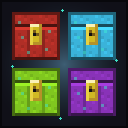
Ender Chest Palette
Dye your Ender Chest in all 16 colors — and each color is its own separate storage
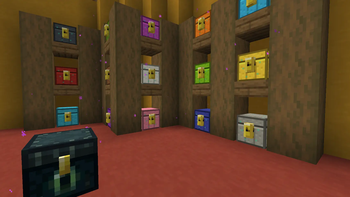
Screenshots
About this Mod
Ender Chest Palette
Ender Palette lets you dye your Ender Chest in all 16 colors — and each color is its own
separate storage. A blue Ender Chest opens your blue inventory, a red one opens your red, and
so on. Every player gets up to 16 private vaults,
one per color.
It's a small, pure-addition mod: it never changes the vanilla Ender Chest, so it's safe to drop
into any pack and works the same in singleplayer and on servers.
How it works
- Dye an Ender Chest any color. Combine an Ender Chest with a dye to color it (see crafting
below). - Each color is its own storage. A blue chest only shows what you put in blue chests; a red
chest only shows your red contents. That's 16 independent 27-slot inventories per player. - Same color, shared everywhere. Every blue chest you place (or anyone's blue chest you open)
opens your blue storage — just like the vanilla Ender Chest, but per color. - Break them freely. Breaking a chest drops the block back; your stored items live on you, not
the block, so nothing is ever lost when you pick one up to move it.
Crafting
| Goal | Recipe (shapeless — any arrangement) |
|---|---|
| Color a chest | Ender Chest + matching Dye → that color (e.g. Ender Chest + Blue Dye → Blue Ender Chest) |
| Recolor | Any colored chest + a different Dye → the new color |
The recipe accepts the vanilla Ender Chest or any colored one, so you can freely recolor like
shulker boxes. (Craft the base Ender Chest the usual way: 8 Obsidian around 1 Eye of Ender.)
Multiplayer
Built for servers. Storage lives on the server-side player and the chest opens the
vanilla container screen, so it syncs with no extra setup. Each player has their own 16 vaults —
your blue chest and a friend's blue chest are separate. Install the mod on the server and on each client.
Compatibility
- Minecraft 1.21.11, Fabric (requires Fabric API).
- Does not touch or conflict with the vanilla Ender Chest or other storage mods.
Modpacks are welcome — no need to ask. Please don't re-upload or redistribute the mod outside its
official pages.
Available Versions
How to Install Ender Chest Palette on Your Server
Order Server
Order a Minecraft Java server with at least 3 GB RAM (4 GB recommended).
Set fabric Loader
In the panel under "Egg", select the fabric loader and matching Minecraft version (1.21.11).
Install Mod
Open the mod browser in the dashboard and search for "Ender Chest Palette". Click "Install" – done! Alternatively, upload the .jar via SFTP to the /mods folder.
Compatibility
Mod Loaders
Minecraft Versions
1.21.11
Server-side
✓ RequiredRecommended RAM
4 GB(min. 3 GB)Frequently Asked Questions
Ender Chest Palette server crashes on startup – what to do?
Most common cause: wrong fabric version or insufficient RAM. Check the server log (latest.log) for "OutOfMemoryError" or "Mixin" errors. With Mado Hosting: ensure at least 3 GB RAM is allocated and the loader matches the mod version (1.21.11). You can switch loaders with one click in the panel.
Is Ender Chest Palette compatible with fabric?
Ender Chest Palette officially supports fabric for Minecraft 1.21.11. The Mado dashboard automatically detects incompatible loader combinations.
Server lagging with Ender Chest Palette – how to optimize performance?
Recommended RAM: 4 GB (per 8 players). Use /spark profiler to check if Ender Chest Palette consumes the most tick time. Common fixes: reduce server view-distance to 8-10, install "performant" or "starlight" as supplementary mods on Forge. With Mado Hosting, your server runs on NVMe SSDs with dedicated CPU cores for minimal latency.
Similar Mods

![[ETF] Entity Texture Features](https://cdn.modrinth.com/data/BVzZfTc1/af683d206d50b05258d865b0d6e4aa2f2cee12f2_96.webp)
![[EMF] Entity Model Features](https://cdn.modrinth.com/data/4I1XuqiY/6e5bbd0d06b1741bfdab6c0cfab6de8fdaf0064c_96.webp)



Rent Modded Server
Install Ender Chest Palette with just one click on your server.