
Ender Dragon Loot│末影龍戰利品
Customizable ender dragon loot.│客製化末影龍戰利品。
About this Mod
To Users│給使用者
f the data pack you are playing requires this data pack as a prerequisite, just add this data pack to the data pack folder.│I如果你所遊玩的資料包需要使用該數據包作為前置,那麼只需將此數據包也加進數據包資料夾即可。
If you are uninstalling a data pack that uses this data pack as a prerequisite, enter this command after removing the data pack archive: /data remove storage minecraft:ender_dragon_loot loot_table_list and then reload it with /reload.│如果你要卸載使用此資料包作為前置的資料包,請在移除該資料包檔案之後輸入此指令:/data remove storage minecraft:ender_dragon_loot loot_table_list,隨後使用/reload重新加載。
To Data Pack Creator│給資料包製作者
Generate loot│產生戰利品
- Create a function│創建一個函數
- Add the following one instructions to the function. Replace
with the loot table you want the ender dragon to drop from.│在該函數中加入下方一條指令,請將<戰利品表命名空間ID>替換為你要讓末影龍掉落的戰利品表。
data modify storage minecraft:ender_dragon_loot loot_table_list append value {id:"<loot table namespace ID>"}
- Add this function to the function tag
#ender_dragon_loot:loot_table_list│將這個函數加入函數標籤#ender_dragon_loot:loot_table_list
Please note: loot will spawn above the block with the largest y value at x=0,z=0.│請注意:戰利品會生成在x=0,z=0中y最大的方塊上方。
Execute Function│執行函數
- Create a function that contains the instructions you want to be executed after the ender dragon dies.│創建一個函數,其中加入你希望在末影龍死亡之後執行的指令。
- Add this function to the function tag
#ender_dragon_loot:rewards│將這個函數加入函數標籤#ender_dragon_loot:rewards
Please note: The command execution position will be set to the square with a white frame in the picture below│請注意:指令執行位置會被設定在下方圖片中有白色框線的那個方塊
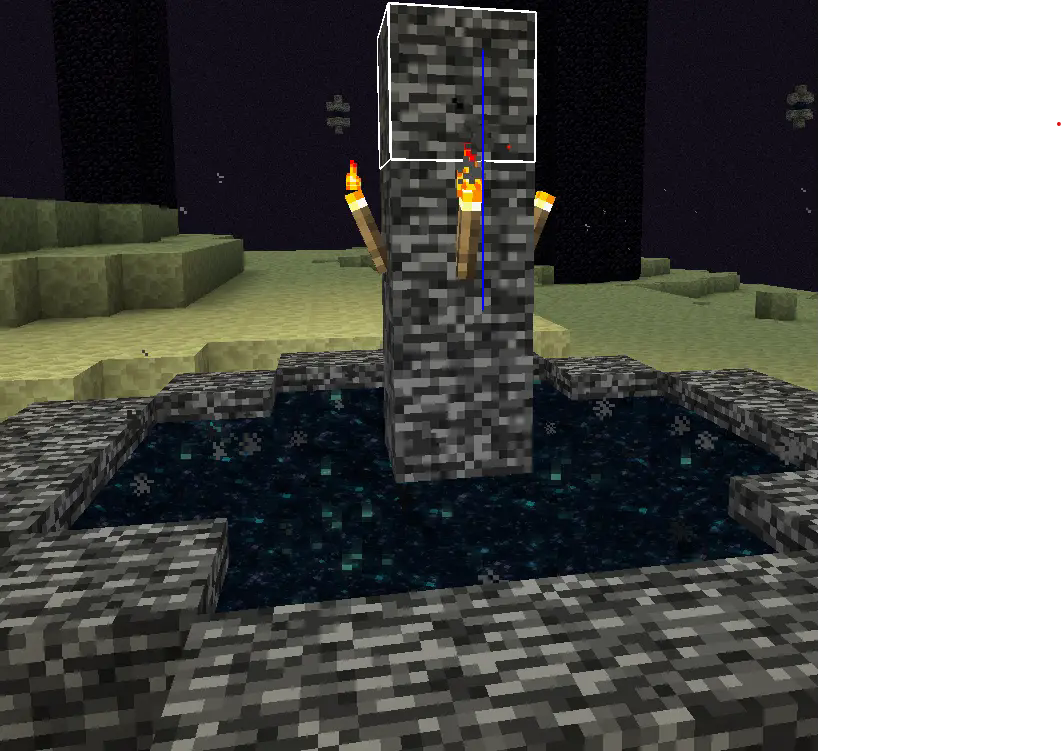
Example data packs made using this data pack│使用此資料包製作的範例資料包
Available Versions
How to Install Ender Dragon Loot│末影龍戰利品 on Your Server
Order Server
Order a Minecraft Java server with at least 3 GB RAM (4 GB recommended).
Set datapack Loader
In the panel under "Egg", select the datapack loader and matching Minecraft version (1.21.11).
Install Mod
Open the mod browser in the dashboard and search for "Ender Dragon Loot│末影龍戰利品". Click "Install" – done! Alternatively, upload the .jar via SFTP to the /mods folder.
Compatibility
Mod Loaders
Minecraft Versions
1.21.11, 1.21.10, 1.21.9 (+3 more)
Server-side
✓ RequiredRecommended RAM
4 GB(min. 3 GB)Frequently Asked Questions
Ender Dragon Loot│末影龍戰利品 server crashes on startup – what to do?
Most common cause: wrong datapack version or insufficient RAM. Check the server log (latest.log) for "OutOfMemoryError" or "Mixin" errors. With Mado Hosting: ensure at least 3 GB RAM is allocated and the loader matches the mod version (1.21.11). You can switch loaders with one click in the panel.
Is Ender Dragon Loot│末影龍戰利品 compatible with datapack and fabric and forge and neoforge and quilt?
Ender Dragon Loot│末影龍戰利品 officially supports datapack, fabric, forge, neoforge, quilt for Minecraft 1.21.11, 1.21.10, 1.21.9. Note: Forge and Fabric mods are NOT cross-compatible – pick one loader and stick with it. The Mado dashboard automatically detects incompatible loader combinations.
Server lagging with Ender Dragon Loot│末影龍戰利品 – how to optimize performance?
Recommended RAM: 4 GB (per 8 players). Use /spark profiler to check if Ender Dragon Loot│末影龍戰利品 consumes the most tick time. Common fixes: reduce server view-distance to 8-10, install "performant" or "starlight" as supplementary mods on Forge. With Mado Hosting, your server runs on NVMe SSDs with dedicated CPU cores for minimal latency.
Similar Mods




Rent Modded Server
Install Ender Dragon Loot│末影龍戰利品 with just one click on your server.