
EndermanNoSpawnIron
Ender man not at iron top summon
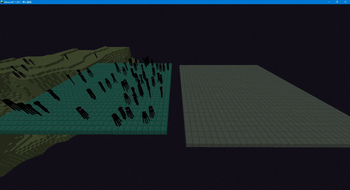
Screenshots
About this Mod
No Enderman on Iron – Prevent Endermen from Spawning on Iron Blocks in The End
Tired of Endermen spawning on your iron blocks in the End?
This lightweight Fabric mod adds a game rule that prevents Endermen from spawning on iron blocks in the End dimension, protecting your end-based builds and redstone contraptions.
📖 Overview
When building farms, contraptions, or decorative structures in the End, you may notice Endermen frequently spawning on iron blocks (e.g., beacon bases or decorative blocks), sometimes interfering with your machines.
No Enderman on Iron listens for Enderman spawn events in the End and removes them immediately if the block beneath them is an iron block – without affecting any other mob spawns.
The mod introduces a new game rule preventEndermanOnIron (enabled by default) that you can toggle at any time via commands, giving you full control.
✨ Features
- Targeted interception: Only checks Endermen spawning in the End; other dimensions are untouched.
- Smart detection: Removes Endermen only when the block directly below is an iron block(
minecraft:iron_block). - Configurable rule: Use
/gamerule preventEndermanOnIron [true/false]to enable or disable the mod without restarting the world. - **Lightweight & compatible: Listens only to necessary events, does not modify vanilla mechanics, and works alongside other mods.
🔧 How to Use
- Place the mod
.jarfile in yourmodsfolder (requires Fabric Loader and Fabric API). - Launch the game (singleplayer or server).
- By default, the rule is enabled (
true). To temporarily disable it:- Type
/gamerule preventEndermanOnIron falsein chat.
- Type
- To re‑enable:
- Type
/gamerule preventEndermanOnIron true.
- Type
Note: The game rule is server‑side, so it works in both singleplayer and multiplayer (only the server needs to have the mod installed, though clients can also have it).
✅ Compatibility
- Minecraft versions: Tested on 1.19.3 – 1.20.4 (may work on other versions; future updates may expand support).
- Requires: Fabric API (mandatory).
- Environment: Works on both client and server (server‑side only installation is sufficient for the rule to take effect).
📥 Download
Get the latest release from the official Modrinth page.
🧑💻 Author
- Author: cebctadet
🌟 Feedback & Suggestions
If you encounter any issues or have ideas for improvements, feel free to leave a comment on the Modrinth project page.
Enjoy the mod? Give it a ⭐ on Modrinth to show your support!
Available Versions
How to Install EndermanNoSpawnIron on Your Server
Order Server
Order a Minecraft Java server with at least 3 GB RAM (4 GB recommended).
Set fabric Loader
In the panel under "Egg", select the fabric loader and matching Minecraft version (1.21.10).
Install Mod
Open the mod browser in the dashboard and search for "EndermanNoSpawnIron". Click "Install" – done! Alternatively, upload the .jar via SFTP to the /mods folder.
Compatibility
Mod Loaders
Minecraft Versions
1.21.10, 1.21.9, 1.21.8 (+15 more)
Server-side
✓ RequiredRecommended RAM
4 GB(min. 3 GB)Frequently Asked Questions
EndermanNoSpawnIron server crashes on startup – what to do?
Most common cause: wrong fabric version or insufficient RAM. Check the server log (latest.log) for "OutOfMemoryError" or "Mixin" errors. With Mado Hosting: ensure at least 3 GB RAM is allocated and the loader matches the mod version (1.21.10). You can switch loaders with one click in the panel.
Is EndermanNoSpawnIron compatible with fabric and quilt?
EndermanNoSpawnIron officially supports fabric, quilt for Minecraft 1.21.10, 1.21.9, 1.21.8. The Mado dashboard automatically detects incompatible loader combinations.
Server lagging with EndermanNoSpawnIron – how to optimize performance?
Recommended RAM: 4 GB (per 8 players). Use /spark profiler to check if EndermanNoSpawnIron consumes the most tick time. Common fixes: reduce server view-distance to 8-10, install "performant" or "starlight" as supplementary mods on Forge. With Mado Hosting, your server runs on NVMe SSDs with dedicated CPU cores for minimal latency.
Similar Mods




Rent Modded Server
Install EndermanNoSpawnIron with just one click on your server.