
Enhanced Tooltips
This mod aims to provide better tooltips for minecraft
Screenshots
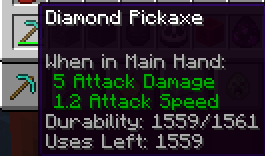
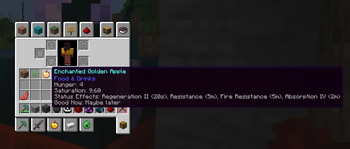
About this Mod
Enhanced Tooltips
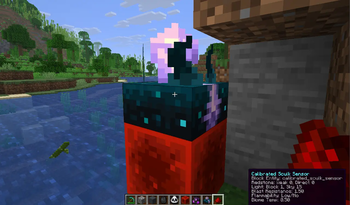
Enhanced Tooltips adds contextual, configurable tooltips that surface useful info both in your inventory and in the world.
Features
- Shows enhanced item tooltips in inventory and other UI screens
- Displays relevant world overlays for blocks and entities when you look at them
- Uses live game data where possible, including loot-table-based mob drop previews
- Filters out irrelevant information so tooltips stay useful instead of noisy
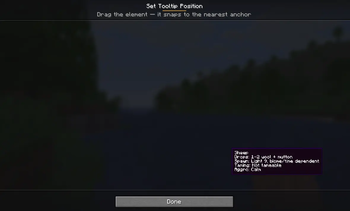
- Drag-and-drop placement — position the tooltip by dragging it and dropping it onto the nearest anchor (corners, edges, centre)
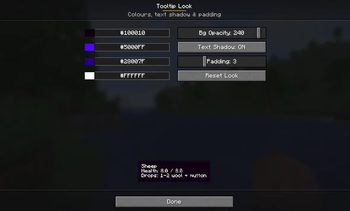
- Customizable look — restyle the tooltip box (background, border, and text colours, opacity, text shadow, and padding) with a live preview
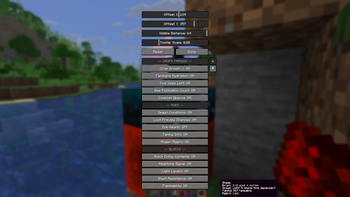
- Includes a built-in config screen and client commands for quick adjustments
Why use it?
If you like information-rich tooltips but hate clutter, Enhanced Tooltips keeps the useful parts and hides the rest. It is designed to feel natural in play: quick at a glance, configurable, and centered around real in-game context.
How to use the menu
Open the config menu with the in-game client command:
/et
You can also use:
/enhancedtooltips
From the menu, you can toggle tooltip features, adjust the tooltip scale and offsets, and fine-tune which hints appear in the world or in your inventory.
Two menu buttons give you full control over presentation:
- Set Position… — drag the tooltip anywhere and drop it; it snaps to the nearest anchor (corners, edges, centre) so it stays put across any screen size or GUI scale.
- Customize Look… — pick the background, border, and text colours, set the background opacity, toggle the text shadow, and adjust the padding, all with a live preview.
Notes
- Some features depend on the block, entity, or item you are looking at
- Tooltip output can vary based on game state and configuration
- The mod is intended for client-side tooltip enhancement and quality-of-life info
Short description
Configurable enhanced tooltips for items, blocks, and entities — with inventory support, world overlays, and multi-loader compatibility.
Available Versions
How to Install Enhanced Tooltips on Your Server
Order Server
Order a Minecraft Java server with at least 3 GB RAM (4 GB recommended).
Set fabric Loader
In the panel under "Egg", select the fabric loader and matching Minecraft version (26.1.2).
Install Mod
Open the mod browser in the dashboard and search for "Enhanced Tooltips". Click "Install" – done! Alternatively, upload the .jar via SFTP to the /mods folder.
Compatibility
Mod Loaders
Minecraft Versions
26.1.2, 26.1.1, 26.1
Server-side
✗ UnsupportedRecommended RAM
4 GB(min. 3 GB)Frequently Asked Questions
Enhanced Tooltips server crashes on startup – what to do?
Most common cause: wrong fabric version or insufficient RAM. Check the server log (latest.log) for "OutOfMemoryError" or "Mixin" errors. With Mado Hosting: ensure at least 3 GB RAM is allocated and the loader matches the mod version (26.1.2). You can switch loaders with one click in the panel.
Is Enhanced Tooltips compatible with fabric and forge and neoforge?
Enhanced Tooltips officially supports fabric, forge, neoforge for Minecraft 26.1.2, 26.1.1, 26.1. Note: Forge and Fabric mods are NOT cross-compatible – pick one loader and stick with it. The Mado dashboard automatically detects incompatible loader combinations.
Server lagging with Enhanced Tooltips – how to optimize performance?
Recommended RAM: 4 GB (per 8 players). Use /spark profiler to check if Enhanced Tooltips consumes the most tick time. Common fixes: reduce server view-distance to 8-10, install "performant" or "starlight" as supplementary mods on Forge. With Mado Hosting, your server runs on NVMe SSDs with dedicated CPU cores for minimal latency.
Similar Mods




![[ETF] Entity Texture Features](https://cdn.modrinth.com/data/BVzZfTc1/af683d206d50b05258d865b0d6e4aa2f2cee12f2_96.webp)

Rent Modded Server
Install Enhanced Tooltips with just one click on your server.
Details
- License
- Creative Commons Attribution Non Commercial No Derivatives 4.0 International
- Server-side
- Unsupported