
Entity Debugger
Provide a GUI Tool to help players & developers to edit the NBT values of the Living Entities.
Screenshots

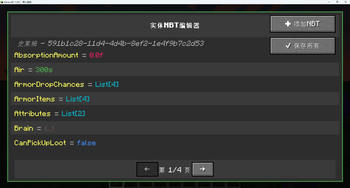
About this Mod
Entity Debugger
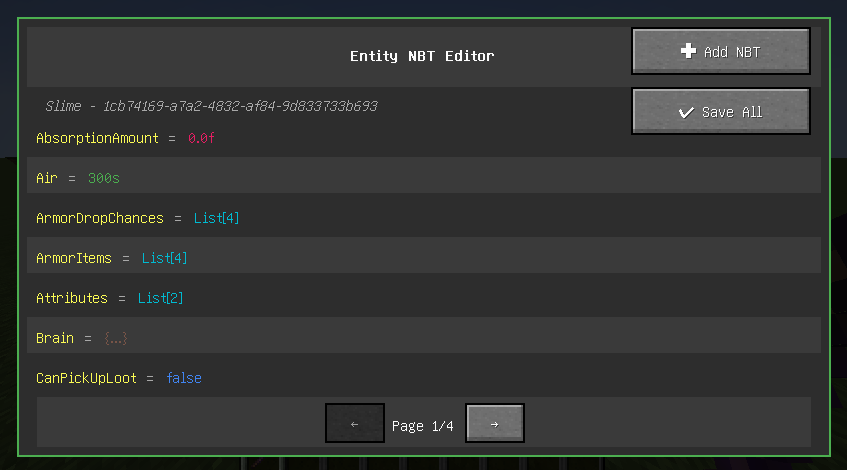
Overview
Entity Debugger is a powerful Minecraft Fabric mod that provides an intuitive entity NBT data editing interface for players and developers. With a simple right-click, you can view and modify any entity's NBT data with real-time synchronization to the game world.
Key Features
🎯 Visual NBT Editor
- Real-time Editing: Edit entity NBT data directly in-game without exiting the world
- Type Highlighting: Different NBT types displayed in distinct colors for easy identification
- Boolean Dropdown: Intuitive dropdown selection for boolean values (true/false)
- List Editor: Dedicated multi-line list editor with syntax highlighting
🔧 Advanced Editing Features
- Special Tag Synchronization: Critical tags (Pos, Rotation, Health, etc.) take effect immediately
- Batch Operations: Support for adding new NBT tags and batch saving all modifications
- Pagination System: Browse large amounts of NBT data with pagination support
- Data Validation: Input validation and error prompts to prevent invalid modifications
🎨 User-Friendly Interface
- Modern UI: Dark theme design that matches Minecraft's style
- Real-time Preview: Modifications show immediate effects without restarting the game
- Undo Protection: Prompt for unsaved changes before closing
- Keyboard Shortcuts: Support for shortcuts like Enter to save, Esc to cancel
How to Use
- Obtain Debug Stick: Find the "Entity Debug Stick" in creative mode operator tab
- Select Entity: Right-click any entity while holding the debug stick
- Start Editing: View and modify NBT data in the opened interface
- Save Changes: Click the "Save All" button to apply modifications
Technical Features
- Fabric API: Developed based on the latest Fabric architecture
- Multi-language Support: Complete Chinese and English localization
- Performance Optimized: Efficient memory management and rendering optimization
- Compatibility: Compatible with most mods without affecting game performance
Installation Requirements
- Minecraft 1.20+
- Fabric Loader
- Fabric API
Developer Features
For mod developers, this tool can:
- Quickly debug entity data
- Test NBT structures
- Validate data synchronization logic
- Learn Minecraft entity data structures
Safety Notice
⚠️ Warning: Incorrect NBT modifications may cause game crashes or entity corruption. Recommended to use in creative mode or test worlds. Backup your world before making important changes.
Roadmap
- Support for more NBT types
- Search and filter functionality
- Preset template system
- History tracking feature
- Export/import NBT data
Support & Feedback
If you encounter any issues or have feature suggestions, please submit an Issue on the project's GitHub page. We welcome community contributions and feedback!
Available Versions
How to Install Entity Debugger on Your Server
Order Server
Order a Minecraft Java server with at least 3 GB RAM (4 GB recommended).
Set fabric Loader
In the panel under "Egg", select the fabric loader and matching Minecraft version (1.20.1).
Install Mod
Open the mod browser in the dashboard and search for "Entity Debugger". Click "Install" – done! Alternatively, upload the .jar via SFTP to the /mods folder.
Compatibility
Mod Loaders
Minecraft Versions
1.20.1
Server-side
✗ UnsupportedRecommended RAM
4 GB(min. 3 GB)Frequently Asked Questions
Entity Debugger server crashes on startup – what to do?
Most common cause: wrong fabric version or insufficient RAM. Check the server log (latest.log) for "OutOfMemoryError" or "Mixin" errors. With Mado Hosting: ensure at least 3 GB RAM is allocated and the loader matches the mod version (1.20.1). You can switch loaders with one click in the panel.
Is Entity Debugger compatible with fabric?
Entity Debugger officially supports fabric for Minecraft 1.20.1. The Mado dashboard automatically detects incompatible loader combinations.
Server lagging with Entity Debugger – how to optimize performance?
Recommended RAM: 4 GB (per 8 players). Use /spark profiler to check if Entity Debugger consumes the most tick time. Common fixes: reduce server view-distance to 8-10, install "performant" or "starlight" as supplementary mods on Forge. With Mado Hosting, your server runs on NVMe SSDs with dedicated CPU cores for minimal latency.
Similar Mods




Rent Modded Server
Install Entity Debugger with just one click on your server.