
Entity Distance 1.12.2
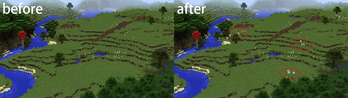
Rendering entities from greater distances or reduce that for improved performance. (Customizable for each entity type)
Screenshots
About this Mod
Entity Distance Mod
Rendering entities from greater distances or reduce that for improved performance. (Customizable for each entity type)
Introduction
This simple mod allows you to customize the rendering and tracking distances for entities in Minecraft1.12.2. For instance, you can opt to see hostile entities from farther away and render neutral entities like animals at closer distances, thus optimizing both FPS and network performance.

Glossary:
Entity Rendering Distance:
The maximum distance at which entities are visually displayed on the client-side. This setting directly impacts client-side performance.
- Example: Setting the rendering distance to its maximum allows all entities to be visually displayed at the full extent of their tracking distance. Conversely, setting it to zero results in no entities being rendered, although they are still being tracked by the server.
- Practical Tip: If you're using a potato computer, you can decrease the rendering distance to ensure entities are only visually displayed when they are closer, which can help improve performance.
Entity Tracking Distance:
This refers to the range within which the server communicates information about entities to the client, making it possible for them to be tracked and eventually rendered. This setting affects server performance.
- Note: For an entity to be rendered, it must first be within the tracking distance. Thus, the actual rendering distance of an entity is the lesser of the set rendering and tracking distances.
Note: If you aim to increase an entity's rendering distance, you must also increase its tracking distance. An entity must first be tracked before it can be rendered.
Features
- Adjust entity rendering distance.
- Adjust entity tracking distance.
- Provides a slider in the settings menu for easy adjustments.
- Entity Blacklist/Whitelist
- Custom Entity Track Multipliers
Commands
/entitydistance <configName> <value>(Possible<configName>: renderDistanceMultiplier, trackDistanceMultiplier, Whitelist, entityblacklist, customentitytrackmultipliers)/setrenderdistance <value>/settrackdistance <value>/entitylistadd <entityID>/entitylistremove <entityID>/customlistadd <entityID>,<multiplier>/customlistremove <entityID>
Installation
- Download the latest version of Entity Distance Mod.
- Place the downloaded jar file into the Minecraft mods folder.
- After installing the mod, navigate to the settings menu where you'll find sliders to adjust the entity rendering and tracking distances. Adjust them to your preference and enjoy the game!
FAQ
Q: Can this mod be used alongside other performance mods?
A: Yes, this mod is compatible with most performance mods. However, ensure to test it before using in tandem with other mods.
Q: Is this mod server-side or client-side?
A: This mod can function on both the server and client sides.
FutureFuture Plans
- Global settings for hostile (and other faction) entities.
- Custom configurations for specific entities, e.g., projectiles.
Contributing
If you've identified a bug or wish to propose a new feature, kindly create an issue on our GitHub page. Should you desire to contribute code-wise, feel free to fork the repository and submit a pull request.
License
This mod is released under the MIT license. Kindly refer to the LICENSE file for more details.
Other
thanks to forge-mixin-example for their mixin template!
Available Versions
How to Install Entity Distance 1.12.2 on Your Server
Order Server
Order a Minecraft Java server with at least 3 GB RAM (4 GB recommended).
Set forge Loader
In the panel under "Egg", select the forge loader and matching Minecraft version (1.12.2).
Install Mod
Open the mod browser in the dashboard and search for "Entity Distance 1.12.2". Click "Install" – done! Alternatively, upload the .jar via SFTP to the /mods folder.
Compatibility
Mod Loaders
Minecraft Versions
1.12.2
Server-side
✓ RequiredRecommended RAM
4 GB(min. 3 GB)Frequently Asked Questions
Entity Distance 1.12.2 server crashes on startup – what to do?
Most common cause: wrong forge version or insufficient RAM. Check the server log (latest.log) for "OutOfMemoryError" or "Mixin" errors. With Mado Hosting: ensure at least 3 GB RAM is allocated and the loader matches the mod version (1.12.2). You can switch loaders with one click in the panel.
Is Entity Distance 1.12.2 compatible with forge?
Entity Distance 1.12.2 officially supports forge for Minecraft 1.12.2. The Mado dashboard automatically detects incompatible loader combinations.
Server lagging with Entity Distance 1.12.2 – how to optimize performance?
Recommended RAM: 4 GB (per 8 players). Use /spark profiler to check if Entity Distance 1.12.2 consumes the most tick time. Common fixes: reduce server view-distance to 8-10, install "performant" or "starlight" as supplementary mods on Forge. With Mado Hosting, your server runs on NVMe SSDs with dedicated CPU cores for minimal latency.
Similar Mods




Rent Modded Server
Install Entity Distance 1.12.2 with just one click on your server.