
Entity Culling Unofficial
Backport of Entity Culling (1.8 version, under MIT) to 1.7.10.
Screenshots

About this Mod
What is this?
This is a port of the 1.8 version of the Entity Culling mod (licensed under MIT, as seen here or backup) to 1.7.10.
See the original mod (1.8+) here.
What does this do?
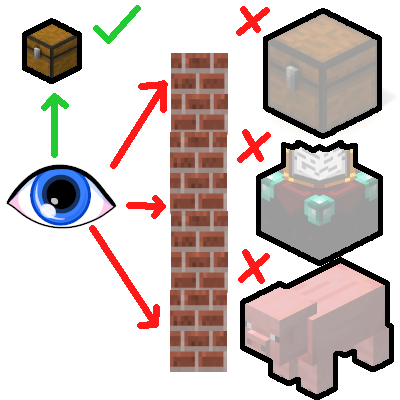
This mod improves performance by using asynchronous calculations to determine obstructed entities and tile entities, in order to prevent them from rendering. What this means in practice is that entities and tiles that you cannot see, will not waste precious FPS by being rendered regardless.
The performance improvements are largest and most noticeable if you're running a heavily modded pack and have a performance-heavy base with lots of machines, decorations, mobs, and so forth.
F. A. Q
- Will this break with (insert optimization mod here)?
No, it will not. I have tested it to work correctly with most widespread optimization mods out there. On the off-chance there is an issue, it should be reported.
- Will this break with (insert content mod here)?
No, it will not, unless the mod's tileentities set their bounding boxes improperly. In that case, all you have to do is blacklist that mod's tileentities from this mod's configuration file.
- Is there any downside to this?
No, except for an extremely small, barely noticeable RAM usage increase.
- Will you port this to (insert any other version)?
It would be more wise to ask the original mod's author this question.
Please also make sure to read the F.A.Q over at the original mod page.
Available Versions
How to Install Entity Culling Unofficial on Your Server
Order Server
Order a Minecraft Java server with at least 3 GB RAM (4 GB recommended).
Set forge Loader
In the panel under "Egg", select the forge loader and matching Minecraft version (1.7.10).
Install Mod
Open the mod browser in the dashboard and search for "Entity Culling Unofficial". Click "Install" – done! Alternatively, upload the .jar via SFTP to the /mods folder.
Compatibility
Mod Loaders
Minecraft Versions
1.7.10
Server-side
✗ UnsupportedRecommended RAM
4 GB(min. 3 GB)Frequently Asked Questions
Entity Culling Unofficial server crashes on startup – what to do?
Most common cause: wrong forge version or insufficient RAM. Check the server log (latest.log) for "OutOfMemoryError" or "Mixin" errors. With Mado Hosting: ensure at least 3 GB RAM is allocated and the loader matches the mod version (1.7.10). You can switch loaders with one click in the panel.
Is Entity Culling Unofficial compatible with forge?
Entity Culling Unofficial officially supports forge for Minecraft 1.7.10. The Mado dashboard automatically detects incompatible loader combinations.
Server lagging with Entity Culling Unofficial – how to optimize performance?
Recommended RAM: 4 GB (per 8 players). Use /spark profiler to check if Entity Culling Unofficial consumes the most tick time. Common fixes: reduce server view-distance to 8-10, install "performant" or "starlight" as supplementary mods on Forge. With Mado Hosting, your server runs on NVMe SSDs with dedicated CPU cores for minimal latency.
Similar Mods




Rent Modded Server
Install Entity Culling Unofficial with just one click on your server.