
Erosion
Configurable mod that causes blocks to change into other blocks when under water and other conditions
Screenshots
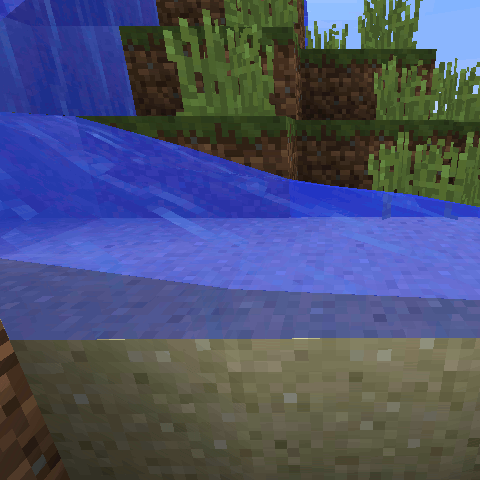
About this Mod
Certain blocks will erode when there is water above them.
When under flowing water, stone will become gravel, dirt will become sand, and undyed hardened clay will become red sand.
When under still water, sand will become clay.
Also, Cobblestone and Stone Bricks will grow moss when adjacent to water.
As of 2.2, rain will turn hardened clay soft, and the sun will bake soft clay into hardened clay.
The original purpose of this mod was to add a renewable source of sand and gravel. It has since been expanded with powerful configuration options.
Note: because of the way this mod is programmed, no erosion will occur until the erosion is triggered. Erosion will never trigger if there are no players nearby. Once erosion is triggered, it will spread to adjacent blocks.
New in 2.2: Configuration expanded with weather, light, and multiple-block requirements.
Configuration
This mod can be configured to erode any block into any other block.
To add a new erosion type to this mod, it must be added to the register list in the main section. It can be named what ever you want, but the name must match the section we're about to create.
To create a new section, it's best to copy and paste one of the existing sections and edit it. Change the name to match the name you added to the register list. Each section has six fields.
- condition is what condition will trigger the block to erode. These must be defined in the erosion_conditions.cfg file.
- fromBlock is the block we are eroding from. This must be a valid resource location.
- fromMeta A comma-separated list of acceptable metadata values. If you prepend it with an exclamation point, it will blacklist these values instead. Set to "any" or "-1" to mean any metadata value.
- intoBlock is the block we are eroding into. Again this must be a valid resource location.
- intoMeta is the metadata of the block we are eroding into. Must be between 0 and 15.
- time is how many game ticks it takes to erode the block.
Defining custom erosion conditions works exactly the same way, but with these 3 fields instead:
- conditionBlock the block that will cause erosion. This is usually a liquid, but it can be any block.
- conditionMeta A comma-separated list of acceptable metadata values. Uses the same syntax as the fromMeta field above.
- checkPositions A list of relative positions that will be checked for the condition block. If the condition block is found in any of these positions, then erosion will occur.
Version 2.2 adds some new configuration options.
First of all, erosion conditions can now depend on the weather and light.
requireLight takes an operator(< or >) and a number. For example, >12 means require a light level greater than 12. It can also be set to just a number to require exactly that light level.
requireWeather can be set to any, clear, rain, snow, or thunder. Any weather other than "any" will require sky access. If set to thunder, then a lightning bolt will be summoned when the erosion occurs.
Finally, you can now require that a certain number of positions match the conditions using the checksRequired option (previously only one of the locations needed to match).
In the position list, a fourth argument can now be used to require a different type of block. A fifth argument can be used to specify the meta of the required block.
Available Versions
How to Install Erosion on Your Server
Order Server
Order a Minecraft Java server with at least 3 GB RAM (4 GB recommended).
Set forge Loader
In the panel under "Egg", select the forge loader and matching Minecraft version (1.12).
Install Mod
Open the mod browser in the dashboard and search for "Erosion". Click "Install" – done! Alternatively, upload the .jar via SFTP to the /mods folder.
Compatibility
Mod Loaders
Minecraft Versions
1.12, 1.11.2, 1.10.2
Server-side
✓ RequiredRecommended RAM
4 GB(min. 3 GB)Frequently Asked Questions
Erosion server crashes on startup – what to do?
Most common cause: wrong forge version or insufficient RAM. Check the server log (latest.log) for "OutOfMemoryError" or "Mixin" errors. With Mado Hosting: ensure at least 3 GB RAM is allocated and the loader matches the mod version (1.12). You can switch loaders with one click in the panel.
Is Erosion compatible with forge?
Erosion officially supports forge for Minecraft 1.12, 1.11.2, 1.10.2. The Mado dashboard automatically detects incompatible loader combinations.
Server lagging with Erosion – how to optimize performance?
Recommended RAM: 4 GB (per 8 players). Use /spark profiler to check if Erosion consumes the most tick time. Common fixes: reduce server view-distance to 8-10, install "performant" or "starlight" as supplementary mods on Forge. With Mado Hosting, your server runs on NVMe SSDs with dedicated CPU cores for minimal latency.
Similar Mods




Rent Modded Server
Install Erosion with just one click on your server.
Details
- License
- Creative Commons Attribution Non Commercial 4.0 International
- Server-side
- Required