
Even Better Chat
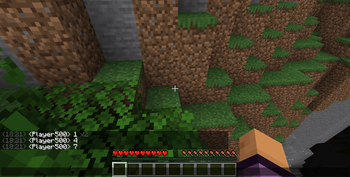
This mod adds chat logging and many more features that aren't available in standard minecraft.
Screenshots
About this Mod
What's new in v1.2.0
- Added "Copy Hovered Message" keybind (C) — hover over a chat message in the chat screen and press C to copy its raw text to clipboard
- Added chat fade duration setting (5–60 seconds) in the Appearance tab
- Added minimum chat opacity setting (0–90%) to keep chat permanently visible
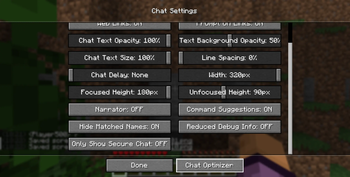
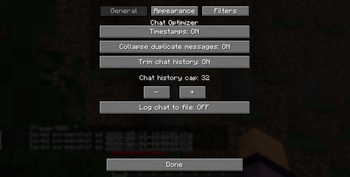
Chat Optimizer improves Minecraft's built-in chat with a set of quality-of-life features, all configurable through a tabbed settings screen accessible from Options → Chat Settings → Chat Optimizer.
Features
✨ NEW in 1.1.0
Mention Highlighting
When someone says your username in chat, it lights up in bold yellow so you never miss it. Toggle the highlight color and an optional sound ping (a note block pling) from the Appearance tab.
Clickable URLs
http and https links in chat are automatically underlined and clickable. Click to open in your browser — Minecraft's standard link confirmation screen keeps things safe. Toggle in the General tab.
Timestamps
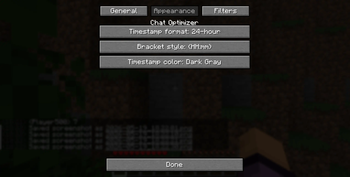
Adds a timestamp to every chat message. Choose between 12-hour and 24-hour format, pick a color, and select square brackets, round brackets, or no brackets.
Duplicate Collapsing
When the same message is sent multiple times in a row, Chat Optimizer merges them into a single line with a repeat count (e.g. x4) instead of flooding your chat.
Chat Filtering
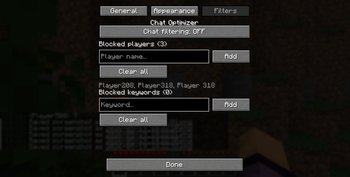
Block messages from specific players or containing specific keywords. Add and remove entries from the Filters tab in the config screen.
Chat Logging
Saves all incoming chat messages to a dated log file at .minecraft/logs/chat/chat-YYYY-MM-DD.log. Disabled by default — enable it in the General tab.
Message Search
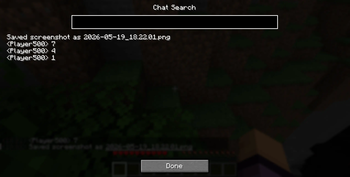
Press a configurable keybind while chat is open to bring up a search bar that filters visible messages in real time.
History Trimming
Caps the number of entries stored in your chat history (the up-arrow recall list) to keep it from growing indefinitely.
Requirements
- Minecraft 1.21.1
- Fabric Loader 0.19.2 or later
- Fabric API 0.104.0+1.21.1 or later
No data is sent to any remote server. All settings are stored locally in your Minecraft config folder.
Available Versions
How to Install Even Better Chat on Your Server
Order Server
Order a Minecraft Java server with at least 3 GB RAM (4 GB recommended).
Set fabric Loader
In the panel under "Egg", select the fabric loader and matching Minecraft version (26.1.2).
Install Mod
Open the mod browser in the dashboard and search for "Even Better Chat". Click "Install" – done! Alternatively, upload the .jar via SFTP to the /mods folder.
Compatibility
Mod Loaders
Minecraft Versions
26.1.2, 26.1.1, 26.1 (+2 more)
Server-side
✗ UnsupportedRecommended RAM
4 GB(min. 3 GB)Frequently Asked Questions
Even Better Chat server crashes on startup – what to do?
Most common cause: wrong fabric version or insufficient RAM. Check the server log (latest.log) for "OutOfMemoryError" or "Mixin" errors. With Mado Hosting: ensure at least 3 GB RAM is allocated and the loader matches the mod version (26.1.2). You can switch loaders with one click in the panel.
Is Even Better Chat compatible with fabric and neoforge and quilt?
Even Better Chat officially supports fabric, neoforge, quilt for Minecraft 26.1.2, 26.1.1, 26.1. The Mado dashboard automatically detects incompatible loader combinations.
Server lagging with Even Better Chat – how to optimize performance?
Recommended RAM: 4 GB (per 8 players). Use /spark profiler to check if Even Better Chat consumes the most tick time. Common fixes: reduce server view-distance to 8-10, install "performant" or "starlight" as supplementary mods on Forge. With Mado Hosting, your server runs on NVMe SSDs with dedicated CPU cores for minimal latency.
Similar Mods




Rent Modded Server
Install Even Better Chat with just one click on your server.