
Even Better Developer Tools
In-game developer tooling for Fabric modders — log viewer, registry browser, config hot-reload, and mixin inspector.
Screenshots
About this Mod
Even Better Developer Tools
A mod for Minecraft mod developers that adds developer-focused tooling directly inside the game — no external IDE or console required.
What's new in v1.1
Performance HUD
Toggle a compact always-on overlay showing FPS, frame time, heap memory usage (used / max, with % fill), GC collection count and total pause time, and server ping. Color-coded green / yellow / red at a glance. Press the bound key (unbound by default, set in Controls) to toggle it on or off.
Full feature list
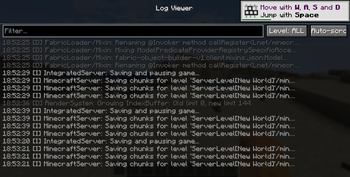
In-Game Log Viewer
View the full game log without alt-tabbing. Filter by level (DEBUG / INFO / WARN / ERROR) and text, with auto-scroll, color-coded severity, and a timestamp on every line.
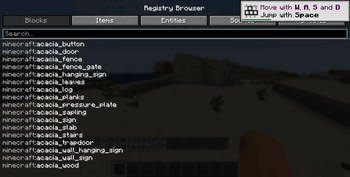
Registry Browser
Instantly look up any registered identifier — Blocks, Items, Entity Types, Sound Events, and Particle Types. Click any entry to copy its namespaced ID to the clipboard.
Config Hot-Reload
Watches your entire config directory. When any config file changes on disk, the game fires a ConfigReloadEvent your mod can subscribe to and shows a toast notification — no restart required.
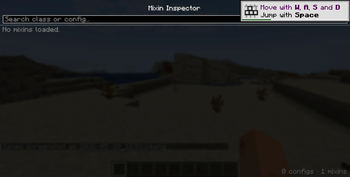
Mixin Inspector
Lists every loaded Mixin configuration and all the classes it injects into, with a live search filter. Great for debugging Mixin conflicts during development.
All features are keybind-accessible (unbound by default, set them in Controls). No server-side component required.
This mod is intended for mod developers. It exposes internal game state and tooling that is not useful for normal gameplay.
Available Versions
How to Install Even Better Developer Tools on Your Server
Order Server
Order a Minecraft Java server with at least 3 GB RAM (4 GB recommended).
Set fabric Loader
In the panel under "Egg", select the fabric loader and matching Minecraft version (1.21.1).
Install Mod
Open the mod browser in the dashboard and search for "Even Better Developer Tools". Click "Install" – done! Alternatively, upload the .jar via SFTP to the /mods folder.
Compatibility
Mod Loaders
Minecraft Versions
1.21.1
Server-side
✗ UnsupportedRecommended RAM
4 GB(min. 3 GB)Frequently Asked Questions
Even Better Developer Tools server crashes on startup – what to do?
Most common cause: wrong fabric version or insufficient RAM. Check the server log (latest.log) for "OutOfMemoryError" or "Mixin" errors. With Mado Hosting: ensure at least 3 GB RAM is allocated and the loader matches the mod version (1.21.1). You can switch loaders with one click in the panel.
Is Even Better Developer Tools compatible with fabric and neoforge and quilt?
Even Better Developer Tools officially supports fabric, neoforge, quilt for Minecraft 1.21.1. The Mado dashboard automatically detects incompatible loader combinations.
Server lagging with Even Better Developer Tools – how to optimize performance?
Recommended RAM: 4 GB (per 8 players). Use /spark profiler to check if Even Better Developer Tools consumes the most tick time. Common fixes: reduce server view-distance to 8-10, install "performant" or "starlight" as supplementary mods on Forge. With Mado Hosting, your server runs on NVMe SSDs with dedicated CPU cores for minimal latency.
Similar Mods




![[ETF] Entity Texture Features](https://cdn.modrinth.com/data/BVzZfTc1/af683d206d50b05258d865b0d6e4aa2f2cee12f2_96.webp)
![[EMF] Entity Model Features](https://cdn.modrinth.com/data/4I1XuqiY/6e5bbd0d06b1741bfdab6c0cfab6de8fdaf0064c_96.webp)
Rent Modded Server
Install Even Better Developer Tools with just one click on your server.