
Exit Protection
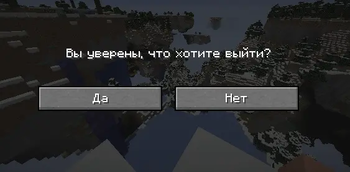
🗸 Confirm whether you really want to exit or was it an accidental press?
Screenshots

About this Mod
EN
This mod prevents accidental pressing of exit from the world.
- I once had a situation where I clicked here and there very quickly and actually exited a couple of times, and if it’s also a build with mods, then re-entering is very expensive
🏆 Support the Author
- 🎯 Boosty
🌐Third-party hosting
You are not allowed to host the mod on third-party resources. You can post news about the mod, but you must link to this mod page for downloading (or link to the download address from modrinth).
RU
Данный мод защищает от случайного нажатия выхода из мира.
- У меня когда то было такое что я очень быстро кликал тюда сюда и пару раз реально выходил, а если это еще и сборка с модами то перезаход это очень дорого
🏆 Поддержать автора
- 🎯 Boosty
🌐Сторонние размещения
Вы не имеете права размещать мод на сторонних ресурсах, вы можете разместить новость о моде, но обязательно ссылаться на эту страницу мода для загрузки. (или ссылаться на ссылку адреса скачивания с modrinth)
Available Versions
How to Install Exit Protection on Your Server
Order Server
Order a Minecraft Java server with at least 3 GB RAM (4 GB recommended).
Set fabric Loader
In the panel under "Egg", select the fabric loader and matching Minecraft version (1.21.1).
Install Mod
Open the mod browser in the dashboard and search for "Exit Protection". Click "Install" – done! Alternatively, upload the .jar via SFTP to the /mods folder.
Compatibility
Mod Loaders
Minecraft Versions
1.21.1, 1.20.1
Server-side
✗ UnsupportedRecommended RAM
4 GB(min. 3 GB)Frequently Asked Questions
Exit Protection server crashes on startup – what to do?
Most common cause: wrong fabric version or insufficient RAM. Check the server log (latest.log) for "OutOfMemoryError" or "Mixin" errors. With Mado Hosting: ensure at least 3 GB RAM is allocated and the loader matches the mod version (1.21.1). You can switch loaders with one click in the panel.
Is Exit Protection compatible with fabric and forge and neoforge?
Exit Protection officially supports fabric, forge, neoforge for Minecraft 1.21.1, 1.20.1. Note: Forge and Fabric mods are NOT cross-compatible – pick one loader and stick with it. The Mado dashboard automatically detects incompatible loader combinations.
Server lagging with Exit Protection – how to optimize performance?
Recommended RAM: 4 GB (per 8 players). Use /spark profiler to check if Exit Protection consumes the most tick time. Common fixes: reduce server view-distance to 8-10, install "performant" or "starlight" as supplementary mods on Forge. With Mado Hosting, your server runs on NVMe SSDs with dedicated CPU cores for minimal latency.
Similar Mods




Rent Modded Server
Install Exit Protection with just one click on your server.