
ExoScanner
Hypixel Skyblock Mod intended for use with Exotic/Fairy/Crystal armor collectors. Has various features to facilitate this hobby
Screenshots



About this Mod
ExoScanner
IF YOU WANT TO SEE ANY FEATURES ADDED DM ME ON DISCORD @Aroiu
ExoScanner is a client-side utility mod for Hypixel SkyBlock focused on scanning armor colors, tracking exotics, and helping organize local scan data.
It combines local world scanning, Hypixel API scanning, search tools, exports, tracer utilities, and configurable automation in one place.
Features
Local Armor Scanning
- Scans nearby players in your current world
- Scans private island armor stands and item frames(Broken at the moment)
- Detects illegal armor colors using local color reference data
- Applies whitelist filtering
- Stores findings in a local database
Hypixel API Scanning
- Scan a single player through the Hypixel API
- Scan an entire lobby through the Hypixel API
- Supports multiple API keys with rotation and cooldown handling
- Tracks usage limits to reduce key exhaustion
Auto Lobby Scan
- Automatically scan on lobby switch
- Optional periodic scan every 5 minutes
- Configurable debounce, min-gap, jitter, and scan budgets
- Designed to avoid overusing API keys
Search and Database Tools
- Search local data by player
- Search by armor set/key and target color
- Filter by color distance and time window
- Reload, update, count, inspect recent entries, and rollback database data
Exports
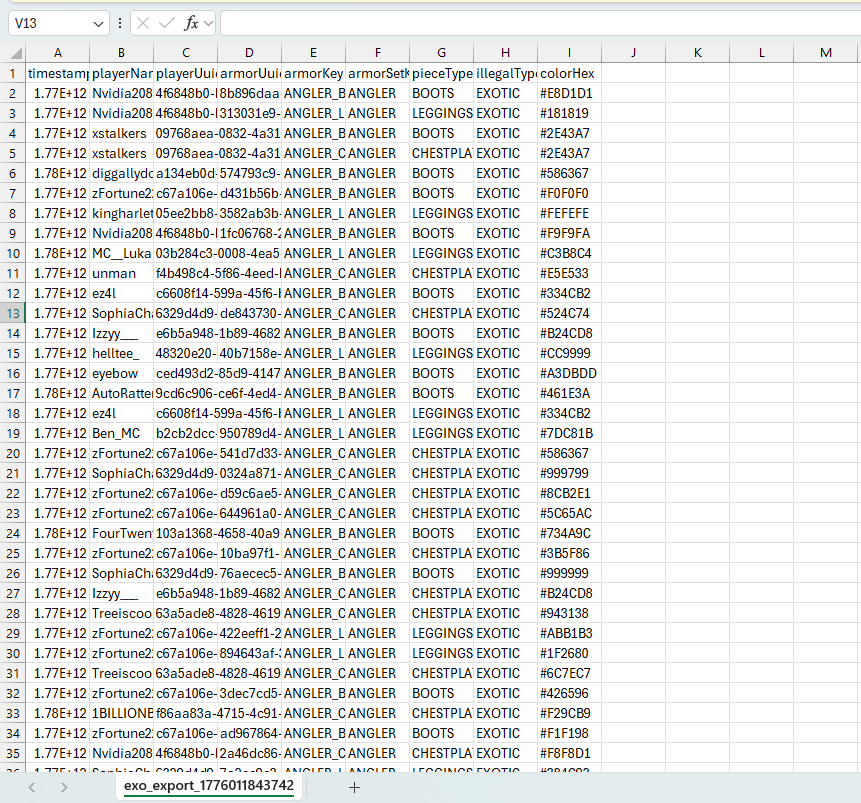
- Export results to CSV
- Export results to XLSX
- Filter exports by time range, armor, and illegal type
Player Tracking
- Manual tracer to a selected player
- Auto-trace specific configured usernames
- Exotic tracer and exotic box overlays
- Configurable colors, widths, alpha, offsets, and target limits
Inventory Highlighting
- Highlights illegal pieces in inventory screens
- Configurable highlight style and color
Warp Macro
- Configure a list of warp commands and cycle through them with a hotkey
- Optional automatic warp cycle mode that advances after auto lobby scan completion
Utility Commands
- Dye recipe finder
- Seymour piece/set search
- API status tools
- Debug logging toggles
- Whitelist reload and config UI access
Notes
- This mod is client-side
- Results are stored locally
- Some armor UUID data may not be available from client-side item data alone
- Intended for utility and local analysis workflows on Hypixel SkyBlock
Commands
Examples:
/exo scan near(Broken)/exo scan island [owner](Broken)/exo scan api <username>/exo scan api lobby/exo search player <username>/exo search <armor|ANY> <color>/exo trace <player>/exo warp next/exo config
Configuration
ExoScanner includes an in-game config screen for:
- scan behavior
- filters
- tracer settings
- auto lobby scan settings
- API key slots
- inventory highlight settings
- warp macro setup
- debug options
Compatibility
- Minecraft 1.21.11
- Fabric
- Cloth Config
Available Versions
How to Install ExoScanner on Your Server
Order Server
Order a Minecraft Java server with at least 3 GB RAM (4 GB recommended).
Set fabric Loader
In the panel under "Egg", select the fabric loader and matching Minecraft version (1.21.11).
Install Mod
Open the mod browser in the dashboard and search for "ExoScanner". Click "Install" – done! Alternatively, upload the .jar via SFTP to the /mods folder.
Compatibility
Mod Loaders
Minecraft Versions
1.21.11
Server-side
✗ UnsupportedRecommended RAM
4 GB(min. 3 GB)Frequently Asked Questions
ExoScanner server crashes on startup – what to do?
Most common cause: wrong fabric version or insufficient RAM. Check the server log (latest.log) for "OutOfMemoryError" or "Mixin" errors. With Mado Hosting: ensure at least 3 GB RAM is allocated and the loader matches the mod version (1.21.11). You can switch loaders with one click in the panel.
Is ExoScanner compatible with fabric?
ExoScanner officially supports fabric for Minecraft 1.21.11. The Mado dashboard automatically detects incompatible loader combinations.
Server lagging with ExoScanner – how to optimize performance?
Recommended RAM: 4 GB (per 8 players). Use /spark profiler to check if ExoScanner consumes the most tick time. Common fixes: reduce server view-distance to 8-10, install "performant" or "starlight" as supplementary mods on Forge. With Mado Hosting, your server runs on NVMe SSDs with dedicated CPU cores for minimal latency.
Similar Mods




Rent Modded Server
Install ExoScanner with just one click on your server.